Broken Links and Redirect Chains: Clearing 3XX, 4XX and 5XX Without Bleeding Link Equity
A broken link is a path that leads nowhere. You'll find them on every site older than a couple of years, and each one quietly takes a bit of your equity, a bit of your crawl budget and a bit of trust. Here's how to clean them out — and why the number of hops should be zero, not 'well, at least one'.


I will look at your site and answer your questions on the topic of this article. 30 minutes, no slide decks, no pressure.
Book a consultationBroken links (4XX/5XX codes) should be fixed in the page's source, not wrapped in a redirect. Redirect chains (3XX) should be shortened to the final destination URL — ideally zero hops. And meta refresh tags should be fully replaced with server-side 301/302 redirects. That frees up crawl budget, preserves link equity, and removes the red flag that makes AI crawlers drop your pages from their knowledge base entirely.
Ask what SEOs do most of the time and the honest answer is: run technical audits and hunt for broken links. It's a well-worn topic, and that's exactly why people underrate it. A broken link is a path that leads nowhere — the user clicks and lands somewhere they didn't want to be. A dead page. A server error. Or, the more annoying case, they get dumped on the homepage by a sloppy redirect and stand there thinking, "wait, where's the page, I wasn't headed here." How a hand-made breakdown differs from an automated report, and what it costs on the market, is in the piece on website audit cost.
What actually counts as a broken link
Technically, any link that returns a 4XX or 5XX response code. 404 — the page is gone or the URL was mistyped. 410 — deliberately removed for good. 500 — the server itself is choking: the page supposedly exists but can't load, so the user never sees it. All three look identical to a visitor — a dead end.
The scale gets underrated. According to an Ahrefs study that crunches billions of pages, roughly 4.6% of all internal links on mature sites (older than three years) turn out to be broken. That's not "somewhere out there" — that's the average, and your site probably isn't the exception.
What it actually costs you
First, the obvious one: an abandonment signal. Search algorithms, Google included, read a high density of 404s in the index as "this site's been left to rot." Nobody's cleaning it, nobody's updating it — so its crawl priority drops. Not some abstract "budget," but priority specifically: the bot comes by less often and less willingly.
The second one hits harder and barely gets talked about — AI penalizes you for broken pages. A regular Googlebot can come back and reindex a page later. AI crawlers don't work that way:
"Unlike the classic Googlebot, which can reindex a page later, crawlers like GPTBot or PerplexityBot hit a 404 or 500 and drop that node from the semantic graph. They don't have a lot of resources — they've still got users to answer, not just their own graph to fill."
The logic is simple: AI won't spend its context window processing empty pages. It refreshes its knowledge base on a schedule — it isn't googling from scratch every time. So if the page is a hole when the crawl comes through, the node drops out of the graph. Whether it ever comes back is anyone's guess. For visibility in AI answers and GPT results, a broken page is a flat-out red flag.
Why redirect chains are worse than they look
There's a stubborn myth that a redirect passes 100% of the equity. It doesn't. Every extra hop in the chain (hop 1 — 301, hop 2 — 301, hop 3 — another 301) skims off 5 to 10% of link equity. And that's the conservative read:
"Honestly, the impact feels bigger to me — I remember how much redirects moved rankings. But if even 10% has that kind of crushing effect, that's a nightmare."
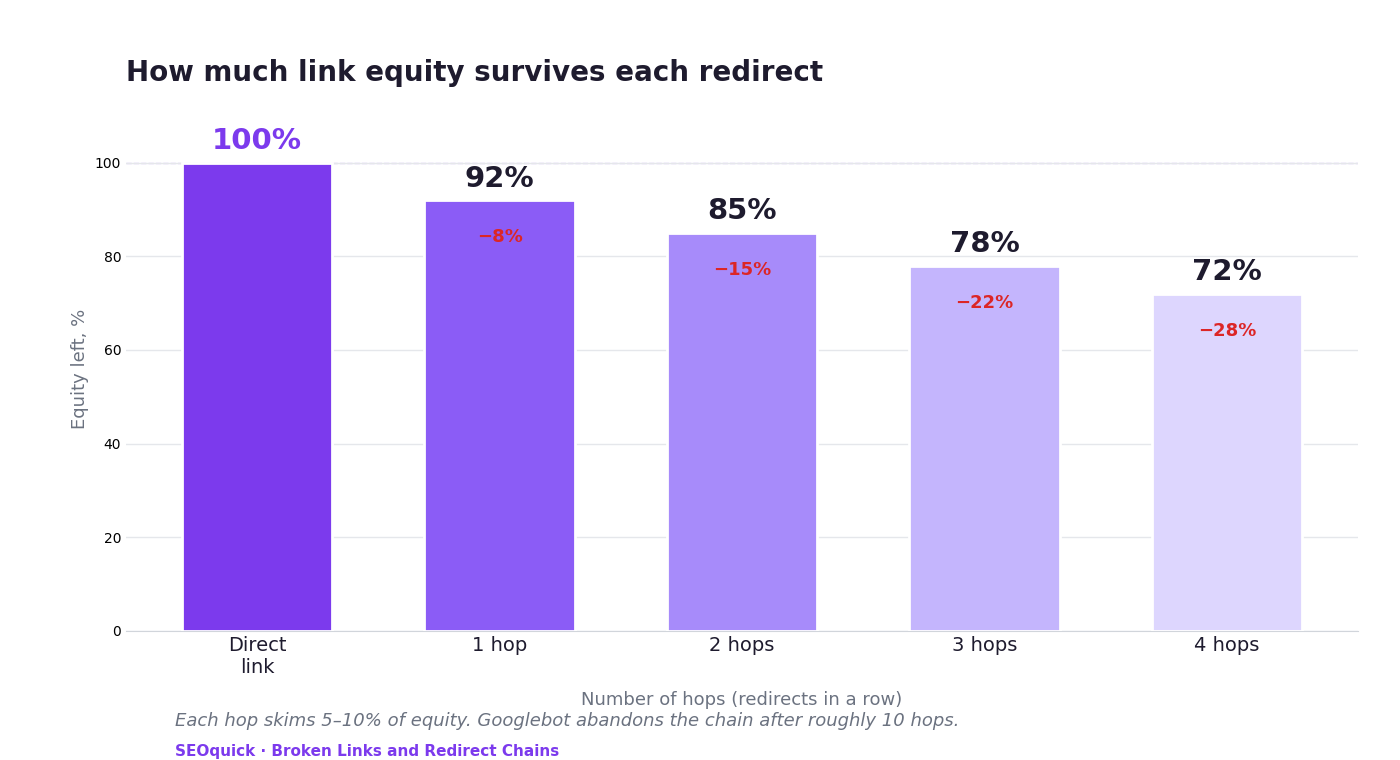
Then there's crawl budget. Bots have a hard cap on consecutive redirects. Googlebot follows a chain up to about 10 hops, then gives up, logs an error in Search Console, and the page falls out of the index. But that's the ceiling of its patience, not a target: Google's own docs flatly recommend keeping chains short — no more than three, and definitely under five. In practice, even a first or second hop is already a bad sign.
And the third, sneakiest cost — TTFB. Every internal redirect forces the browser or bot to make another HTTP round trip to the server. That's an extra 150–300 milliseconds per hop. You've probably met time to first byte in the context of site speed — well, extra redirects quietly inflate it and drag down your Core Web Vitals.
A pain of its own — meta refresh
A technical relic that still shows up. Instead of a server-side 301/302, someone drops in a <meta http-equiv="refresh"> tag and redirects the user at the browser level. It brings a whole cluster of problems. The back button breaks: the user hits back, and the script immediately shoves them forward again. Google degrades PageRank transfer through this kind of redirect — it first has to download the page, parse the HTML, spot the tag, and only then move on. And historically, spammers loved meta refresh for phishing and doorways, so search engines treat it with deep suspicion and may demote the page.
What to do about it
Fix broken links at the source, not with a redirect. Found an internal link returning 404/410/500? Go into the page's HTML and swap the broken address for the live one. It's your site — you own the link. If the target page is gone for good with no equivalent, just remove the link:
"If the target page is deleted for good and there's no equivalent, you remove the reference from the text, keeping the anchor text as a plain, non-clickable element."
Customize your 404. For the case where a visitor lands on a broken URL anyway. The page must return a proper 404 status (not a 200!) and still carry a search box and links to your main sections — to keep the person around instead of shoving them off the site.
Point internal links straight at the final URL. If page A links to B, and B redirects to C, don't settle for "eh, good enough." Change the link on A so it goes directly to C.
"Your job is to get internal hops down to zero. Not to one — to zero."
Mind your protocol and slashes. The most common cause of internal redirects is plain carelessness. Absolute links need the current protocol (https, if you're on https). And if your site runs without a trailing slash, a link with an extra slash on the end spawns a redirect out of nowhere — equity lost for free. A trifle that multiplies across thousands of links.
Kill meta refresh entirely. Replace every tag with server-side redirects — via .htaccess for Apache, nginx.conf for Nginx, or at the backend level. And use the right code: 301 when you're moving a finished page to a new permanent URL; 302 for temporary cases, like a page still under development.
Checklist before you close the ticket
- Zero balance on 4XX/5XX: no broken pages left inside the site. Drop your domain into our site audit — it walks the structure and surfaces every internal 4XX/5XX.
- Direct routing: every link in the menu, footer and article body points at a final page, with almost no internal redirects.
- No loops: rule out cycles like A → B → C → A that throw a "too many redirects" error.
- Not a single meta refresh in the HTML — the server controls all redirects.
- External links checked for life: dead links to abandoned third-party sites removed or swapped for live, authoritative sources.
FAQ
Should I fix a broken internal link or redirect it?
Fix it in the code. A redirect is a crutch for the case where external links you don't control point at the page. Inside your own site you own every link, so correct the address directly or drop the link if the content is gone.
How many redirects in a row is already a problem?
Google will survive one hop, but you should aim for zero. Every extra step skims 5–10% of equity and adds 150–300 ms to load time. Past the fifth-to-tenth hop the bot abandons the chain entirely and drops the page from the index.
What's the practical difference between 301 and 302?
301 is permanent: the page has moved to a new URL for good, and the equity should flow there. 302 is temporary: the content will return to the old address, say while development is underway. Mix them up and you either fail to pass equity or pass it to the very place you meant to leave.
Bottom line
Broken links and redirects aren't cosmetics — they're a leak. Out flows crawl budget, link equity, search-engine trust and your spot in the AI knowledge base. The good news: fixing it takes discipline, not budget. Correct links in the code, route them to the final URL, keep a live 404, and forget meta refresh ever existed — and your site stops losing a little bit every single day.
Want someone to walk your site and clear out all the hops and broken URLs? Let's talk about your project — we'll run an audit and show you exactly where it's leaking.

Pagination SEO: how to index list pages without breeding duplicates
Pagination SEO in 2026: canonicals on list pages, noindex, rel=next/prev, infinite scroll, crawl budget. Based on a check of 36,000 traffic-driving URLs across twelve Ukrainian retailers, plus a teardown of pagination at Foxtrot, Epicentr and our own blog.
Read →
Search Everywhere Optimization: Ranking on TikTok, YouTube, Reddit and AI Search
Your customer does not only search on Google: 49% of consumers search on TikTok, Reddit pulls 842M organic clicks a month, and YouTube is the source of roughly one in four AI Overview citations. Here is how a business owner picks 2–3 platforms without burning the budget.
Read →
Keyword Cannibalization: How to Find and Fix It in 2026
Keyword cannibalization dilutes relevance and drains traffic. We break down, with real examples, how to find cannibal pages and consolidate them with a 301 redirect — by SEOquick.
Read →Want to apply this to your site?
We will review the current situation, find the first growth levers, and suggest a practical working format.