How to Check and Estimate Website Traffic: Yours and Your Competitors'
Track your own traffic in GSC and GA4, size up everyone else's with Similarweb and SEO platforms — and never trust a single tool on its own. A complete guide to measuring website traffic, including the brand-new AI channel.


Life was simple back in 1991, when the public internet was just being born.
There was exactly one website online — built by British physicist Tim Berners-Lee. By the end of 1992 there were ten sites, by 1994 — 3,000, and by 2019 the number of websites had passed 1.7 billion.
Today the challenge is real: traffic needs to be not just attracted but constantly monitored — both on your own site and on your competitors'.
You can check your own website traffic for free in Google Analytics 4 and Google Search Console. To estimate someone else’s traffic, use Similarweb, Ahrefs, Semrush, or Serpstat: they show approximate visit volumes, channels, keywords, and ads. Only the site owner has the exact numbers — any third-party service gives you an estimate, not a fact.
Now let’s go through everything step by step.
Types of Website Traffic
First, let’s figure out what types of traffic exist.
This chapter covers the main types of traffic and the sources that drive them.
Website traffic is the flow of visitors to your site’s pages over a given period of time.
Traffic can be roughly divided by channel, device, and behavior.
Traffic Types by Channel
A traffic channel is a group of sources categorized by how the traffic is generated.
Channels contain sources — for example, search engines or specific websites.
Here are the main traffic channels that exist today:
Organic traffic — visitors who come to your site directly from search engines (Google, Bing, etc.) by typing a query and choosing your site in the search results.
Referral traffic — visitors who arrive at your site from other resources that link to it. This often includes messengers, third-party platforms (other than social networks), blogs, and news portals. Keep in mind that some search and AI services may incorrectly land in referral traffic.
AI traffic — visitors who click through from answers given by ChatGPT, Perplexity, Gemini, Copilot, and other AI assistants. It’s the youngest channel — I’ve devoted a separate chapter below to tracking it.
Direct traffic — visitors who type your site’s URL straight into the browser’s address bar or open it from bookmarks. This bucket also collects traffic that analytics systems fail to recognize (more on that below).
Social media traffic — visitors who come to your site from social networks (Facebook, X, Instagram, LinkedIn, TikTok, etc.) by clicking links to your site. Paid social traffic is usually not included here.
Paid traffic — visitors who reach your site through paid search advertising: Google Ads campaigns, Bing Ads (pay-per-click), display advertising, social media ads, and so on. For convenience, it makes sense to break this traffic down by campaign.
Email traffic — visitors who click through to your site from the emails you send as part of your email marketing strategy.
Traffic Types by Device
These days, traffic is also segmented by the device it lands on:
- Desktop traffic — generated by users of desktop computers and laptops. It includes any online activity on these devices and is usually broken down by operating system and browser.
- Mobile traffic — generated by users of mobile devices: smartphones and tablets. Mobile traffic usually means browsing websites through mobile browsers.
- Mobile app traffic — generated by users of a specific mobile app: from opening the app to actions inside it, such as purchases or interacting with other users.
Each of these traffic types has its own specifics and requires a separate approach to optimization and acquisition.
Traffic Types by Behavior
Informational traffic — visits from users who are looking for information, seeking answers, or researching a topic. They’re not ready to buy yet and are at the very beginning of the customer journey. This traffic still matters: it builds brand awareness and loyalty, and can later turn into commercial traffic.
Most of it lands on blog pages and news sections. To grow it, we recommend:
- Starting a blog on your site and filling it with tips, reviews, and how-to guides.
- If you plan to publish news — setting up a news section.
- Running an active YouTube channel to capture referral traffic from YouTube.
Commercial traffic — visits from users who intend to make a purchase or order a service. They’ve already made up their mind and are looking for where to buy. This traffic usually brings the most profit, since it’s directly tied to sales.
It lands on service pages, individual product pages, and category pages.
When working with commercial traffic, focus on increasing conversions on these pages — purchases and meaningful interactions: after all, every one of these visitors is a potential customer.
Seasonal traffic — a flow of visitors tied to a specific time of year or recurring events. For example, travel sites see traffic spikes during the summer vacation season, and gift sites see surging demand ahead of the holidays.
Trend traffic — a flow of visitors driven by current trends. For example, if electric cars become popular, sites covering the topic may see a sharp spike in visits. This traffic can be short-lived and disappear as soon as the trend fades.
To forecast trending topics, we recommend Google Trends.
Branded traffic — visitors who come to a site because they already know the brand. These are people who search for the site by company name rather than by generic queries. Branded traffic usually signals strong brand recognition and customer loyalty.
Google Alerts is a great free tool for tracking mentions of your brand.
Each of these traffic types calls for its own strategy across your marketing mix — whether that’s SEO, paid advertising, email campaigns, buying placements on third-party sites, or activity on your own social channels.
Now that the definitions are clear, let’s move on.
Measuring Your Own Website Traffic
In this chapter I’ll show you how to measure your own site’s traffic — and understand which pages bring you users and which don’t.
Today there are two types of services for measuring your own traffic.
These are Google Analytics 4 and the search engines’ webmaster panels — Google Search Console and Bing Webmaster Tools.
Each of them gives you a fairly accurate picture.
Measuring Traffic in Google Analytics
Since July 2023, the classic Universal Analytics has stopped processing data — everyone now works in Google Analytics 4.
We recorded a detailed video on setting up GA4.

GA4 lets you pull traffic reports quickly.
How to view traffic sources and channels in Google Analytics 4 (GA4):
- Sign in to your Google Analytics 4 account and go to “Reports”.
- Then select “Acquisition”.
- In the menu, choose “User acquisition” or “Traffic acquisition”.
What’s the Difference Between User Acquisition and Traffic Acquisition in GA4?
Funnily enough, the wording can trip you up.
You might mistakenly assume that traffic acquisition is a report about a user’s first visit, while user acquisition counts all sessions.
In reality, it’s the other way around.
The “User acquisition” report shows how new users find your site or app for the first time.
The “Traffic acquisition” report, meanwhile, covers session sources for both new and returning users.
How to See Paid Ad Traffic to Your Site
To get a convenient view of your ad traffic, we recommend building custom reports in Google Analytics using filters.
- Open the “Traffic acquisition” report and click “Edit comparison” / add a filter.
- Choose the “Session default channel group” dimension.
- Tick the paid ad types: Paid Search, Paid Social, Paid Shopping.
- Save the report.
Then add a secondary breakdown by campaign — and you’ve got a handy campaign report.
You can slice it further by:
- Campaign.
- City.
- Page path.
- Country.
- Region within a country.
And don’t forget that the table can be sorted by conversions, so you can pinpoint which segment or region is profitable — and which campaign performs best.
How to Track Traffic from ChatGPT and AI Search Engines
In 2026, AI assistants became a full-fledged traffic channel that can no longer be ignored.
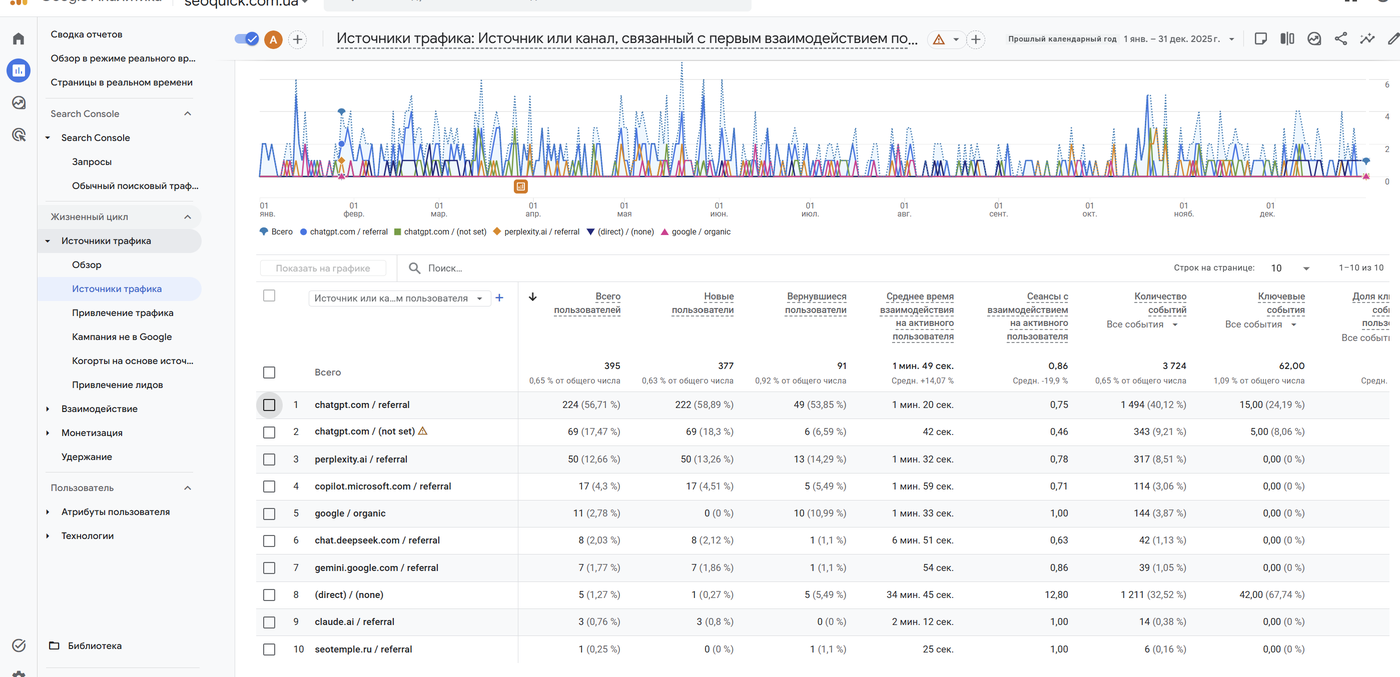
According to Similarweb, AI platforms generated over 1.13 billion referral visits in June 2025 alone. And after the May 2026 update, when ChatGPT started showing clickable brand links right inside its answers, referral clicks from it jumped 157% in a single week.
The key point: this traffic converts remarkably well. Per Similarweb clickstream data (April–May 2026), visits from ChatGPT convert at around 7.1% — nearly on par with paid search and higher than organic, direct, and social.
Where to See AI Traffic in GA4
The fastest way is the “Traffic acquisition” report:
- Open “Reports” → “Acquisition” → “Traffic acquisition”.
- Switch the primary dimension to “Session source”.
- In the table search box, type one by one: chatgpt.com, perplexity.ai, gemini.google.com, copilot.microsoft.com, claude.ai.
Since May 2026, GA4 also automatically assigns a native “AI Assistant” channel to recognized AI sources (ChatGPT, Gemini, Claude). But it’s imperfect: Perplexity still falls into Referral, and clicks from Google’s AI Overviews are counted as regular Organic Search.
A Custom Channel Group with Regex
To see all AI traffic on a single line, create a custom channel group:
- Go to “Admin” → “Data settings” → “Channel groups”.
- Create a copy of the default group and add an “AI Traffic” channel.
- Set the condition: “Session source” matches the regular expression:
chatgpt\.com|chat\.openai\.com|perplexity\.ai|claude\.ai|gemini\.google\.com|copilot\.microsoft\.com|grok\.com|meta\.ai|you\.com
- Drag the “AI Traffic” channel above the Referral channel: GA4 evaluates rules in order, and if Referral fires first, your AI traffic will stay smeared across referrals.
One important caveat: a large share of AI clicks arrives with no referrer at all — according to Statcounter (March 2026), 35% to 70% of such sessions land in Direct. So real AI traffic is almost always bigger than any report shows.
How to See Your Competitors’ AI Traffic
Third-party services have already caught up:
- Similarweb launched an AI Chatbot Traffic module: it shows how much traffic any site gets from ChatGPT, Perplexity, and Claude, which pages it lands on, and even which prompts trigger it.
- Ahrefs Brand Radar tracks brand mentions in ChatGPT, Perplexity, AI Overviews, AI Mode, and Grok, and lets you compare your share of visibility against competitors.
- Serpstat shows whether a domain is cited in Google’s AI Overviews, right inside its rank-tracking projects.
SEOquick’s experience. For nadomu.kiev.ua, a Ukrainian home-services website, we grew traffic 10x over five years — and in 2025–2026 the project started receiving real inquiries from ChatGPT: the AI assistant recommends the site in answers to queries about at-home services. Full details in our case study on promoting a service website (in Russian).
Tracking is only half the job. How to get into AI search answers is something I’ve covered in detail in my guide to GEO: optimizing your site for GPT.

Why Analyze Your Competitors’ Traffic
In this chapter we’ll look at who actually needs to estimate other sites’ traffic.
It often happens that you need to size up a competitor’s traffic and figure out their promotion methods.
Without that information it’s hard to understand their growth strategy: what exactly your competitor has promoted, and where their strengths and weaknesses lie.
When someone decides to check a third-party site’s traffic, it’s rarely out of idle curiosity.
High traffic is the best evidence of audience and search engine trust — and a sure sign that the site publishes quality, engaging content.
How many people visit a site, where the traffic comes from, the ratio of paid to free traffic, which topics and pages are most popular — all of this helps solve a wide range of tasks.
Here’s who needs this data:
1. Competitors
Visit statistics typically reveal visitor paths: where people come from and which keywords brought them.
Keyword data helps you map out your competitor set, adjust your own SEO strategy, and refine keyword selection for paid search campaigns.
By reviewing competitors’ most popular pages, you can see what attracts people in your niche and use those insights to win the maximum number of users.
Detailed knowledge of competitors’ traffic helps you adjust your marketing strategy and ad campaigns when competitors are pulling ahead.
Traffic analysis also helps you identify the leaders worth benchmarking against.
2. Advertisers
When buying ad placements, it’s important to choose high-traffic sites — and the best way to assess traffic is with objective, independent methods.
Large sites with millions of visitors usually don’t hide their traffic numbers; they advertise them.
But the traffic of smaller sites and blogs — where you plan to place banners, links, or guest posts — is worth checking yourself.
This helps you forecast the return on your ad spend.
3. Buyers
All else being equal, a savvy buyer is more likely to purchase a product or order a service from a more established site — and popularity is defined precisely by visitor numbers.
And if a company sells traffic management courses, it’s only natural to check how well the people behind the site handle their own traffic.
4. Startup Founders
If you’re thinking of entering a specific market segment, analyzing competitors’ traffic lets you:
- probe the niche;
- understand how broad the interested audience is;
- see whether there’s money in the niche (is anyone investing in paid traffic?);
- learn the demographic makeup of the sites’ visitors;
- assess the overall potential of the idea.
5. Content Managers
Competitors’ traffic data helps identify the topics, formats, and clever tactics (promos, contests, content presentation) that drive the most traffic growth — and apply them to your own content.
In the following chapters I’ll focus on the key questions that come up when analyzing traffic.
How to Analyze a Site’s SEO Traffic
Search traffic is one of the most coveted metrics to evaluate.
It reflects a project’s long-term promotion strategy, reveals its potential, and points to growth opportunities — after all, SEO is a marathon, and the lack of a strategy can lead to falling sales.
Several tools are traditionally suited for evaluating SEO traffic:
- Ahrefs — the leading all-in-one platform for organic and backlink analysis; in 2026 it added Brand Radar (visibility in AI answers), AI Content Grader, and AI Overviews detection in Rank Tracker.
- Semrush — Ahrefs’ closest rival, with a strong advertising analysis suite.
- Serpstat — an affordable tool with a solid database for Ukraine and Eastern Europe; it tracks domain citations in AI Overviews, and its team published a study of 35 million AI Overviews based on 1 billion keywords for 2025.
- Similarweb — estimates of total traffic volume and channels for any large site, including the new AI traffic report.
These tools are great for assessing how a site performs in Google — and where Google leads, other search engines tend to follow.
How to Track Competitors’ Share of SEO Traffic
Similarweb is the tool for the job here.
It’s a paid tool, but its free features are enough for basic analysis.
Go to similarweb.com, type in the site you’re interested in, then scroll down to the Marketing Channels report.
You’ll see what share of traffic comes from search, direct, referral, and social, plus email and paid advertising.
The downside of this service is the lack of data on low-traffic sites: it only analyzes reasonably large resources, so for small sites you’ll most likely see nothing.
You can use the SEO traffic share to roughly estimate what the other channels contribute.
As for the SEO traffic itself, other tools can measure it more precisely.
How to Find Competitors’ Top Pages
Using Ahrefs as an example, you can estimate the traffic potential of any competitor’s site: enter it into Site Explorer and open the Top Pages report.
This report shows which pages on the site drive traffic, and by expanding a page’s individual keywords you can see their positions and potential traffic.
Why this matters:
- When evaluating traffic, pay attention to the structure of the pages that bring competitors traffic.
- From the structure, look at which keywords those pages rank for in the top results.
- Take those keywords and check whether they’re used on your pages — in titles and H2 headings.
- Updating your content around them will significantly boost your ranking chances.
How to See Which Keywords Bring a Competitor the Most Traffic
Why pay attention to keywords at all?
Because some sites are strong purely thanks to branded queries, while non-branded queries bring them almost no traffic.
For example, a well-known fashion brand’s site may get almost exclusively branded traffic, with non-branded queries far down the list.
In competitor analysis, you have to study the weaker players and find their strong pages: what wins them customers, and which promotion method they use.
Sites that are strong on branded queries are most likely not your search competitors: they get traffic because people already know the brand and navigate to it directly.
But there are also cases where branded and non-branded traffic are equally strong.
To check, open the Organic Keywords report in Site Explorer and filter out branded queries: if the site still gets traffic without them and holds many keywords in the top 10 — it’s a genuine competitor.
People often ask me: can such a competitor be outranked?
I usually suggest looking at the search results as a whole and at the competitor’s page in particular:
- How many backlinks they’ve built to that specific page.
- How many backlinks, on average, other competitors have built to similar pages.
- How many backlinks the site has built overall.
If a specific page has more than 5 backlinks, it will already be hard to displace the competitor just by creating a page from scratch.
Every keyword has its own difficulty and competition metrics, and there are genuinely many ways to calculate them.
But if the report shows that a competitor’s main keywords bring them traffic yet remain an easy target — that’s a great way to outrank them in SEO.
For example, for a query like “car rental Odesa,” the top 3 spots may be held by strong competitors while positions 4 and 5 are fairly weak.
By creating a dedicated city page for your car rental site, you have every chance of squeezing into the results and collecting traffic from positions 4–5.
What you can do:
- Look for competitors’ pages where they’re weak.
- Study where they’ve invested little effort in promotion.
- Create similar pages and focus your promotion there.
How to Find Competitors’ Weak Pages
It often happens that you’re up against huge marketplace competitors and have no idea how to beat them.
This is where the weak-pages method comes in. Everyone has them.
For example, a large marketplace may rank for hundreds of thousands of pages in your niche.
But if you sort by low-traffic pages — in the Top Pages report, set the Traffic filter from 0 to 1 — you’ll see that most pages get virtually no traffic.
In practice, it often turns out that only about 20% of a large site’s pages bring traffic, while the remaining 80% leaves room for finding niches and growing.
For example, you can filter the pages where the site ranks below the top ten and claim topics like “sediment water filter,” “crystal chandelier,” or “dual-rate day-night electricity meter” for yourself.
In the end, analyzing strong competitors lets you:
- Learn their strengths.
- Learn their weaknesses.
- Find weaker competitors and study their promotion methods and site structures.
How to Filter Keywords Where Competitors Rank Poorly
Next, you can study not only the top pages, but also the keywords where a competitor doesn’t hold top positions.
It’s simple: apply a keyword filter for positions 11 to 20, and also filter out single-word queries (that will most likely remove the junk).
The resulting list of high-traffic keywords is a source of ideas for new pages on your own site.
Analyzing these tables, you can build a strategy around:
- Which products and services will be easy to promote.
- Where no strong competitor is blocking the top results.
- Where SEO promotion is cheaper thanks to good content, links, and so on.
As a result, you’ll be able to shape an SEO strategy for your project, focusing your efforts where competitors are weak and where you can capture more traffic in a shorter time.
How to Analyze Competitors’ Paid Traffic
Beyond free traffic channels, competitors have other ways of driving visitors to their sites.
This is where services with a bigger arsenal come to the rescue.
Competitors’ paid traffic can come from various sources:
- search ads;
- dynamic search ads;
- shopping ads;
- paid social media ads;
- paid YouTube ads;
- referral — from paid platforms (price aggregators).
Tracking how much each channel contributes is quite difficult. For some, it’s impossible. But there are always workarounds.
How to Analyze Competitors’ Paid Search Ads
The simplest approach is to track how actively your competitor buys Google Ads.
For this, we recommend Serpstat.
It lets you study how a competitor promotes their site with ads and which search queries they target.
Select the site, then open the “Domain Analysis” → “PPC Research” → “Keywords” report.
Clicking the “Ads” tab takes you to the report on that site’s ad copy.
What’s the catch? The service only sees the keywords where it managed to catch an ad. If it didn’t spot one, the report will look rather empty.
Ahrefs isn’t much better here — its advertising reports are usually even thinner.
So hunting down competitors’ campaigns is a fairly labor-intensive process.
It’s also worth checking the Google Ads Transparency Center: it lets you see for free which ads a competitor is running in Search, on YouTube, and across the Display Network.
How to Analyze Competitors’ Shopping Ads
There’s actually no direct way to analyze shopping ads.
But you can see what’s trending and who’s selling what in the “Best Sellers” report in Google Merchant Center.
Go to Merchant Center, open “Growth” and then “Best Sellers”.
This lets you filter the products your competitors are actively promoting in a given market.
The downside? You search by product, not by competitor. Filtering what a specific competitor sells is impossible.
Still, analyzing this table helps you see where competition is thinner and which products are in demand.
How to See What Competitors’ Facebook Ads Look Like
Here you have a genuinely powerful tool that shows not just whether your competitor runs ads, but exactly WHICH ads they run.
Meta opened up its advertiser data long ago in the Ad Library.
It lets you search for any active ads on Facebook and Instagram by keyword.
You can see how actively a competitor rotates their creatives and which formats and messages they use.
In short, Meta gives you the full picture of how and where your competitor places ads and collects traffic.
How to Find Banner Ad Placements
Beyond Google Ads, there are plenty of other display networks. Many of them can genuinely surprise you with their variety.
We suggest using Similarweb for this: in the site analysis, find the Display Advertising report — it shows the top platforms where competitors place their banner ads.
Cycling through competitors, you’ll quickly map them all.
As a result, you’ll gather plenty of intelligence:
- How competitors advertise.
- Which paid channels they pull traffic from.
- Which products and services they emphasize.
And even though the data comes in scraps, sometimes scraps are enough.
How to Analyze Social, Referral, and Other Traffic Types
Tracking down the remaining traffic types is the most labor-intensive task, and the detection methods are usually quite complex.
But not impossible.
After all, a site can get traffic from news outlets, Telegram chats, social media posts (X, for instance), YouTube videos, and many other places.
Some questions, though, do have answers.
How to Track a Competitor’s Referral Traffic
You can do this in both the paid and free versions of Similarweb.
Select your site, add up to 4 competitors, and scroll down to the Referrals report — you’ll see a list of the main traffic-donor sites.
By rotating the sites at the top, you can fish out an even longer list: it can vary a lot from site to site.
Is the paid version worth buying?
If you’re an agency or actively growing your project, it’s worth splurging for one month to run all the analyses you need. In all other cases, the free version may well be enough.
How to Track Traffic from Social Networks and Messengers
Don’t forget that social networks are excellent traffic accumulators.
You may be genuinely surprised at how much attention some sites pay to these channels.
Once again, Similarweb is the tool: enter up to 5 sites for analysis, then find the Social Traffic report — it shows which social networks send competitors the most visits.
How to Track the Behavior of Users Visiting Competitors’ Sites
It would be naive to think that visitors of one site never visit similar ones.
This, too, can be measured in Similarweb.
Open the Audience Interests report and look at Cross-browsing behaviors: it shows how often visitors of site A also visit site B.
How to Analyze Competitors’ Audience Demographics
Finally, you can evaluate competitors’ traffic by demographics and geography.
For demographics, simply open the corresponding Demographics report in Similarweb.
You’ll easily see the male/female split and the age segments of the sites you plan to compete with.
Detailed geography is available in the paid version (with regional breakdowns); the free version only shows a breakdown by country.
As a result, you’ll get a detailed portrait of your project’s target audience:
- Gender.
- Age.
- Region.
- Which sites they visit.
- Where they arrive at a competitor’s site from.
- Which social networks they prefer.
That’s enough to build an audience profile simply by analyzing competitors in Similarweb.
Conclusions
Researching third-party sites’ traffic provides an excellent foundation for working on your own resource and helps boost the effectiveness of ad campaigns, content marketing, and your promotion strategy as a whole.
Traffic analytics helps you improve content, pick effective keywords for paid search, forecast ad budgets, and fine-tune your marketing strategy.
In 2026, AI traffic joined the classic channels: set up its tracking in GA4 now — even if clicks from ChatGPT are still few, this channel is growing faster than any other and converts on par with paid advertising.
Almost any task related to studying third-party traffic can be solved with zero budget — all it takes is time and a bit of thinking.
The most accurate and complete picture comes from using two or three tools and comparing the results.
Our advice: don’t skip this.
FAQ
How can I check another site’s traffic for free?
Enter the domain in the free version of Similarweb: it shows approximate visit volume, channel breakdown, geography, and main referral sources. For small sites there may be no data — in that case, estimate SEO traffic through Ahrefs or Serpstat based on search visibility.
How accurate are Similarweb and Ahrefs data on third-party traffic?
It’s always an estimate, not a fact. Similarweb builds its data on clickstream panels, while Ahrefs and Serpstat rely on keyword positions and search volumes. The gap versus real analytics can reach tens of percent, so compare competitors against each other rather than trusting absolute numbers.
How do I see ChatGPT traffic in Google Analytics 4?
In the “Traffic acquisition” report, switch to the “Session source” dimension and search for chatgpt.com. Since May 2026, GA4 assigns an “AI Assistant” channel automatically, but the full picture comes from a custom channel group with a regex rule covering all AI sources, placed above the Referral channel.
Why is AI traffic underreported in analytics?
Most clicks from AI assistants arrive without a referrer: according to Statcounter (March 2026), 35% to 70% of such sessions are counted as direct traffic. The real volume of AI traffic is almost always higher than what GA4 or any third-party service shows.
Which tool should I choose for competitor traffic analysis?
For the overall channel picture — Similarweb; for SEO traffic and backlinks — Ahrefs or Serpstat; for paid ads — Serpstat PPC Research, Meta Ad Library, and the Google Ads Transparency Center. The best results come from combining two or three tools and cross-checking the data.

Merchant Center for AI Mode: Getting Your Product Feed Ready for Conversational Shopping in 2026
Google AI Mode is reshaping product search and a plain feed no longer cuts it. Here are the new Merchant Center attributes, why stores get banned, and where to start.
Read →
Image SEO Optimization: alt, Dimensions and Weight for Core Web Vitals
How to optimize images for SEO in 2026: why alt text matters, how width and height stop layout shifts (CLS), which formats (WebP, AVIF) to use, and how not to break LCP with lazy loading. A guide from SEOquick.
Read →
Search Everywhere Optimization: Ranking on TikTok, YouTube, Reddit and AI Search
Your customer does not only search on Google: 49% of consumers search on TikTok, Reddit pulls 842M organic clicks a month, and YouTube is the source of roughly one in four AI Overview citations. Here is how a business owner picks 2–3 platforms without burning the budget.
Read →Want to apply this to your site?
We will review the current situation, find the first growth levers, and suggest a practical working format.