Email Marketing in 2026: The Complete Guide
Email marketing in 2026 is no longer about blasting a pretty newsletter to your list. It is deliverability under Gmail and Yahoo rules, metrics without Apple MPP illusions, automations, and AI. I break it all down step by step — from SPF/DKIM/DMARC to a launch checklist.


“Email is dead” — I have been hearing this since 2010. In that time, email has outlived flash-in-the-pan social networks and rival messengers, and is now calmly surviving the era of AI search. Billions of people still read email, and for a business it remains the only major channel where you talk to your audience directly — no feed algorithms, no ad auctions.
But the rules of the game have changed radically. Since 2024, Gmail and Yahoo strictly require authentication and one-click unsubscribe, and since late 2025 Gmail has been permanently rejecting messages from non-compliant senders. Apple Mail Privacy Protection has devalued open rate as a metric. AI writes subject lines better than a junior copywriter.
This guide is about how to run email campaigns in 2026: what to set up before your first send, which metrics to track, which automations actually make money, and which ESP to choose — including if you operate in Ukraine, like we do at SEOquick.
In short: an email campaign is sending messages to a list of subscribers who have explicitly agreed to receive them. In 2026, successful email stands on four pillars: technical deliverability (SPF, DKIM, DMARC, spam rate below 0.3%), list segmentation, automated flows (welcome, abandoned cart, re-engagement), and measuring clicks and conversions rather than opens. Without the first pillar, the rest does not work: an email that never reaches the inbox sells nothing.
Email Marketing: Key Definitions
Let’s start with the terms — brief and to the point, so we speak the same language from here on.
Email marketing is a channel of direct communication with prospects and existing customers via email: regular digests, promo campaigns, transactional messages, and automated flows.
An email campaign is a series of messages united by a single goal (a sale, a webinar registration, a content download) sent to a list segment over a defined period.
An email blast (broadcast) is a one-off or recurring mass send of a single message to your list or a segment of it. A campaign is made of broadcasts the way a TV series is made of episodes.
Email outreach is personalized messages to specific people (journalists, site owners, bloggers) aimed at striking a deal: a publication, a backlink, a partnership. It is not a mass channel, and the rules are different — more on that below, in the section on email and SEO.
Deliverability is your messages’ ability to land in the inbox rather than the spam folder or the black hole of server rejections. The number one health indicator of a sender.
Transactional emails are messages triggered by a user’s action: order confirmation, password reset, payment receipt. They have the highest open rates and the strictest delivery-speed requirements.
Double opt-in is a two-step subscription confirmation: the user submits an address and then clicks a link in a confirmation email. In 2026 this is basic list hygiene, not an option.
Deliverability: The Foundation Everything Else Depends On
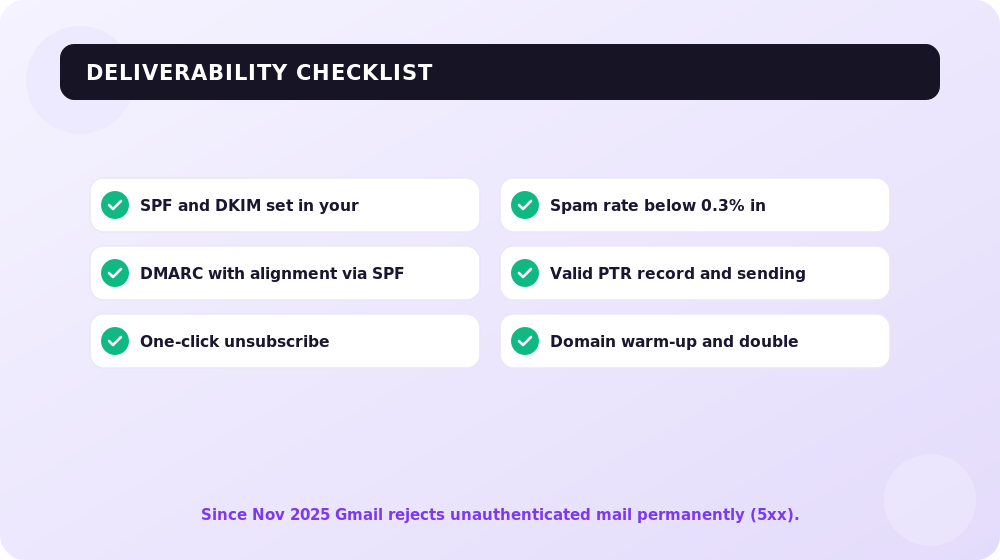
In 2024, Gmail and Yahoo simultaneously introduced mandatory requirements for bulk senders — and have only been tightening the screws since. Where poor authentication used to mean “we occasionally land in spam,” it now means “our emails are not delivered at all.”
The key date for 2026: since November 2025, Gmail has stopped returning temporary errors for authentication failures and switched to permanent 5xx rejections. Previously the server replied “try again later,” and some messages got through on the second or third attempt. Now the answer is final: message rejected, period. For a sender without SPF/DKIM, that is the death of the channel.
Here is what Gmail and Yahoo require from bulk senders (the threshold is 5,000+ emails per day to Gmail domains, but I recommend every business comply regardless):
| Requirement | Who it applies to | What exactly is needed |
|---|---|---|
| SPF and DKIM | All senders | Both records configured in your domain’s DNS |
| DMARC | Bulk senders (5,000+/day) | At least a p=none policy; the From domain passes alignment with SPF or DKIM |
| One-click unsubscribe | Bulk senders | List-Unsubscribe and List-Unsubscribe-Post headers per RFC 8058; unsubscribes processed within 2 days |
| Spam rate | All senders | Below 0.3% in Google Postmaster Tools; the working target is 0.1% or less |
| Infrastructure | All senders | A valid PTR record (reverse DNS), TLS in transit, no forged From headers |
A few practical notes from our agency experience:
- Alignment matters more than the records themselves. A common mistake: SPF and DKIM are set up on the ESP’s domain while your own domain sits in the From field. The records formally exist, but alignment fails — and DMARC kills the message. Send from your own domain and DKIM-sign that exact domain.
- 0.3% is the ban threshold, not the norm. If your spam rate hovers around 0.2–0.3%, you are already in the yellow zone: domain reputation degrades and inbox placement drops. A healthy program lives in the 0.0–0.1% range.
- One-click unsubscribe reduces complaints. A paradox for beginners: the easier it is to unsubscribe, the cleaner the list and the lower the spam rate. A person who cannot find the unsubscribe button hits “Spam” instead — and that hurts you ten times more.
Set up Google Postmaster Tools on day one of working with email. It is free, takes 10 minutes to configure (domain verification via DNS), and shows your spam rate, domain and IP reputation, and authentication errors — through Gmail’s own eyes.
Domain Warm-up and List Hygiene
A new domain or a new IP cannot start blasting tens of thousands of emails right away — mailbox providers read a sudden spike as a spam attack. The standard warm-up scheme: start with 50–100 emails per day to your most engaged addresses and double the volume every 2–3 days while watching your spam rate and bounces.
List hygiene is the other half of deliverability:
- Double opt-in only. Purchased lists and scraped addresses kill a domain within one or two sends.
- Validate addresses before import (ZeroBounce, NeverBounce, or your ESP’s built-in tools) — a hard bounce rate above 2% is already a red flag for providers.
- Automatically remove addresses after 2–3 hard bounces.
- A sunset policy: subscribers with no opens or clicks for 6–12 months get a re-engagement flow; no response — archive them. Dead weight on the list drags down engagement for the entire domain.
Metrics: What to Track After Apple Mail Privacy Protection
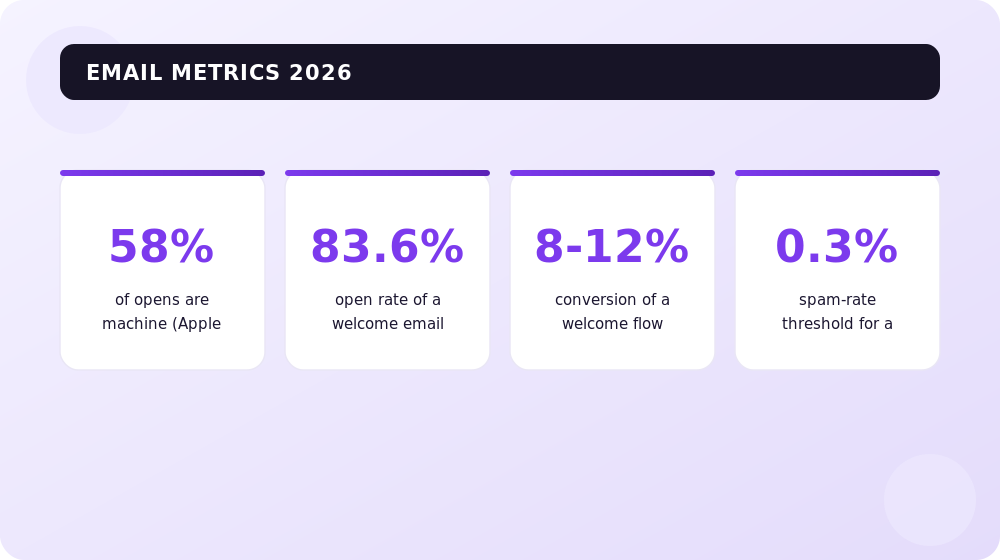
Since 2021, Apple Mail Privacy Protection (MPP) has automatically “opened” emails through Apple proxies — regardless of whether a human actually read them. According to Litmus, Apple proxies account for roughly 58% of all recorded opens. That means open rate as a standalone metric is dead: more than half of the “opens” in your reports may be machine-generated.
What this means in practice:
- Open rate is only a relative signal: comparing subject lines against each other within one list is fine; bragging about “our 45% open rate” is meaningless.
- The main KPIs of 2026: CTR (clicks), conversions from email, and RPE (revenue per email). MPP does not distort these metrics.
- Build “inactive” segments on clicks, not opens — otherwise your re-engagement flow will hit people who actually read you every week on their iPhone.
Benchmarks by Email Type
Averaged reference points from Klaviyo, Omnisend, and MailerLite reports for 2025–2026 (open rate listed with the caveat that MPP inflates it):
| Email type | Open rate | CTR | Conversion |
|---|---|---|---|
| Mass promo campaign | 25–40% | 1–2% | 0.1–0.3% |
| Welcome email | up to 83.6% | 8–15% | 8–12% |
| Abandoned cart | 40–50% | 5–8% | 3.3–7.7% |
| Re-engagement | 12–25% | 1–3% | up to 2% |
| Transactional | 60–80% | 10–15% | — |
The big takeaway from this table: automated trigger emails convert an order of magnitude better than mass campaigns. A welcome email delivers an 8–12% conversion rate versus 0.1–0.3% for a regular broadcast — a 50–100x difference. That is exactly why you set up automations before regular content.
Segmentation and Automations: Where the Money Lives
Segmentation
Sending “everything to everyone” is the fastest way to burn out a list. The minimum segment set that works in any niche:
- By activity: active (clicked within the last 90 days), cooling (90–180 days), dormant (180+).
- By stage: new subscribers, leads without a purchase, customers, repeat customers.
- By interests: which categories/topics a person clicks. Even two or three topical segments lift CTR noticeably.
- By signup source: lead magnet, checkout, blog form — these people have different expectations of your emails.
Three Must-Have Automations
If you have zero automated flows, start with these three, in this order:
1. Welcome flow. An email immediately after signup plus 2–4 emails over the next 7–10 days: who you are, how you help, your best content, a first offer. This is the most-opened email you will ever send (up to 83.6% open rate per Omnisend) and the best-converting one — the person has literally just asked you to write to them.
2. Abandoned cart (for e-commerce — browse abandonment and cart abandonment; for services — an abandoned inquiry). The classic three-email series: after 1 hour, after 24 hours, after 3 days. Conversion of 3.3–7.7% — this money is lying on the floor; you just have to pick it up.
3. Re-engagement. A 2–3 email flow for the cooling segment: “we miss you,” your best content from the period, a special offer. No response — sunset and archive. This is not only about sales: pruning dormant contacts protects deliverability.
SEOquick case: automations work alongside organic traffic, not instead of it. For nadomu.kiev.ua, a Ukrainian at-home medical services provider, we grew traffic 10x over 5 years — and accompanied every growth stage with touchpoints for the list: capture forms on the highest-traffic pages, confirmation and reminder flows for inquiries. Today the site gets conversions even from ChatGPT — but it is email that walks “still thinking” visitors all the way to booking.
AI in Email Marketing: What Actually Works in 2026
AI features now ship with every other ESP, but their usefulness varies. What delivers a measurable effect:
- Subject line generation and optimization. AI-generated subject lines in A/B tests lift opens by 14–26%, per 2025 industry studies. Important: AI is good at generating options, but the final pick belongs to a human who knows their audience.
- Predictive sending (send-time optimization). The algorithm picks an individual send time for each subscriber based on their activity history. On average this adds +23% to opens and +17% to CTR versus sending to everyone at once.
- Predictive segments. Klaviyo and Omnisend forecast purchase probability and churn risk — so you can send promos to those who are “ripe” and retention emails to those slipping away.
- Email content generation. Works as a draft: structure, CTA options, length adaptation. Blindly sending unedited AI copy produces faceless emails that readers smell a mile away — and that hurts engagement.

My position has not changed in 18 years of doing this: tools amplify strategy but never replace it. AI speeds up an email marketer’s routine many times over, but segmentation, the offer, and the tone of voice with your list are still set by a human.
AMP Emails: The Short Version
AMP for Email lets you embed interactivity right inside a message: product carousels, forms, surveys, live prices — no click-through to the site. Sounds great, but in 2026 it is still a niche technology:
- Supported by Gmail and a handful of other clients; Apple Mail (the largest email client) does not support AMP.
- Requires separate sender registration with Google and a spotless reputation.
- Each email needs three versions (AMP + HTML + plain text), which complicates production.
Verdict: experiment with it if you run e-commerce with a large Gmail audience and have resources to spare. For everyone else, classic well-built HTML solves 99% of the job.
ESPs Popular in Ukraine and Globally: A Comparison
We do not consider Russian email services (UniSender, Sendsay, and the like) at all — for ethical, legal, and technical reasons alike. The remaining choice is excellent anyway.
| Service | Strength | Free plan | Best for |
|---|---|---|---|
| SendPulse | Multichannel: email + SMS + chatbots + Viber, Ukrainian-language interface | Up to 500 subscribers / 15,000 emails per month | Small businesses that want every channel in one window |
| eSputnik (Yespo) | Ukrainian-built product, deep triggers and product recommendations, CDP features | Pay per send, no subscription fee to start | Mid-size and large Ukrainian e-commerce |
| MailerLite | Best price-to-simplicity ratio, a clean editor, landing pages and forms | Up to 500 subscribers / 12,000 emails per month | Bloggers, creators, small businesses |
| Mailchimp | Ecosystem, integrations, brand recognition | Up to 500 contacts with limitations | Startups targeting Western markets |
| Brevo (ex-Sendinblue) | Pay per email rather than per list size; SMS and transactional email | 300 emails per day | Projects with a large list and infrequent sends |
| Klaviyo | The deepest analytics and predictive segments for e-commerce | Up to 250 contacts | Shopify/WooCommerce stores, US/EU markets |
| Omnisend | E-commerce automations out of the box, email + SMS + push | Up to 250 contacts | Small and mid-size online stores |
How to choose in practice:
- A local business in Ukraine — SendPulse or eSputnik: Ukrainian interface and support, a Viber channel (a messenger hugely popular in Ukraine), billing in UAH (Ukrainian hryvnia).
- An online store — eSputnik, Klaviyo, or Omnisend: product triggers, RFM segmentation, predictive features.
- A content project, expert, or agency — MailerLite or Brevo: cheap, simple, reliable.
- Going after Western markets — Klaviyo (e-commerce) or Mailchimp (general-purpose).
Any of these services handles the Gmail/Yahoo requirements correctly: it will suggest DNS records, add one-click unsubscribe, and surface spam reports. But responsibility for your domain and content still rests with you.
Email and SEO: How the Channel Helps Your Rankings
Email and SEO look like parallel worlds, but in our agency practice they intersect constantly.
1. Outreach is the engine of link building. In 2026, quality backlinks are earned almost exclusively through personalized emails: guest posts, mentions, digital PR, scholarship campaigns. Outreach rules are the opposite of mass email: a hand-built recipient list, personalization based on the recipient’s site content, short plain-text messages with no HTML design, and 1–2 follow-ups at most.

SEOquick case: for SWEETCV, an English-language resume builder, we built growth precisely on email outreach: scholarship campaigns with emails to universities and topical sites earned .edu backlinks that competitors simply cannot get. The result — growth from 10,000 to 55,000 visits per month. Every one of those links started with a well-written email.
2. Email traffic improves behavioral signals. Subscribers are your most loyal audience: they spend more time on the site, view pages more deeply, and come back. Announcing a new article to your list gives it its first visits and engagement within hours — which helps both indexing and content quality evaluation.
3. Email turns SEO traffic into an asset. An organic visit is a single session. A subscription turns it into dozens of touchpoints. The formula is simple: content attracts from search → a lead magnet converts the visit into a subscription → flows walk the lead to a deal. A site without a signup form pours its SEO budget into one-off visits.
How to Build a Subscriber List
Your list is the only true asset in email marketing, and it can only be built honestly. The mechanics that work in 2026:
- A lead magnet matched to page intent. Not an abstract “subscribe to our newsletter,” but concrete value: a checklist, a template, a calculator, a PDF guide on the exact topic of the page where the form sits.
- In-content forms. An embedded form after the second or third screen of an article outperforms an in-your-face popup. An exit-intent popup is the compromise: it catches leavers without annoying readers.
- Checkout opt-in. For e-commerce — a checkbox (not pre-ticked!) at checkout. Legally clean, and it yields your most valuable subscribers: buyers.
- Webinars and events. Registration = a subscription with explicit consent and high topical interest.
- A blog as a subscription machine. Every article is an entry point from search and AI answers. The more systematic the content, the steadier the inflow to your list.

What never to do: buy lists, scrape addresses, or add conference business cards to your list without consent. It violates GDPR (and, in Ukraine, the Law on Personal Data Protection) and guarantees a deliverability hit: spam traps inside purchased lists send your domain to blocklists after a single broadcast.
Checklist: Launching an Email Program in 10 Steps
- Set up domain authentication. SPF, DKIM, DMARC (at least p=none) in DNS. Verify alignment: the From domain must match the DKIM signing domain. Verification tools: MXToolbox, Google Admin Toolbox.
- Connect Google Postmaster Tools and Yahoo’s equivalent (Sender Hub). These are your instruments: spam rate, reputation, authentication errors.
- Pick an ESP from the table above to match your scenario. Make sure it adds one-click unsubscribe automatically.
- Add signup forms with double opt-in and a lead magnet. State in the form what you will send and how often.
- Validate your existing list, if you have one: remove invalid addresses before the first send, not after a batch of hard bounces.
- Set up a welcome flow of 3–4 emails. This is priority #1 — it will convert from day one.
- Warm up the domain: start with 50–100 emails to your most active segment, double the volume every 2–3 days, and keep an eye on Postmaster Tools.
- Launch the money triggers: abandoned cart/inquiry, re-engagement. Only then a regular content digest.
- Segment the list at minimum by activity and funnel stage. Ban “everything to everyone” from month one.
- Set up reporting on clicks, conversions, and RPE. Add UTM tagging and goals in GA4. Open rate — for subject line A/B tests only.
Conclusions
In 2026, email is the highest-ROI channel in digital — but the barrier to entry has risen. The key things to remember:
- Deliverability is the foundation. SPF/DKIM/DMARC with alignment, one-click unsubscribe per RFC 8058, a spam rate below 0.1% — without this, Gmail simply will not accept your email, and since late 2025 the rejection is permanent.
- Honest metrics, not pretty ones. Open rate is distorted by Apple MPP (~58% of opens are proxy-generated). Count clicks, conversions, and revenue per email.
- Automations beat campaigns. Welcome and abandoned cart convert dozens of times better than mass broadcasts — set them up first.
- AI is an accelerator, not a pilot. Subject lines, send times, predictive segments — yes. Fully automated content with no editing — no.
- The list is built honestly only, and it works hand in hand with SEO: search brings people in, email turns them into customers.
If you need a strategy where SEO, content, and email work as one system — get in touch; in 18 years we have built dozens of such setups.
FAQ
What is an email campaign in simple terms?
An email campaign is sending messages to a group of people who agreed to receive them: news, useful content, promotions, reminders. It differs from spam by recipient consent (double opt-in), the ability to unsubscribe in one click, and sending from an authenticated domain.
Which Gmail and Yahoo requirements are mandatory in 2026?
For bulk senders (5,000+ emails per day): SPF, DKIM, and DMARC with passing alignment, one-click unsubscribe per RFC 8058 processed within 48 hours, and a spam rate below 0.3% in Postmaster Tools. Since November 2025, Gmail rejects non-compliant email with permanent 5xx errors — no retries.
Why is open rate no longer the main metric?
Apple Mail Privacy Protection automatically loads emails through Apple proxy servers, registering an “open” with no human involved — about 58% of all opens, per Litmus data. Focus on clicks (CTR), conversions, and revenue per email (RPE): privacy proxies do not distort these metrics.
Which ESP should I choose in Ukraine?
For a local business — SendPulse or eSputnik (Yespo): Ukrainian interface and support, billing in UAH. For an online store — eSputnik, Klaviyo, or Omnisend with product triggers. For content projects — MailerLite or Brevo. Russian services are off the table.
Which automated emails should I set up first?
Three flows, in priority order: a welcome series after signup (open rate up to 83.6%, conversion 8–12%), abandoned cart or inquiry (conversion 3.3–7.7%), and re-engagement of dormant subscribers. Automations generate the bulk of the channel’s revenue with minimal ongoing effort.
Can I send to a purchased list?
No. It violates GDPR and Ukraine’s personal data law, and technically it is the fast lane to blocklists: purchased lists contain spam traps, and mailbox providers will block your domain after the very first send. A list is built only through confirmed opt-in.
Merchant Center for AI Mode: Getting Your Product Feed Ready for Conversational Shopping in 2026
Google AI Mode is reshaping product search and a plain feed no longer cuts it. Here are the new Merchant Center attributes, why stores get banned, and where to start.
Read →
Image SEO Optimization: alt, Dimensions and Weight for Core Web Vitals
How to optimize images for SEO in 2026: why alt text matters, how width and height stop layout shifts (CLS), which formats (WebP, AVIF) to use, and how not to break LCP with lazy loading. A guide from SEOquick.
Read →
Search Everywhere Optimization: Ranking on TikTok, YouTube, Reddit and AI Search
Your customer does not only search on Google: 49% of consumers search on TikTok, Reddit pulls 842M organic clicks a month, and YouTube is the source of roughly one in four AI Overview citations. Here is how a business owner picks 2–3 platforms without burning the budget.
Read →Want to apply this to your site?
We will review the current situation, find the first growth levers, and suggest a practical working format.