Google Ads Keywords in 2026: Research, Match Types, Negative Keywords
Exact match is no longer exact, broad match is no longer junk, and Performance Max does without keywords entirely. Here is how Google Ads keywords really work in 2026 — and how to build a keyword set that won't burn through your budget.


If you set up Google Ads five years ago and have come back to it today, forget almost everything you knew about keywords.
The broad match modifier was buried back in 2021. SKAG structures (one keyword per ad group) stopped working. Exact match now picks up “close variants”, broad match reads your landing page, and Performance Max has no keywords at all.
That said, keywords are not dead. They have changed their role: from a hard targeting filter into a signal for machine learning. And how well you build your keyword set and negatives still determines where your budget goes.
This guide covers how Google Ads keywords actually work in 2026: what really matches under each match type, where to source keywords, how to structure campaigns and why negative keywords have become more important than the keywords themselves.
In short: in 2026, keywords in Google Ads are an intent signal for the algorithm, not a precise query filter. Exact and phrase match work on meaning (including synonyms and word reordering), broad match works only paired with Smart Bidding and a strict negative list. Keywords come from Keyword Planner, Search Console and the Search Terms report, are grouped by intent (not one keyword per group), and traffic control shifts from keywords to negatives.
How the Role of Keywords Has Changed
The logic used to be simple: a keyword equals a query. You collected thousands of phrases in every word form, split them by match type and managed bids manually at the keyword level.
Today Google is steadily taking that control away from the advertiser and handing it to the algorithms. Three developments shaped the 2026 picture.
Broad Match + Smart Bidding Became Google’s “Default” Strategy
Google explicitly recommends the combination: broad match, an automated strategy (Maximize Conversions / tROAS) and responsive ads. The logic is that Smart Bidding evaluates each auction individually — by query, device, audience and user history — and decides how much to bid on its own.
In this model long keyword lists are unnecessary: the algorithm finds the “tail” itself. The 2025–2026 trend in mature accounts is fewer keywords, more budget on broad match, and heavy negative-keyword work instead of manually enumerating phrases.
But there is a condition Google states more quietly: broad match needs data. Without a steady 30–50 conversions per month per campaign, Smart Bidding learns slowly and expensively. On small budgets, phrase and exact match are still safer.
AI Max: Keywordless Search Inside a Regular Campaign
In May 2025 Google announced AI Max for Search — a feature set that adds “keywordless” query matching (based on landing page and ad signals), text generation and final-URL swapping to a regular search campaign.
Google claims an average of +14% conversions at the same CPA, and up to +27% for campaigns on exact and phrase match. Independent tests are more modest: the agency Monks analyzed around 30,000 AI Max search terms and found that 99% of impressions brought no conversions at all, while in Adriaan Dekker’s survey of PPC specialists only 16% reported a positive result.
The practitioner’s takeaway: AI Max is a scaling tool for accounts that already have conversion history and a cleaned-up negative list. Flipping it on with a single button on a fresh account is a quick way to meet a lot of irrelevant traffic.
Performance Max: No Keywords, Just “Search Themes”
PMax uses no keywords at all — only signals: audiences, feeds, creatives and search themes. More on those below, but the fact itself is telling: Google’s flagship campaign type is built without keywords.
What this means for you: keywords remain the main control lever only in classic search. And that is exactly why you need to handle them more carefully than before — it is the last lever Google has left to the advertiser so far.
Match Types in 2026: What Actually Matches
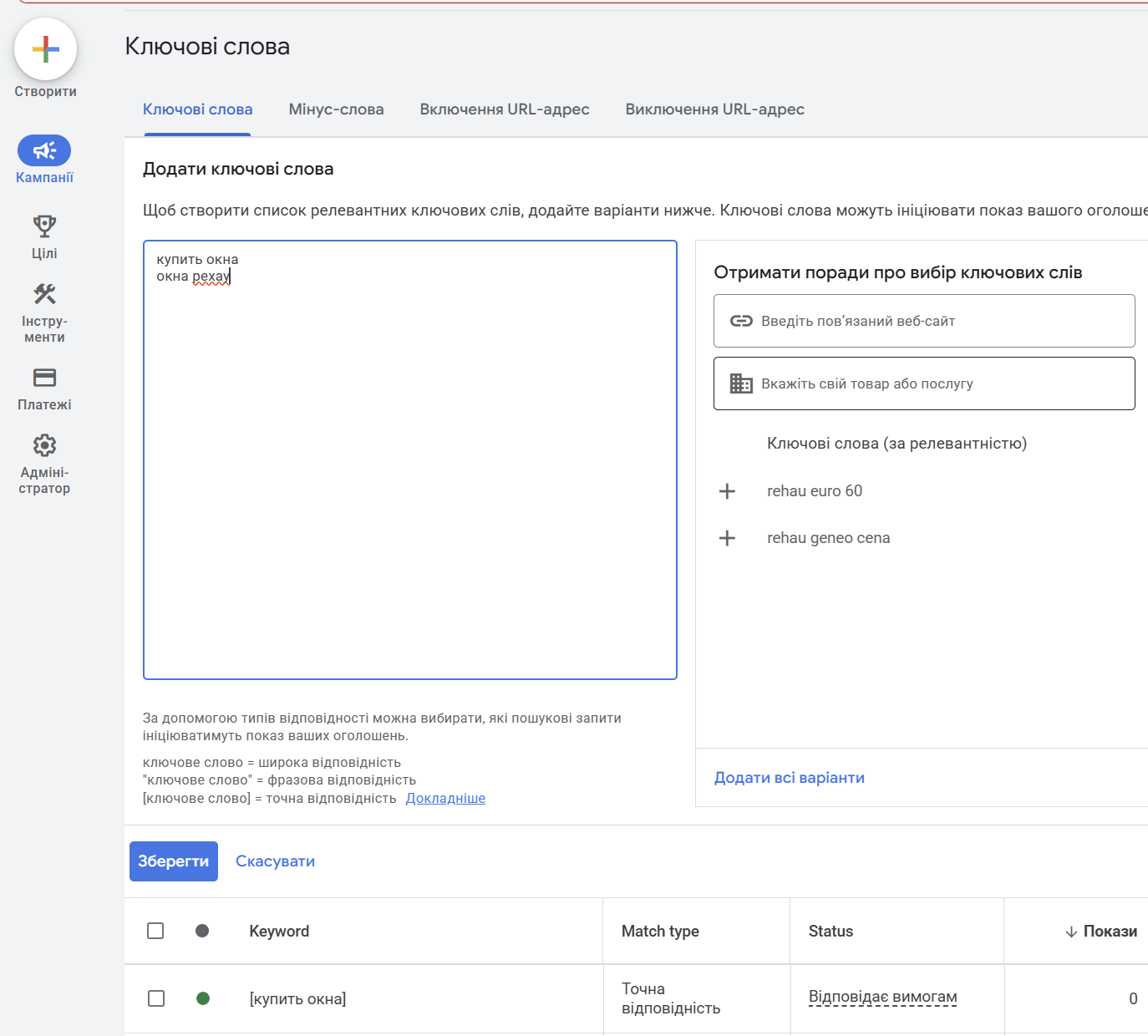
Formally there are three types — exact, phrase and broad. In practice all three have “spread out” over the past few years: Google matches on intent, not on words.
| Match type | Syntax | What Google promises | What happens in practice |
|---|---|---|---|
| Exact | [buy windows london] | Queries with the same meaning | Plus “close variants”: word forms, reordering, synonyms, typos |
| Phrase | “buy windows” | Queries that include the phrase’s meaning | Matches on intent: word order and extra words barely constrain it |
| Broad | buy windows | Queries related in meaning | Takes the landing page, other account keywords and user context into account; widest spread |
Exact Match Is No Longer Exact
With the introduction of close variants, exact match now serves ads on queries with the same intent: plurals, word reordering, synonyms, abbreviations. The keyword [iphone repair] happily matches “fix my iphone”.
This is not a bug — it is official behavior. The only way to control it is by regularly reviewing the Search Terms report and adding negatives.
Phrase Match Absorbed the Broad Match Modifier
After the death of BMM (the broad match modifier), phrase match was expanded: it now covers queries that “include the meaning” of the keyword. Words before and after the phrase, a changed word order, close paraphrases — all of it matches.
In 2026 phrase match is the sensible middle ground: enough reach without fully delegating to the algorithm. For new campaigns on a limited budget, this is usually where I start.
Broad Match: From Junk to a Working Tool (With Caveats)
Old broad match was rightly considered a “budget drain”. Modern broad match is different: the algorithm factors in the landing page content, the rest of the ad group’s keywords and the search context, and it works paired with Smart Bidding, which lowers bids on questionable auctions.
When broad match works:
- The campaign has conversion history (30+ conversions/month) and an automated strategy with a target CPA/ROAS.
- The landing page is relevant and unambiguous about its topic.
- Negatives are collected and topped up weekly.
When it does not work: a new account, manual bidding, few conversions, a “broad” landing page (the homepage instead of a category). In those cases broad match will scoop up everything — from informational queries to competitors’ brands.
Keyword Research: Working Sources for 2026
The strategy for sourcing keywords for ads differs from the SEO one: you do not need every query on the topic, but the commercial intents you are willing to pay per click for. I covered estimating click cost and forecasting budget in detail in the article on the cost of a click in paid search.
1. Keyword Planner
The basic tool is the Keyword Planner inside Google Ads itself. It gives ideas from a landing page or seed queries, volume ranges, top-of-page bid forecasts and seasonality.
The catches: the planner shows exact volume figures only to accounts with active spend (everyone else gets “1–10K” ranges), and it groups similar queries and hides part of the “tail”. For a given market be sure to set the geo and language — otherwise you get a mix of markets.
2. Google Search Console — An Underrated Source
If your site has organic traffic, GSC is a ready-made database of real queries that already find you. The logic is simple: queries with impressions and clicks from organic are proven phrasings from real people, not a generator’s fantasies.
Queries where the site sits in positions 5–15 are especially valuable: organic underperforms on them, and ads close the gap. Export the Performance report for 12 months, filter by commercial markers (buy, price, order, service) — and you have a core for a search campaign.
3. Serpstat, Ahrefs and Competitor Analysis
Third-party tools cover what you cannot see in your own account: which queries competitors advertise on, what their ads and landing pages look like. In Serpstat these are the domain’s PPC keyword reports; in Ahrefs it is the Paid Search section of Site Explorer.
This is not a “copy and upload” source: a competitor may have a different margin and different goals. It is a source of gaps — queries you missed during research.
4. The Search Terms Report — The Main Source After Launch
After 2–4 weeks of a campaign running, the most valuable keywords sit in the Search Terms report: the real phrasings that got impressions and clicks. Add converting queries as keywords on exact or phrase match; send the junk to negatives.
With a caveat: Google does not show every query in the report — some are hidden “for privacy reasons”. By PPC-community estimates, a noticeable share of spend can be hidden, which is one more argument for discipline with negatives.
SEOquick experience. In a full-cycle campaign for a window-services site in Odesa we built a keyword set of 1,626 keywords and, over the engagement, added 7,093 negatives — it was the constant cleaning of search terms that delivered a 10.93% CTR and a cost per conversion of 73.71 UAH. Details are in our paid search setup case study (in Russian).

Campaign Structure: SKAG Is Dead, Long Live Themed Ad Groups
SKAG (Single Keyword Ad Group — one ad group per keyword) was the standard for precise control about eight years ago. In 2026 this structure is not just useless — it is harmful.
There are two reasons:
- Close variants killed the point. If [buy windows] and [windows buy] match the same queries anyway, splitting them into groups only breeds duplicates that compete with each other.
- Smart Bidding learns from group and campaign data. A hundred groups with three clicks each are a hundred starving algorithms. A single group with a coherent intent and a normal volume of data learns faster and more stably.
The working structure for 2026 is themed ad groups by intent (sometimes called STAG — Single Theme Ad Group):
- Campaign = a business line or category with its own budget (windows, doors, balconies).
- Ad group = a single intent: 5–20 keywords that mean the same intention and lead to the same landing page (“buy uPVC windows”, “windows buy price”, “order windows london”).
- Ads = responsive, with headlines tailored to the group’s intent, not to each keyword.
Split by intent, not by word forms: “buy windows” and “window repair” are different groups (and different landing pages), while “buy windows” and “window price” can live together. If you are unsure how to slice the keywords into groups, we have a dedicated breakdown of keyword grouping and a free clustering tool.
A separate structural classic is the split into “branded / category / competitor / generic” campaigns to manage budgets by traffic warmth. More on that below.
Negative Keywords: The Main Control Tool
The paradox of 2026: the smarter the matching, the more important negatives become. Once exact match stopped being exact, the only thing that hard-limits impressions is negatives. PPC specialists note that, due to AI matching and the expansion of close variants, the number of unique search terms in accounts has grown 3–5x over a couple of years — and that entire “tail” needs filtering.
Negative keywords in Google Ads work at four levels:
- Ad group — for cross-negation between groups (so that “buy windows” does not poach the queries of the “window price” group).
- Campaign — topical junk for the line of business.
- Negative keyword lists (shared negative lists) — up to 20 lists of 5,000 words each, applied to several campaigns at once. This is where universal junk goes: “free”, “DIY”, “used”, “jobs”, “what is”.
- Account level — up to 1,000 negatives, applied across the entire account, including PMax and Shopping.
Important details people forget:
- Negatives do not expand to synonyms and close variants (except in PMax, where since 2025 Google applies “expanded” matching to negatives). If you negate “free”, you have to add “freebie” separately, in the right forms.
- Exact and phrase negatives work as before: [“free”] blocks the whole query, “download free” blocks the phrase.
- A conflict between a keyword and a negative blocks impressions — Google flags such conflicts in recommendations, so check after every upload of negatives.
Automation: Scripts and Regular Cleaning
Reviewing thousands of queries by hand is impossible, so a minimal automation set is:
- Google Ads Scripts for n-grams. The script breaks search terms down into single words and pairs and tallies spend and conversions for each. Words with spend and zero conversions are negative candidates. There are dozens of free versions of such scripts online.
- A weekly routine. Search Terms report → sort by spend → everything irrelevant goes to negative lists. At the start of a campaign, 2–3 times a week.
- Anomaly alerts. A script that emails you when impressions spike on a new n-gram catches broad-match “leaks” before they eat the budget.
I covered the typical mistakes with negatives (and not only with them) in a separate article — Google Ads mistakes that drain your budget.
Keywords vs PMax Search Themes
Performance Max is a campaign without keywords: it picks queries, placements and audiences on its own from the feed, creatives and signals. The only “keyword-like” tool in it is search themes, up to 50 per asset group.
The fundamental difference:
- A keyword is targeting. The query matches — the ad enters the auction.
- A search theme is a hint. You tell the algorithm “these are the kinds of queries I care about”, it tests the hypothesis and keeps only what converts. By priority, themes are on par with phrase and broad match — and they lose to your exact keywords.
Hence the rule of coexistence between search and PMax: an exact keyword in a search campaign always takes priority over PMax for an identical query. So keep branded and your highest-converting category queries in classic search on exact match — that way PMax does not “cannibalize” cheap traffic and claim the credit for it.
What else has changed in PMax by 2026:
- Negatives finally arrived: since March 2025 — up to 10,000 negatives per campaign; since August 2025 — support for shared lists. PMax used to be a black box; now you can clean it like a regular campaign.
- A theme-usefulness indicator: Google shows whether a search theme brought additional traffic or the algorithm would have found those queries anyway. Replace low-usefulness themes.
- The search categories report has become more detailed — you can see the query groups the campaign runs on.
SEOquick experience. For a jewelry online store in Ukraine we combined Performance Max with regional campaign segmentation — separate campaigns per city with different bids and budgets. The result: ROAS in Odesa reached 116, while the account average was several times lower. Details are in our jewelry store case study (in Russian).
Branded Campaigns: Cheap Traffic That Needs Protecting
Branded queries are the cheapest and highest-converting in the account: the user is already looking for you. Always break them out into a separate campaign. The reasons:
- Manageability. Mixing brand with category queries gives you a flattering average CTR and CPA at the campaign level — and hides the fact that generic queries are running at a loss.
- Protection from competitors. Competitors can advertise on your brand (this is not prohibited as long as they do not use the brand in the ad copy). Your own branded campaign on exact match almost always wins the auction for pennies, thanks to a top Quality Score.
- Misspellings and variants. Collect every spelling of the brand: in Latin and local scripts, with and without spaces, with typos. Close variants will cover some, but not all — especially for non-obvious transliterations.
And the flip side: add your brand to the negatives of all non-branded campaigns (and to the PMax negatives), otherwise the stats of your “generic” campaigns will be inflated by branded traffic.
SEOquick experience. In a search-campaign case for a multi-region network of psychologists, it was exactly the structural split (brand / services / regions) and constant search-term work that delivered a CTR of up to 18% and a ROAS of about 7.4x. The breakdown is in our search campaign setup case study (in Russian).
Checklist: Campaign Keywords in 2026
- Build the core: Keyword Planner + GSC + Serpstat/Ahrefs on competitors.
- Keep the commercial intents; send informational ones to SEO and the blog, not to paid search.
- Group by intent: 5–20 keywords per group, one landing page. No SKAG.
- Match types: start with phrase (+ exact for the highest converters); broad only with Smart Bidding and conversion history.
- Upload starter negative lists (universal junk + cross-negation).
- Brand into a separate campaign; brand negatives into all the others.
- After launch: the Search Terms report 2–3 times a week, an n-gram script, topping up negatives.
- PMax — after search has gathered conversion data; build search themes from your best search keywords.
The full campaign setup, from account structure to extensions, is in our big Google Ads guide.

FAQ
How many keywords does a Google Ads campaign need?
Fewer than you think. In 2026 the algorithm covers word forms and close variants itself, so 5–20 keywords per ad group with a single intent is enough. Thousands of keywords in every word form create duplicates, fragment your statistics and hinder Smart Bidding’s learning.
Which match type should I choose for a new campaign?
Start with phrase match plus exact for your highest-converting queries. Bring in broad match after accumulating 30–50 conversions per month, and only with an automated strategy (tCPA/tROAS) and regular negative-keyword cleaning — without that it will collect irrelevant traffic.
Why do my ads show on queries that aren’t in my keywords?
Because of close variants: Google matches queries by meaning, not by letters — even on exact match. Plus features like AI Max add keywordless query matching. You control this with the Search Terms report and negatives — synonyms and word forms have to be added to negatives manually.
Do negative keywords work in Performance Max?
Yes, since 2025. PMax campaigns support up to 10,000 negatives and shared negative lists. Account-level negatives (up to 1,000) apply too. This is the main way to strip branded traffic and irrelevant queries out of PMax.
How do PMax search themes differ from keywords?
A keyword is targeting: the query matches, the auction happens. A search theme is a hint to the algorithm about which queries to test; by priority it is on par with phrase and broad match and always loses to an exact keyword from a search campaign. The limit is 50 themes per asset group.
Do I need a separate campaign for branded queries?
Yes. Branded traffic is the cheapest and highest-converting, and you need to see it separately from category traffic. At the same time you protect the results page from competitors advertising on your brand. And add the brand to the negatives of every other campaign so it does not distort their stats.

H1 vs Title: how many H1 tags you need and how they differ
H1 in SEO 2026: how many H1 headings are acceptable, optimal length, how it differs from title, empty H1 and H1 as an image. Based on a measurement of 77 pages from the Ukrainian top and data on how often Google replaces your title with the H1.
Read →
Pagination SEO: how to index list pages without breeding duplicates
Pagination SEO in 2026: canonicals on list pages, noindex, rel=next/prev, infinite scroll, crawl budget. Based on a check of 36,000 traffic-driving URLs across twelve Ukrainian retailers, plus a teardown of pagination at Foxtrot, Epicentr and our own blog.
Read →
URL Structure: The Full Guide to Addresses You Can't Change After Launch
How to get URLs right: transliteration or Cyrillic, slug length, duplicates from case and filters, pagination, UTM tags, redirect maps. A breakdown of Rozetka, Comfy, Prom and Makeup URLs plus 2026 research data.
Read →Want to apply this to your site?
We will review the current situation, find the first growth levers, and suggest a practical working format.