H1 on the page: how many you need and why it shows in the SERP
Google has spent ten years repeating that H1 is not a ranking factor. We took 77 pages from a live Ukrainian SERP and looked at what actually happens: Google rewrote the headline for 65% of them, and in 77% of those cases it showed the text of the H1 instead. So "not a ranking factor" and "doesn't matter" are two different statements.


I will look at your site and answer your questions on the topic of this article. 30 minutes, no slide decks, no pressure.
Book a consultationShort answer: one H1 per page, 30–60 characters, as text rather than an image, and it should not repeat the title word for word. Google really does not rank by H1 — but when it doesn't like your title, the H1 is exactly what it puts in the SERP. In our measurement of the Ukrainian top this happens to two thirds of pages. On top of that, the H1 is what a screen reader reads and what tells a language model what the document is even about.
H1 is a rare case: Google's official position sounds like "do whatever you want", while in practice half the sites out there do it in a way that loses them control of their own snippet. I'll cover both — first what Google says verbatim, then what the live-SERP measurement showed.
What Google actually says about H1
I'll start with quotes, because in this topic paraphrases distort the meaning into its opposite.
John Mueller, October 2019, write-up on Search Engine Roundtable: "Your site can do perfectly fine with no h1 tags or with five h1 tags". In the fuller phrasing from the same discussion: "You can use H1 tags as often as you want on a page. There's no limit, neither upper or lower bound".
An official Google video: "Our systems don't have a problem when it comes to multiple H1 headings on a page. That's a fairly common pattern on the web".
September 2022, a headline on the same Search Engine Roundtable: "Google Will Never Penalize You For Not Having H1 Attributes". November 2022: "Size Of Your H1 & Header Fonts Doesn't Matter For SEO" — the font size of a heading changes nothing either. August 2020: "Google Says Heading Elements (Tags) Order Does Not Matter" — the order of the tags is not penalised in itself.
If you read only that, the conclusion looks simple: you can skip the H1. And it is wrong — because those quotes are about one specific thing, ranking. The H1 has three other jobs that nobody cancelled.
So why do you need an H1: three jobs Google doesn't mention in those quotes
First — the H1 ends up in the SERP. Google substitutes it into the snippet headline when it isn't happy with your title. This is documented and easy to verify, which is what we'll do in the next section.
Second — accessibility. A screen reader builds navigation out of headings: the user presses a key and jumps from heading to heading. A page with no H1 is, for a blind person, a document with no table of contents.
Third — extractability for language models. When a model splits a page into chunks to find an answer, headings are the chunk boundaries. Without them the whole document becomes one wall of text you can't pull a specific fragment out of.
I put the third one this way in a talk about getting into AI answers:
"Artificial intelligence takes material in the form that is easy for it to format and easy to understand."
A heading is the cheapest way to give it that form.
Our measurement: 77 pages from a live Ukrainian SERP
To avoid arguing in the abstract, I took two commercial queries — "ремонт квартири київ" (apartment renovation Kyiv) and "купити ноутбук" (buy a laptop) — pulled the live Google SERP for them (region Ukraine, language Ukrainian, 7 September 2026) and ran every organic result through curl. I looked at the raw HTML: how many H1 tags, what's inside, what the title is, how many H2s.
Out of 77 URLs, 62 responded normally. Fifteen did not — Cloudflare, 403s, timeouts; those are mostly large marketplaces like OLX and Rozetka, and I leave them out of the statistics.
How many H1s the pages already ranking actually have
| Number of H1 tags | Pages | Share |
|---|---|---|
| none | 5 | 8% |
| exactly one | 51 | 82% |
| two | 3 | 5% |
| three | 2 | 3% |
| five | 1 | 2% |
| Total | 62 | 100% |
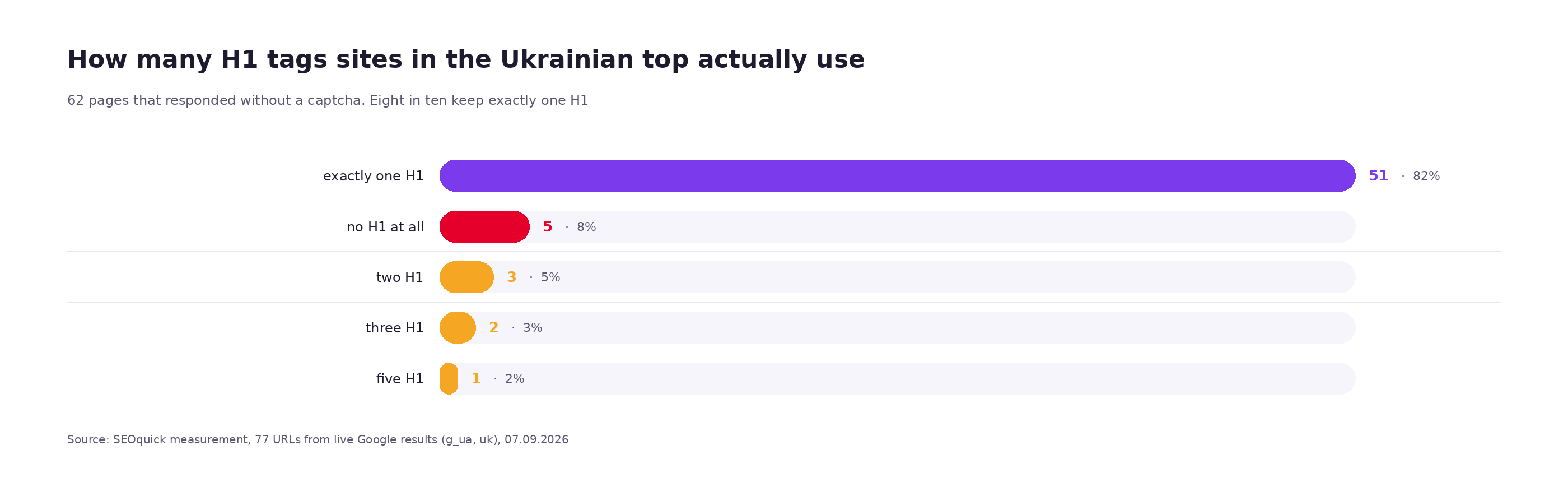
Eight out of ten ranking pages have exactly one H1 — so the industry has settled on a convention after all, despite "do whatever you want" from Google.
But look at the first row: five pages have no H1 at all — and they sit in the top 20 for a commercial query. That is exactly Mueller's point: the absence of an H1 does not stop you ranking. Among them, for example, master-remont.kiev.ua and remont-plus.com.ua/remont-kvartir/.
And now the interesting part. Count the subheadings on those five pages: their median number of H2s is zero, against five for the rest of the sample. Three of the five have no H2 or H3 whatsoever. So this isn't a deliberate decision to drop the H1 — it's a template where nobody worked on headings at any level.
H1 length: median 30 characters
Across the 55 non-empty headings in the sample:
| Metric | Value |
|---|---|
| Median H1 length | 30 characters |
| Shortest | 7 characters ("KYIVKEY") |
| Longest | 55 characters |
| Longer than 70 characters | none |
| Median title length on the same pages | 60 characters |
So in reality the H1 is half the length of the title. The logic is simple: a title has to fit the brand, the city, the year, the price — everything that helps in the SERP. The H1 is read by someone who is already on the page, and they don't need the brand a second time.
Our audit flags an H1 longer than 70 characters. Judging by this sample the threshold is generous: nobody came close to it.
H1 and title: they should not match
This is the most common thing I see in templates: the CMS prints the same string into both <title> and <h1>. Let's check it against the sample.
| Relationship between H1 and title | Pages | Share |
|---|---|---|
| Word-for-word match | 0 | 0% |
| H1 contained in the title, but the title is longer | 23 | 42% |
| Noticeably different texts | 32 | 58% |
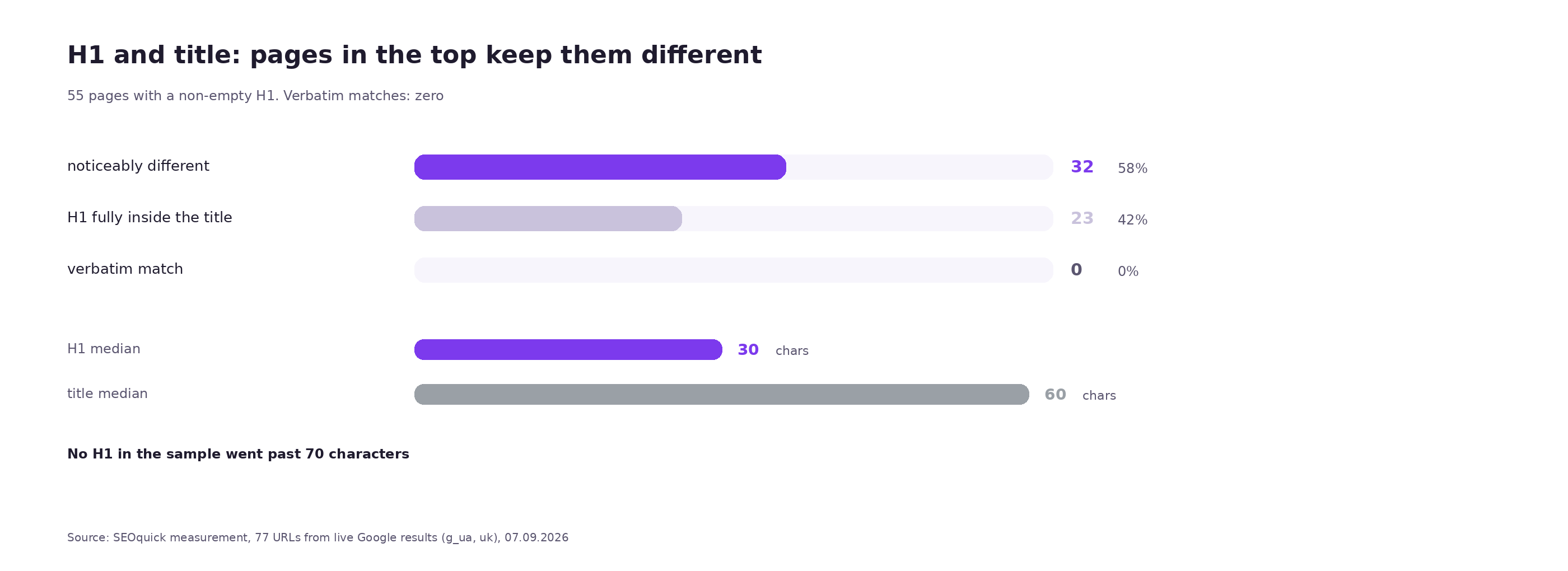
Zero exact matches across 55 pages. Not one site in the Ukrainian top prints the same string into both places.
What it looks like in practice:
H1:    Ціни на ремонт квартир в Києві
title: Ціни на ремонт квартир Київ, прайс-лист на 2026 рік

H1:    Ремонт квартир під ключ у Києві
title: Ремонт квартир під ключ в Києві - HALFEE

H1:    Недорогі ноутбуки у Києві — ТОП рейтинг із гарантією
title: Купити ноутбук у Києві дешево | Рейтинг моделей з гарантією
The title pulls in the commercial qualifiers — price, year, brand, the word "buy". The H1 stays the human heading of the page. Our audit raises a separate title-eq-h1 warning when the two fields match exactly — precisely because it signals a template where nobody worked on the headings.
The main point: Google rewrites your headline — and takes the H1
This is what the whole exercise was for.
For 48 pages in the sample I knew two things at once: what the <title> says on the page itself, and what Google actually displayed in the SERP for that query. Let's compare.
| What Google did with the headline | Pages | Share |
|---|---|---|
| Showed your title as is | 17 | 35% |
| Rewrote it | 31 | 65% |
Now the interesting part. Of the 31 rewritten headlines, 30 pages had a non-empty H1. And in 23 cases out of 30 — that's 77% — the headline shown in the SERP contained the full text of the H1.
Live examples from the measurement:
title: ᐈ Економний ремонт квартири під ключ Київ : Ціни на ремонт…
H1:    Економний ремонт квартири під ключ в м. Київ
SERP:  Економний ремонт квартири під ключ в м. Київ    ← the H1 was used

title: ᐉ Ремонт квартири, кімнати. Розцінки 2026 на ремонт під ключ
H1:    Ремонт квартири або кімнати у м. Київ
SERP:  Ремонт квартири або кімнати у м. Київ           ← the H1 was used

title: Ремонт квартир Київ - KYIVKEY
H1:    KYIVKEY
SERP:  KYIVKEY: Ремонт квартир Київ                    ← the H1 was pushed to the front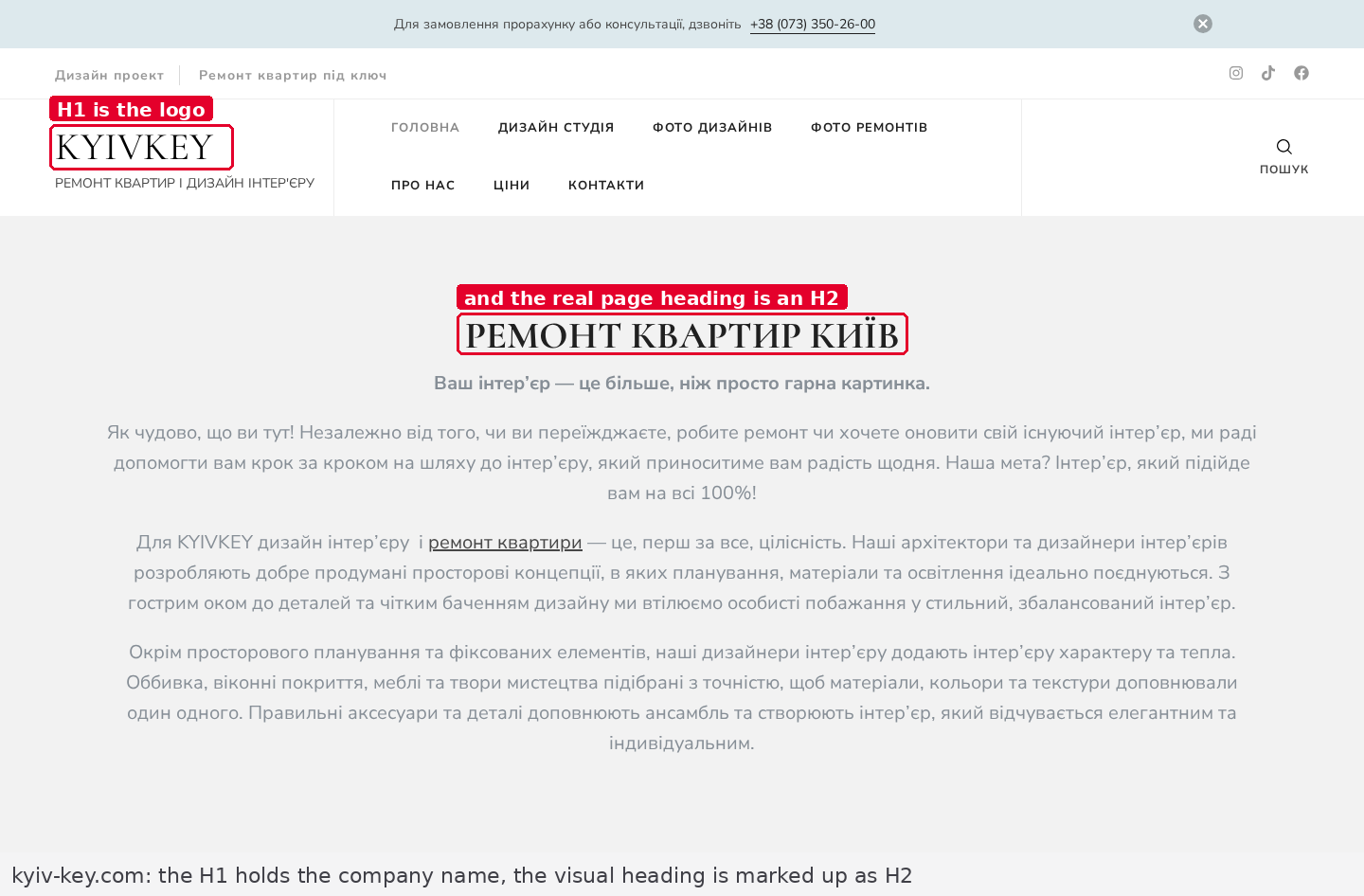
The third example is especially telling: the site's H1 is just the company name — and Google moved that name to the front of the headline in the SERP. The searcher sees "KYIVKEY: Ремонт квартир Київ" instead of what the SEO wrote.
So the formula is this: the H1 doesn't affect where you rank, but it does affect what a person reads about you in the SERP. And that feeds straight into CTR — that is, into traffic at the same position.
The same shows up in large Western datasets
Our 48 pages are a small sample, so let's cross-check against big studies.
Semrush, August 2021: after Google changed how it generates headlines, the share of impressions using the original HTML title fell by 77%, and "roughly 75% are utilizing the H1 instead of the title tag" — in three quarters of the replacements the H1 was shown instead of the title. The sample was around 3,000 keywords.
Zyppy, 2022: 80,959 titles across 2,370 sites, Google rewrote 61.6%. Our result — 65% on a 2026 Ukrainian SERP — lands in exactly the same band.
How Google decides what to show instead of your title
This isn't guesswork — the mechanics are documented. In the title links section Google lists the sources it assembles the SERP headline from. Among them:
- the contents of the
<title>tag; - "Main visual title shown on the page";
- "Heading elements, such as
<h1>elements"; - the anchor text of links pointing to the page;
- content that is simply large and prominent.
And one separate line that explains why you want one H1 and not five: "it can be confusing if multiple headings carry the same visual weight and prominence" — Google explicitly asks that the main heading stand out from the rest as the most prominent one.
So the logic is this. Google looks at the title. If the title is long, boilerplate, stuffed with separators, or repeats the same thing across the whole site, it goes looking for a replacement. The first place it looks is the most prominent heading on the page. On a properly built page that is the H1.
Which leads to a non-obvious consequence: the worse your title, the more important the H1 becomes. Exactly the opposite of how priorities are usually set.
What decides whether you get rewritten: title length
Zyppy have a number that reads almost like a law: headlines longer than 70 characters get rewritten 99.9% of the time. Let's check it on our sample.
| Title length | Pages | Rewritten | Share |
|---|---|---|---|
| up to 50 characters | 7 | 3 | 43% |
| 51–60 characters | 17 | 7 | 41% |
| 61–70 characters | 9 | 7 | 78% |
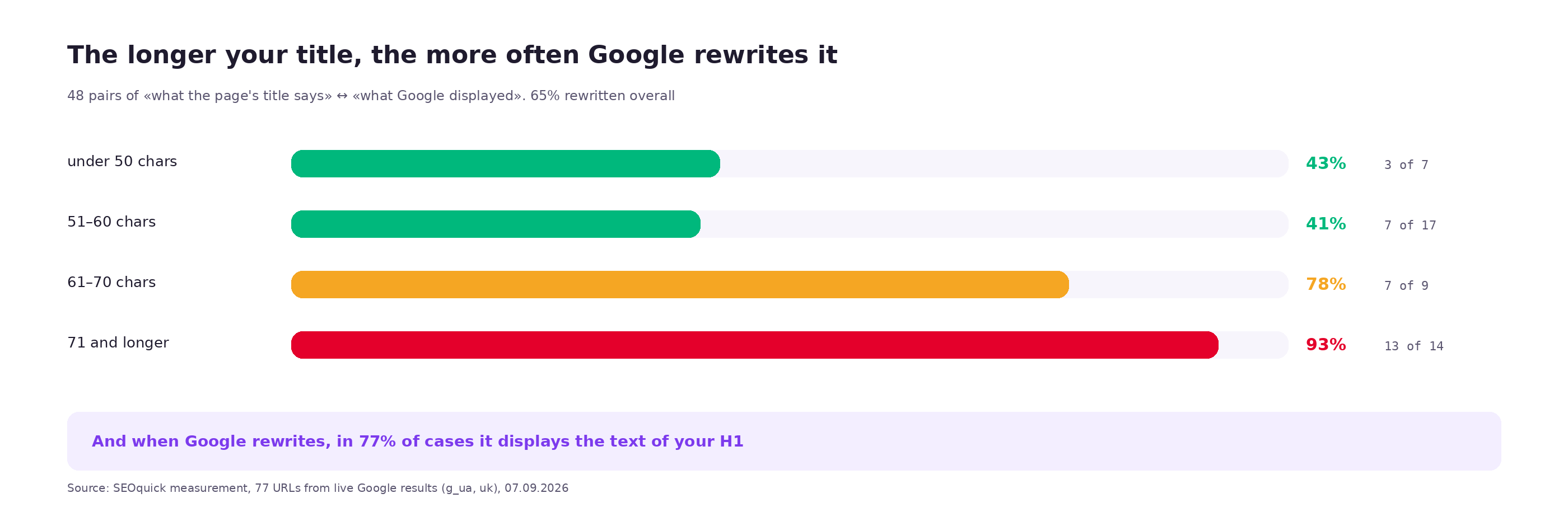
| 71 characters and above | 14 | 13 | 93% |
The curve has the same shape: under 60 characters the chance of a replacement is about 40%, past 70 it's near certain. The absolute values are higher than Zyppy's — a small, commercial sample — but the direction matches.
Practical takeaway: if you write a title longer than 70 characters, you are not writing a title. You are writing a draft that Google will assemble a headline from — and your H1 is the material it will use.
What we found on our own site while running this measurement
I ran the same script against our own pages. Three findings, all three instructive.
First: we break our own length threshold. Our audit flags an H1 longer than 70 characters. The two most recent blog posts:
/paginaciya/     H1 = 72 characters
/struktura-url/  H1 = 89 characters
The H1 in the blog template is printed from the title field in the front matter, and we write that field for the SERP — so it's long. The result: the article heading meant for a reader inherited the length of a search headline. I only noticed it when I ran our own site through our own check. We fixed it in the same release as this article: the blog template now has a separate field for the H1, so the heading for the reader is written separately from the headline for the SERP.
Second: grepping the code lied to me. On /website-audit/ — our highest-traffic page — the script first counted three H1s. I went to look and found this:
...</style></head><body><h1>SEO-"+t("аудит","audit","аудит")+" — "+escapeHtml(o)+'</h1>...There is no heading here at all: it's a string inside JavaScript that builds the HTML for the printable version of the report. Browsers and crawlers read it as script text; my regex read it as a tag. The page has one real H1.
The methodological moral: before counting headings with a regex, strip the contents of <script> and <style> out of the code. Otherwise any client-side templating will hand you H1s that don't exist. I rewrote the script and recounted the entire sample — no discrepancies turned up on third-party sites, but that check belonged before publication, not after.
Third: we link to a meta-refresh page ourselves. The URL /tools/onpage-seo-audit/, which we link to from articles, returns 267 bytes of this:
<title>https://seoquick.com.ua/website-audit/</title>
<link rel=canonical href=https://seoquick.com.ua/website-audit/>
<meta http-equiv=refresh content="0; url=https://seoquick.com.ua/website-audit/">
It's a technical alias page: no H1, no content, a meta-tag redirect. It works, and nobody notices. But our own audit raises a warning on meta refresh — and we point internal links at that page from fresh material. We switched them to the direct URL in this same release.
I'm noting this not out of self-flagellation but because all three findings are typical. The first is about one field feeding two different places. The second is about a checking tool lying to you when you don't understand how it works. The third is about technical pages leaking into internal linking.
Three real breakages found in the same sample
The measurement also dragged out things you can't see in a screenshot but that sit in the code.
A broken HTML comment inside an H1. The site nsdgroup.com.ua, renovation services page:
<h1 class="articles-typical__title md-main-title">--><!--</h1>
<h1 class="first__title"><span>Ремонт квартир</span> в Киеве под ключ</h1>
The first H1 on the page contains a fragment of a comment. The real heading is the second one. A human doesn't see it: the browser hides the comment. A crawler sees two H1s, the first of which is garbage.
A completely empty H1. The site asgroup.in.ua, Russian-language version of the renovation page:
<h1 class="pri-title h1"></h1>The tag exists, the content doesn't. Formally the "H1 present" check passes; in fact the page has no heading. The classic result of a template where the H1 is pulled from a CMS field and the field was left blank.
Five H1s as a way to make text bigger. The site euroremont.kiev.ua:
<h1>Будівництво, ремонт та оздоблення від 4500 грн./м²</h1>
<h1> </h1>
<h1>Наші переваги</h1>
<h1>Надихаємо Вас на ремонт!</h1>
<h1>Часті запитання щодо ремонту</h1>
"Наші переваги" (our advantages) and "Часті запитання" (FAQ) are H2s by meaning. They were made H1s because that renders bigger. One of the five is empty. Google will not penalise this — but the document structure is now meaningless to a machine: five equal main headings mean there is no main one.
Empty H1 and H1 as an image
Two related breakages that our scanner reports as separate checks.
An empty H1 — the tag is there, the text isn't. It shows up when the heading comes from a CMS field and the field is blank, or when the designer decided the hero doesn't need a heading and the developer left the tag in.
An H1 made of an image — inside the tag sits an <img> with a logo or a nicely set piece of lettering:
<h1><img src="/img/logo.png" alt=""></h1>Everything here depends on a single attribute. If the image has a meaningful alt, both the search engine and the screen reader will read it as the heading text — workable, if awkward. If the alt is empty, as above, the page has no heading for anyone except a sighted human. More on alt text in our separate piece on image optimisation.
Our sample turned up two pages with a non-empty H1 tag from which not a single word of text can be extracted. Across 62 pages that's 3% — small, but both pages rank, so their owners don't know about the problem.
Multiple H1s: when it's fine and when it isn't
HTML5 formally allows multiple H1s — the spec assumed that each <section> or <article> would have its own first-level heading. Google, as we saw, doesn't mind either.
The problem is elsewhere. The "outline" algorithm that was supposed to build a hierarchy out of sections was never implemented in any browser or any screen reader. So in practice several H1s simply read as several main headings — and the question "what is this page about" is left without a single answer.
| Situation | Fine? | Why |
|---|---|---|
| One H1 — the page heading | Yes | The only variant everything reads the same way |
| H1 in the header (logo) + H1 for the heading | No | A logo is not a document heading; it belongs in an <a> with alt text |
| An H1 on every card in a listing | No | A card is a list item; its heading is an H2 or H3 |
Several H1s in different <article> blocks on one page | Debatable | Formally allowed by the spec, supported by nobody in practice |
| H1 instead of H2 "to make it bigger" | No | Size is set by styles, not by heading level |
My working test is simple: if a page has more than one H1, ask yourself which of them you'd want to see in the Google SERP in place of your title. If the answer is "well, that one", the rest should be demoted to H2.
Heading hierarchy: H1 → H2 → H3
Google says the order of the tags doesn't matter in itself, and that's true — you won't be penalised for skipping a level. But the hierarchy isn't there for the search engine.
It's there, first, for the screen reader: the user navigates by level, and a jump from H1 straight to H4 reads as "something is missing here". And second, for the language model that cuts the document into chunks along heading boundaries.
Rules worth following:
- One H1 — the main heading of the page, usually the same thing a person sees first.
- H2 — the meaningful sections. There should be more than one: a section that exists in a single copy isn't a section.
- H3 — subsections inside an H2. Don't start a page with an H3.
- Levels are not skipped: after an H2 comes an H2 or an H3, but not an H4.
- A heading is not an image caption or a button label. If the element doesn't open a section of text, it isn't a heading.
In our sample 6 pages out of 62 (10%) have no H2 at all. Those are exactly the pages where the text runs as one solid block — and they are the hardest to break into fragments.
H1 and accessibility: why this isn't only about SEO
The point that articles about H1 usually skip.
A blind user doesn't scan a page with their eyes. They switch on heading navigation and jump through them with a key. If a page has no H1, the document has no entry point: the screen reader starts reading from whatever element comes first. If there are five H1s, there are five entry points and none of them is the main one. If the H1 is an image with no alt, the screen reader will say "graphic" and that's it.
There are requirements on paper, too. Ukraine has ДСТУ ISO/IEC 40500:2015 — the national standard adopted on the basis of WCAG 2.0. For government sites and organisations working with public funds, requirements for heading structure are mandatory. For a commercial site it is still a matter of culture, but culture changes faster than laws.
H1 and AI search: the heading as a fragment boundary
When a language model looks for an answer on your page, it doesn't read the whole thing. It cuts the document into chunks and looks for the chunk that answers the question. The chunk boundaries run along the headings.
Hence a practical shift: a heading is no longer decoration for a section, it's the section's label for a machine. And whatever comes immediately after the heading matters more than everything else in that section. I've phrased the rule like this:
"Every section of an article should start with a direct answer to the question in its heading — not with a run-up, but with the answer."
And in the checklist from the same talk:
"Every h2 starts with an answer, not with a run-up, no filler."
For the H1 this means: the first-level heading sets the topic of the whole document, and the first paragraph after it is what a model is most likely to quote. If your H1 is followed by "In today's world, more and more people are thinking about…", you've handed that quote to a competitor.
It also explains why question-shaped headings work better than statement-shaped ones: "How many H1s should a page have" is a ready-made question–answer pair; "Features of using the H1 tag" is not.
H1 on different page types
| Page type | What goes in the H1 | Common mistake |
|---|---|---|
| Home | What the company is and what it does | A logo image, or no H1 at all |
| Shop category | The category name, with a city if needed | Duplicates the title, price and the word "buy" included |
| Product page | Product name with the model | Adding "buy cheap in Kyiv" — that belongs in the title |
| Service page | The name of the service | A slogan instead of a heading |
| Blog post | The article headline | Matches the title right down to the brand at the end |
| Pagination page | The same H1 as on page one | The page number is appended to the H1 instead of the title — covered separately |
| Filter page | The filter name, treated as a landing page | The category heading with no mention of the filter |
| 404 | A clear "Page not found" | An H1 with the site name — the page looks like it works |
How to check the H1s on your own site
Three ways, from fastest to most thorough.
One page, thirty seconds
curl -s "https://site.ua/page/" | grep -oE '<h1[^>]*>.*?</h1>'You're looking at the raw HTML before scripts run. If the result is empty, either there is no H1 or JavaScript draws it in — which, for a crawler, is nearly the same thing.
Compare the H1 with the title and with what's shown in the SERP
URL="https://site.ua/page/"
curl -s "$URL" | grep -oE '<title>[^<]*</title>'
curl -s "$URL" | grep -oE '<h1[^>]*>[^<]*</h1>'
# then find the page in Google and compare it with the snippet
If the SERP headline matches the H1 rather than the title, Google is already rewriting you and you didn't know.
The whole site at once
Our on-page audit tool checks four things about H1 as separate items: a missing H1, multiple H1s, an H1 longer than 70 characters, and an H1 made of an image. It also separately catches a title that matches the H1 and a broken heading hierarchy. You give it a URL — you get a list of specific pages.
If the catalogue is large and you need a full crawl, that's a technical audit: there we look at headings across all templates at once and find the systemic error rather than individual pages.
What to look at in Search Console
- The Performance report, comparing CTR by page. A page with a decent position and a low CTR is the first candidate for a headline check: Google may be showing something other than what you wrote.
- The URL Inspection tool on a specific page: the rendered-HTML tab will show whether an H1 exists after scripts run.
Symptom → cause → fix
| What you see | Likely cause | How to check | What to do |
|---|---|---|---|
| The SERP headline isn't the one in your title | Google replaced it with your H1 | Compare the snippet against the H1 and the title | Cut the title to 60 characters, tidy up the H1 |
| Good position, low CTR | An unhelpful headline is being shown | Performance report plus looking at the snippet | Rewrite the H1 so you'd be happy to see it in the SERP |
| The audit says "H1 missing" but you can see a heading on the page | The heading is drawn by a script or built out of a div | curl plus grep for h1 | Serve the H1 in the HTML before JavaScript runs |
| The audit says "H1 is an image" | There's an <img> inside the tag | Look at the tag's markup | Put text in the H1; if you need the image, give it a meaningful alt |
| Multiple H1s across every page of the site | The template uses H1 for the logo or for cards | Check two or three different templates | Demote everything except the page heading to H2 |
| The H1 matches the title character for character | Both fields are printed from the same variable | Compare on five random pages | Split them: title for the SERP, H1 for the human |
| Many pages share the same H1 | The heading comes from the section name, not the page | A crawler, the duplicate-headings report | Put what makes the page different into the H1 |
| The H1 exists but is empty | The CMS field was left blank | Search the code for <h1[^>]*></h1> | Fill the field in, or drop the tag from the template |
A brief for the developer: what to write in the ticket
"Fix the headings" will end in an argument about what counts as done. Here is a specification you can accept work against.
1. Count. Exactly one <h1> tag on every page of the site. The header logo, card titles in listings and block labels are not marked up as first-level headings.
2. Content. The H1 contains text, not an image. If the design requires an image, it carries a meaningful alt repeating the heading text.
3. Non-emptiness. If the heading field in the CMS is blank, the <h1> tag is not output at all — an empty tag is not acceptable.
4. Length. The H1 is between 20 and 70 characters. Exceeding that raises a warning in the CMS rather than being published silently.
5. Distinct from the title. The H1 and the <title> are filled in from separate fields. The default value of one is not substituted into the other.
6. Served in the HTML. The H1 is present in the source before JavaScript runs. Verified by viewing the page source with scripts disabled.
7. Hierarchy. H2s follow the H1, H3s sit inside them. Levels are not skipped. Headings are not used to control font size.
8. Uniqueness. The H1 differs on pages that differ in meaning. On pagination pages the H1 stays unchanged and the page number goes into the title.
9. Acceptance. The output of curl | grep h1 is attached for five pages from different templates: home, category, product, service page, article.
Checklist
- Exactly one H1 on the page.
- The H1 contains text, not an image and not nothing.
- H1 length between 20 and 70 characters, aim for around 30.
- The H1 doesn't repeat the title word for word: title for the SERP, H1 for the reader.
- The title is under 70 characters, otherwise Google will almost certainly rewrite it.
- The H1 is present in the HTML before scripts run.
- A direct answer to the heading's question follows the H1 immediately, not a run-up.
- The page has H2s and they don't skip levels.
- Headings are not used to enlarge type.
- The H1 differs on pages that differ in meaning.
- The SERP headline is the one you intended — checked by eye on at least five pages.
The easiest place to start is our on-page audit tool: it will show missing, multiple and over-long H1s by specific URL. And if you suspect the problem is in the template and repeats across thousands of pages, that's a technical audit.
FAQ
Do I need an H1 at all if Google says you can go without?
You can rank without one — five pages with no H1 in our sample sit in the top 20. But the H1 is exactly what Google substitutes into the SERP when it rewrites your title, and that happens to two thirds of pages. On top of that, without an H1 the page has no entry point for a screen reader. So it's worth having — just not for the sake of rankings.
How many H1s should a page have?
One. HTML5 and Google formally allow more, but the sectioning algorithm is supported by neither browsers nor screen readers, so multiple H1s read as multiple main headings. In the Ukrainian top, 82% of pages have exactly one.
How long should an H1 be?
Aim for around 30 characters — that's the median across pages in the Ukrainian top. The sensible upper bound is 70; nobody in our sample exceeded it. There is no lower bound, but a one-word heading usually means the company name went in instead of the page topic.
Can the H1 match the title?
Technically yes, practically no. Across 55 pages in the Ukrainian top there wasn't a single word-for-word match: the title takes on the price, the city, the year and the brand, while the H1 stays the human heading. A match usually means both fields are printed from one variable and nobody worked on the headings.
What do I do if Google rewrites my headline?
First look at where it takes the replacement from: most often it's your own H1. Then two steps. Cut the title to 60 characters — in our measurement, titles of 71+ characters are rewritten 93% of the time against 41% at 51–60. And tidy up the H1, because that's what will end up in the SERP.
Does the heading's font size matter?
No. Google addressed this specifically in 2022: heading font size has no effect on SEO. The tag level matters, not how it looks. If you need large type, that's a job for CSS.
How is the H1 connected to getting into AI answers?
A language model cuts the document into fragments along heading boundaries and searches among them for the answer. The H1 sets the topic of the whole document, the H2s set the topics of the fragments. A page without headings becomes one indivisible wall of text that's hard to pull a quote from. Hence the practical rule: every heading is followed immediately by an answer, not an introduction.

Website audit cost in 2026: what the price is built from
31 prices from 13 Ukrainian pages: $33 to $2,035 for the same word. How a report differs from an audit, which free tools still work, which are dead — and what we charge.
Read →
How to choose an SEO agency in 2026: a verification procedure
Not another ranking. Ten criteria with a specific check for each, how to tell a number you can trust from one you can't, what the market actually charges with links to the agencies' own price pages, what belongs in the contract, and when you don't need an agency at all.
Read →
URL Structure: The Full Guide to Addresses You Can't Change After Launch
How to get URLs right: transliteration or Cyrillic, slug length, duplicates from case and filters, pagination, UTM tags, redirect maps. A breakdown of Rozetka, Comfy, Prom and Makeup URLs plus 2026 research data.
Read →Want to apply this to your site?
We will review the current situation, find the first growth levers, and suggest a practical working format.