ChatGPT ads: setting up the account and where budget leaks
I went through OpenAI Ads Manager on a test account: how to create an account and give an agency access, which defaults eat your budget, and what clicks and leads cost in other advertisers' tests.



I will look at your site and answer your questions on the topic of this article. 30 minutes, no slide decks, no pressure.
Book a consultationShort answer: to advertise on ChatGPT, you create an account in OpenAI Ads Manager at ads.openai.com, add a logo and a card, then build a campaign, an ad group and ads. Self-serve ads are open in 89 countries as of late October 2026. The minimum is $25 a day (€15 or £15), payment is by card only, and the currency, country and time zone you pick at sign-up can never be changed. Targeting is narrow: country, region or postal code, device type and "context hints" instead of keywords. There are no demographics, no negative keywords and no agency manager account. Most wasted spend comes from the defaults: a $100 daily budget, a $4 bid and AI that rewrites and translates your ads without asking. In published tests a click costs $3–5, and about 9 times fewer visitors convert than from Google.
I went through the whole Ads Manager on a SEOquick test account on 9 November 2026: built a campaign by hand and with the AI wizard, and checked user access, billing and conversion tracking. I launched nothing and attached no card. Below are the setup steps, screenshots, the places where budget leaks, and numbers from other advertisers' tests. Our test account is registered in Ukraine, which shows in the currency and location settings.
What to prepare before you sign up
Five things, without which ads will not serve or you will end up recreating the account:
- The legal entity. Advertiser type is either a business or an individual. Pick business if you are one: changing the type later triggers a new verification.
- A company Visa, Mastercard or Discover card that allows foreign payments. A $50 authorisation hold goes on it.
- A logo. Without it the account shows a banner saying ads will not run.
- A landing page with a clear offer. OpenAI's AI reads it to write ad suggestions and to rewrite your ads.
- A pixel or the Conversions API if you want to optimise for leads rather than clicks. The Conversions objective does not work without one.
How to create a ChatGPT ads account
- Go to ads.openai.com and sign in with an OpenAI account (your ChatGPT login or a work one).
- Enter the account name and the company website.
- Choose the country. The currency list depends on it: in Ukraine, for example, the only option is USD.
- Choose the time zone and create the advertiser account. Next the dashboard asks for a logo, the advertiser type and billing details.
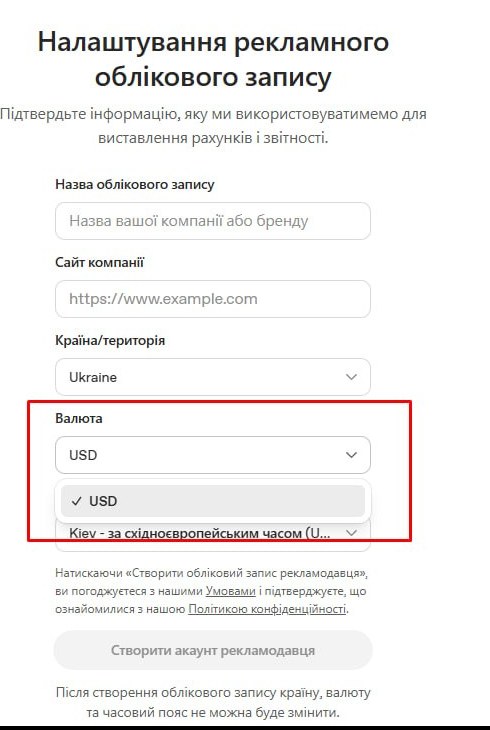
Country, currency and time zone are fixed for good. The settings page says so: to use different ones, create a new account. If your company operates in several markets, decide which entity registers before you start: the country sets the currency and, at first, where you can advertise. According to Index Lab, new accounts are sometimes limited to their own country until they pass verification and reach a spend threshold that OpenAI does not publish.
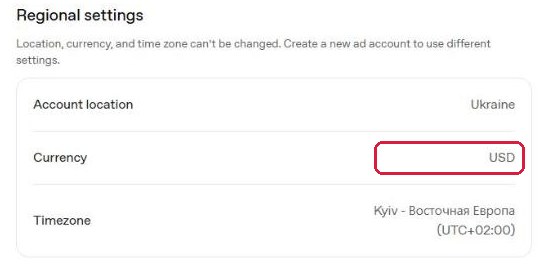
One more detail sits in the dashboard footer: the account runs on its local time zone, but billing uses UTC. A "day" in your reports and a day on your invoice will not match.
One login can manage several ad accounts through the profile menu. According to OpenAI's help centre (as summarised by Soku), the limit is 10 accounts per email, and you can only add a new one once you already have an account with a card attached.
How to give access to a colleague or an agency
Settings → Users → Invite. Enter an email and pick one of three roles:
| Role | What it can do | Give it to |
|---|---|---|
| Admin | Full access: billing, users, campaigns | The business owner, finance |
| Member | Create and manage campaigns | Marketer, agency |
| Viewer | Read only | Managers who only read reports |
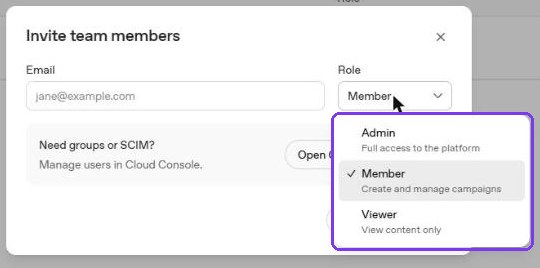
There is no agency manager account like Google Ads MCC or Meta Business Manager. An agency cannot hold client accounts under its own roof and switch between them in one view. The only model is: the client creates the account and invites the agency by email. Large companies can manage groups and SCIM through the OpenAI Cloud Console, but that is for staff, not contractors.
In practice:
- The business owner registers the account on a company email, not an employee or a contractor on a personal one. When that person leaves, access leaves with them.
- An agency needs the Member role. Keep Admin in house: it sees billing and can remove users.
- If an agency has already created the account under its own login, it cannot be transferred to you; the agency can only invite you as an Admin. Check this on day one.
Billing: card only, a $50 hold and invoices
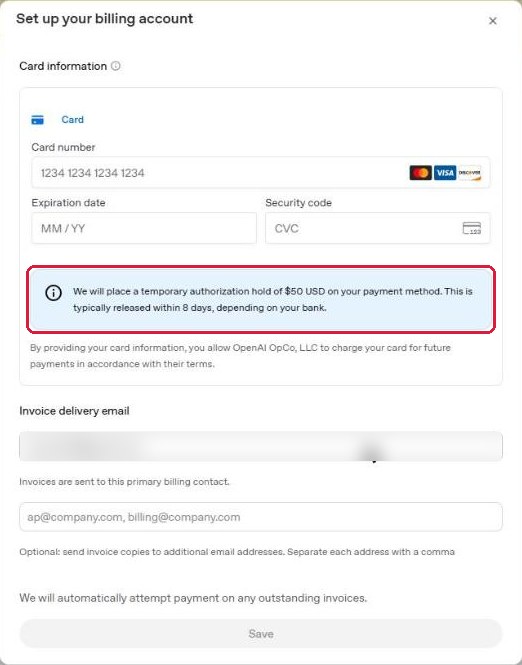
Billing → Settings. There is one payment method: a card. When you add it, the bank places a $50 hold; the dashboard warns it is usually released within 8 days, depending on the bank.
- Payment method
- Card only
- Minimum budget
- $25 / €15 / £15 a day
- Model
- Postpay
- Seller
- OpenAI OpCo, LLC
Billing is postpay: OpenAI accrues spend and charges the card when the balance hits a threshold. The threshold grows with your payment history and you cannot request a higher one (InPromptAds, citing OpenAI's help centre). If a charge fails, ads stop. Invoicing with payment terms is only for large advertisers managed by OpenAI's sales team (Flyweel, 28 Oct 2026); there is no public application. I found no fields for a VAT or tax ID in the billing form.
Step 1. Campaign: objective, locations, budget
The structure mirrors Google Ads: campaign → ad group → ads. The wizard has three steps: campaign, ad group and ads, review.
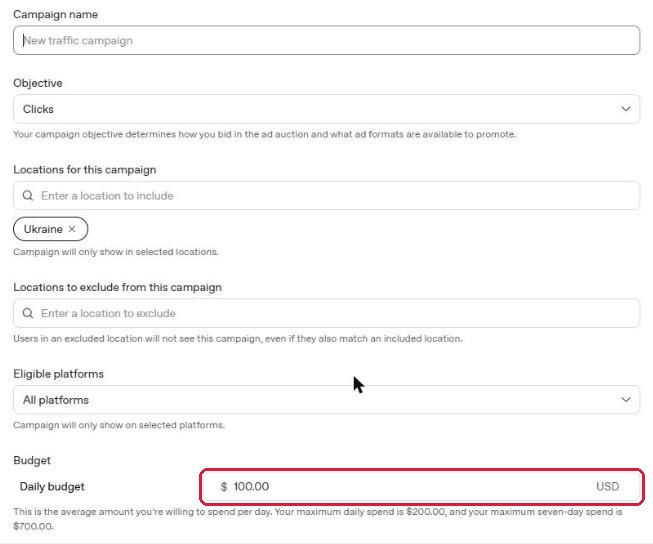
At campaign level you set:
- Objective: Reach, Clicks or Conversions. It determines the bidding options and formats. Conversions needs a working pixel.
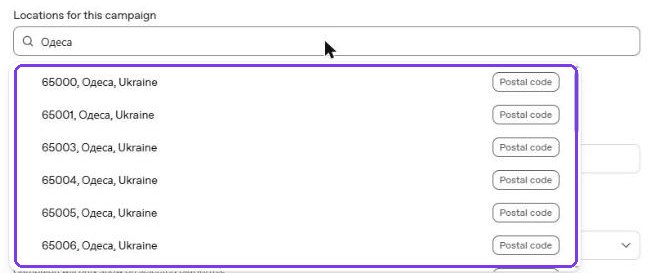
- Locations and exclusions. Countries, regions and postal codes; in the US also DMAs. There is no radius: to cover a whole city you add its postal codes one by one. Postal codes are indexed under local names, so in Ukraine "Odesa" finds nothing while "Одеса" returns 65000, 65001, 65003 and so on; "Kharkiv" finds only the oblast.
- Platforms: Android app, Android web, Desktop web, iOS app, iOS web. All five are on by default.
- Daily budget and dates.
- Creative enhancement, the most important toggle in the account. More on it below.
The budget field is pre-filled with $100 a day, and the small print says this is an average: maximum daily spend is $200 and maximum seven-day spend $700. On any single day OpenAI can spend twice what you entered, as long as the week stays within seven daily budgets. You cannot set less than $25 a day.
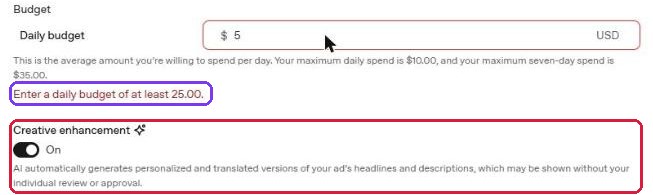
Creative enhancement is on by default, both in every new campaign and in the account settings. The label says AI automatically creates personalised and translated versions of your headlines and descriptions that may be shown without your review or approval. The account setting spells out more: new headlines and descriptions, resized images, optimised destination URLs and translation into other languages. For healthcare, finance, legal services and any business where the exact wording of a price or a guarantee matters, I would switch it off until you have seen what it writes.
Step 2. Ad group: bids and context hints
The ad group holds the bid strategy, context hints, the landing page and tracking parameters.
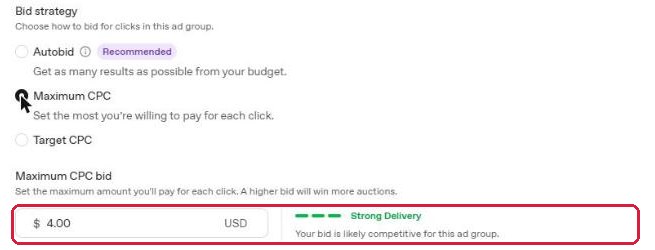
As of 9 November there are three strategies. A new ad group shows only Autobid; the manual options appear when you click Edit next to it:
- Autobid, marked as recommended: get the most results within the budget. No cap on cost per click.
- Maximum CPC. Defaults to $4. The indicator next to it shows "Strong Delivery" at about $4 and warns of a low chance of delivery below $3.
- Target cost per click. The system tries to keep the average CPC at your target.
Bidding is changing right now. In an email to advertisers (reported by Search Engine Roundtable on 5 Nov 2026), OpenAI said Target CPA for conversion campaigns and Target CPC for click campaigns arrive on 9 November, while Max Bid and Max CPC will be retired on 1 January 2027. The manual CPC cap, the only hard brake you have, is going away. OpenAI itself warns that targets that are too strict, or a weak conversion signal, will lead to underspend.
Context hints are an optional field of situations rather than keywords: "when a company compares SEO agencies", "when someone looks for a car service near work". OpenAI's help centre says they are not exact-match keywords and do not guarantee delivery. There are no negative keywords at all: the only way to keep away from irrelevant conversations is narrow hints and precise ad copy.
Tracking parameters are appended to the URL. Supported macros are {campaign_id}, {ad_group_id}, {ad_id}, {ad_account_id} and {oppref}. Add UTM tags here, or GA4 will mix paid clicks with organic ChatGPT referrals.
Under advanced settings there are audience bid adjustments. They only work with your own customer lists, which need at least 25,000 matched users (Everything-PR, citing the help centre). Custom audiences are not available at all for campaigns targeting the EEA or Switzerland.
Step 3. Ads: 50 characters that get cut to 32
An ad consists of the business name and logo, a headline, a description, an image and a link. Format: a single image or several (4–6). Field limits are 50 characters for the headline and 100 for the description. But the editor tracks a second limit: once the headline goes past 32 characters or the description past 54, it warns: "Copy may be truncated in some placements."
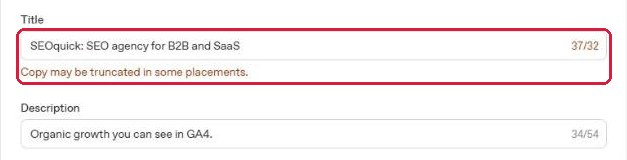
Write 32-character headlines and 54-character descriptions. Anything longer is a bonus for desktop.
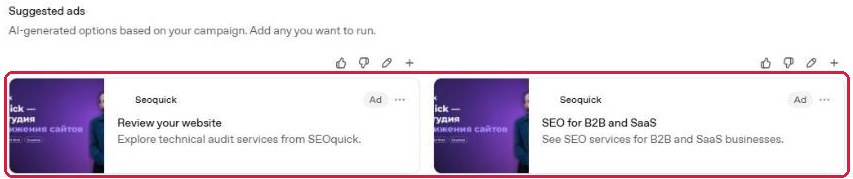
The Suggested ads block generates options from your site. For a campaign targeting Ukraine, on a site in Ukrainian and Russian, the AI suggested ads in English: "Review your website", "SEO for B2B and SaaS". Check the language of every suggestion before you add it.
The AI campaign wizard
The campaigns page offers a second route: enter your website and let AI build the campaign. I gave it the English version of our site. Half a minute later there was a summary marked as AI-generated:
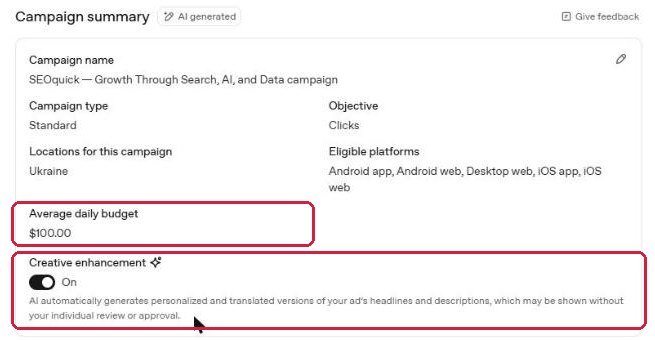
- objective Clicks, the whole country, all five platforms;
- average daily budget $100;
- creative enhancement on;
- Autobid with no CPC cap;
- sensible context hints and one ad, "Search and AI SEO", with an image taken from the site.
The hints and copy were reasonable. The numbers are the problem: $3,000+ a month with no CPC cap, on every device. Use the wizard as a draft, but before you press Publish open each block and change the budget and the bid.
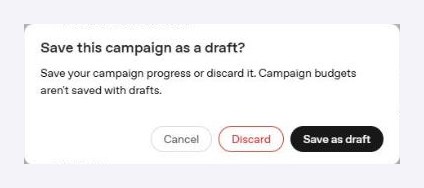
About drafts: if you close an AI-built campaign, it is saved as a draft without asking. Campaigns cannot be deleted, only archived. The manual wizard asks whether to delete or save, and warns that budgets are not saved in drafts. When you come back to a draft, set the budget again.
Conversion tracking and reports
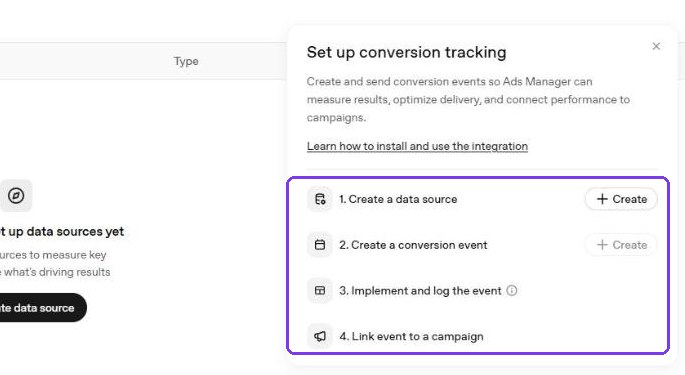
The Conversions section walks you through four steps: create a data source (a pixel on the site or the Conversions API from your server), create a conversion event, install and verify it, and link it to a campaign. OpenAI has turned on automatic advanced matching for pixels, which sends hashed visitor contact details.
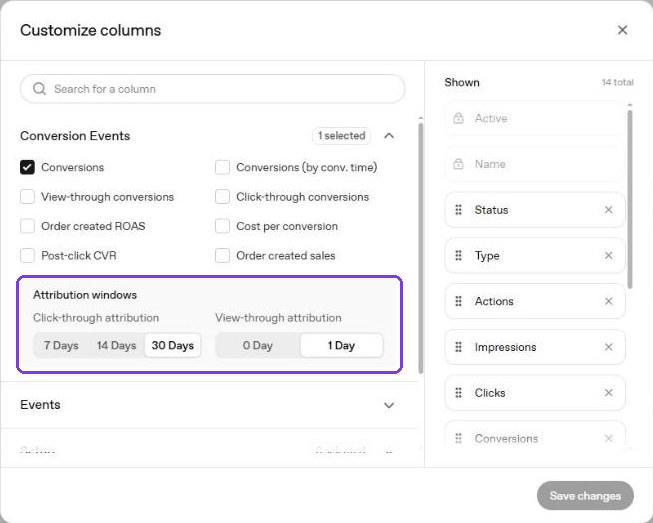
Attribution windows are set in the report's column settings: 7, 14 or 30 days after a click (30 by default) and 0 or 1 day after a view (1 by default). Thirty days post-click plus one day post-view credits the ads with conversions that would have happened anyway. For a fair comparison with Google Ads, use 7 days post-click and 0 post-view.
Practitioners question the reporting. PPC ONE's roundup lists 53 clicks in Ads Manager against 35 sessions in GA4 for one advertiser, 57 clicks against fewer than 20 sessions for another, and 36 dashboard conversions against 2 real enquiries for a third. There are no auction insights, impression share or competitor data (Search Engine Journal, 8 Sep 2026). Reconcile with GA4 and your CRM from day one.
How flexible is ChatGPT ad targeting compared with Google Ads
| Setting | Google Ads | ChatGPT Ads |
|---|---|---|
| Keywords | 3 match types | No Context hints |
| Negatives | Yes | No |
| Geo | City, radius | Region, postal code |
| Demographics | Yes | No |
| Devices | Yes | 5 platforms |
| Ad schedule | By hour | Dates only |
| Own audiences | Yes | 25k+, not EEA |
| Manual CPC cap | Yes | Until 1 Jan 2027 |
| Auction insights | Yes | No |
| Agency account | MCC | No |
You control where and on which device you appear, not in which conversation. Whether an ad fits a chat is decided by AI from the conversation, your landing page and your hints. SE Ranking measured how often it misses on 50,006 US prompts (10 Aug 2026): ads appeared on 25.94% of commercial prompts, and 14.35% of ads were off-topic. In News & Politics, 54.2% were irrelevant.
Where ChatGPT ad budget leaks: 8 defaults to change
| Default | Risk | Fix |
|---|---|---|
| $100 daily budget | $3,000 a month, up to $200 on one day | Test at $25–40 |
| Autobid, no cap | $10–20 clicks, as some US advertisers saw | Manual max CPC of $3–4 for the test |
| Creative enhancement on | AI rewrites and translates copy unapproved | Turn off in the campaign and in account settings |
| All 5 platforms | 96% mobile clicks in one European test | Check mobile forms; for B2B start with desktop web |
| AI-suggested ads | Copy in the wrong language | Write your own: 32 + 54 characters |
| Whole country | Spend where you do not sell | Pick regions or exclude them |
| 30-day click + 1-day view | More conversions than really happened | Check against CRM; report on 7-day click |
| Account budget of $1,000,000,000 | No account-wide cap in practice | Watch the billing threshold and card limit |
I found the last one in the change history: when the account was created, it was given a budget of $1,000,000,000. If you want a hard ceiling on total spend across campaigns, the card limit is it.
ChatGPT ads cost: CPC, CTR and cost per lead from published tests
Below is what advertisers and agencies in the US, Europe and Canada have published. Most case studies come from agencies that sell ChatGPT ads management themselves.
Cost per click. OpenAI recommends starting with a $3–5 max bid. Actual CPC ranges from $3 to $22 across advertisers (SEJ). One advertiser's CPC by country: UK $5.10, US $10.62, Australia $17.59, New Zealand $22.89. The median across 15 public USD cases is $4.41; in Europe clicks ranged from €0.16 to €2.68 (PPC ONE). Earlier in the year, before CPC bidding, ChatGPT ads sold on CPM: about $60 at launch, falling to $25–45 by April (PPC Land, citing Digiday).
ChatGPT ad click-through rate by country
Average ad CTR from 30 March to 16 September 2026. For comparison, the same advertisers in the case studies saw 5–12% on Google Search.
Fewer advertisers, higher CTR: Brazil and Mexico click 2.5 times more often than the US.
Show data
| Country | CTR |
|---|---|
| Brazil | 1.91% |
| Mexico | 1.55% |
| Japan | 1.53% |
| South Korea | 1.21% |
| Canada | 0.75% |
| United Kingdom | 0.74% |
| United States | 0.73% |
| Australia | 0.67% |
| New Zealand | 0.6% |
CTR in ChatGPT is 5–7 times lower than on search. B2B agency Workshop Digital spent $2,319: CTR 1.1% and CPC $3.14, versus 5.2% and $6.76 on Google Search over the same period. Clicks were half the price, but 739 of them produced 0 qualified leads, against 2 from Google.
Visitor conversion rate: ChatGPT Ads vs Google, same advertiser
Share of clicks that ended in a lead or a sale. Four published comparisons where one business ran both channels at the same time.
On average about 1 visitor in 170 converts from ChatGPT ads, versus 1 in 18 from Google.
Show data
| Advertiser | ChatGPT Ads | Google Ads |
|---|---|---|
| Andy Brice | 0.46% | 5.3% |
| StubGroup, B2B compliance | 0.21% | 3.71% |
| Falia, B2B (Canada) | 0.9% | 5.95% |
| StubGroup, second case | 0.8% | 6.64% |
Cost per lead in published cases:
| Case | Niche | ChatGPT CPL | Comparison |
|---|---|---|---|
| MalachiSoft | Wellness, Texas | $52 ($114 booking-ready) | — |
| StubGroup* | B2B compliance | $92 | $158 Google |
| Obility* | B2B | $120–250 per MQL | — |
| Reddit, France* | Services | ~€74 | €15–25 Google |
| Reddit, Australia* | Services | AUD 40 | AUD 20 Google |
| Workshop Digital | B2B, $2,319 | 0 leads | 2 MQLs Google |
| Grow My Ads | ~$1,200, $13 CPC | 0 leads | — |
* The source sells ChatGPT ads services or is an anonymous post; figures are unverified. Sources: PPC ONE (29 Sep 2026), Workshop Digital (26 Aug 2026), MalachiSoft, StubGroup.
The positive data comes mostly from OpenAI itself and from e-commerce: 3× ROAS over 28 days and more than 80% of ad traffic from new customers; Common Thread Collective reported ROAS of 3.3× to 6.8× depending on the attribution model. For lead generation and B2B the picture is weaker: clicks are cheaper than on search, leads are dearer or absent.
How to run a ChatGPT ads test without overpaying
Test calculator: how many leads your budget buys
Enter your own numbers or pick a preset. A month is 30 days; OpenAI may spend up to 2× the daily budget on a single day.
At $30 a day and a $4.40 CPC you get about 200 clicks a month. At a 0.6% site conversion rate that is one lead. To learn anything you need either two or three months, a bigger budget or a very good landing page. The plan I would start with:
- One campaign on the Clicks objective, one ad group, 2–3 ads of your own. Manual max CPC of $3–4, a $25–40 daily budget.
- Creative enhancement off, only the regions you serve, only the platforms that convert for you in GA4.
- A dedicated landing page or UTM tags, with a GA4 goal and CRM tracking ready before launch.
- Checkpoint at 300 clicks. No leads: change the ads and hints. Still none after 600 clicks: stop.
- Move to the Conversions objective only once the pixel has a meaningful number of events, or the automated bidding will not learn.
Who should test now: brands with a long consideration phase where people compare options (SaaS, education, high-ticket services), and e-commerce with a product feed. Who should wait: local businesses in one city, since there is no radius and a city has to be assembled from postal codes.
Let us run your ChatGPT ads test
Alena will set up the account, analytics and a first campaign with safe limits, and after a month show you what a lead cost compared with Google Ads.
FAQ
How much does it cost to advertise on ChatGPT?
The minimum is $25 a day per campaign (€15 or £15 in those currencies). Clicks in published tests cost $3–5 on average, ranging from under $1 to $22 depending on the market. OpenAI can spend up to 2× the daily budget on a single day and up to 7× over a week.
Can I pay for ChatGPT ads by invoice?
Self-serve accounts pay by card only, on postpay. Invoicing with payment terms is reserved for large advertisers managed by OpenAI's sales team.
How do I give an agency access?
Settings → Users → Invite, enter the agency's email and choose the Member role. There are no agency manager accounts, so the business should create the account itself.
Can I target a city?
Yes, through postal codes (and DMAs in the US). Search the city's name in the local language and add its postal codes one by one. There is no radius targeting.
Who sees ads in ChatGPT?
Adult users on the Free and Go plans. Plus, Pro, Business, Enterprise and Edu subscribers see no ads. Ads are not shown next to conversations about personal or mental health.
Do ads change what ChatGPT answers?
OpenAI says no: the ad sits below the answer in a separate block labelled as sponsored. Getting into the answer itself takes GEO work on your site, which is a separate job.
Methodology
We went through OpenAI Ads Manager on 9 November 2026 using a SEOquick test account (Ukraine, USD, no card attached): we built campaigns by hand and with the AI wizard, published nothing, and deleted or archived the drafts. Screenshots are from the English interface, except the sign-up form, which is in Ukrainian. External data with publication dates: OpenAI (openai.com, January–October 2026), Search Engine Journal (8 Sep 2026), Search Engine Roundtable (5 Nov 2026), PPC Land (17 Apr and 5 Oct 2026), Digiday (19 Aug 2026), Similarweb and Graphite (28 Sep 2026), SE Ranking (10 Aug 2026), PPC ONE (29 Sep 2026), Workshop Digital (26 Aug 2026), Index Lab (27 Oct 2026). OpenAI Ads changes almost monthly, so check the numbers in your account before launch.
Instagram Targeting in 2026: Advantage+, AI, and Ads Manager Setup
How to set up targeted Instagram ads in 2026: Advantage+ campaigns, the Andromeda AI engine, audience types, Reels, budgets, and privacy after iOS ATT.
Read →
Google Tag Manager Setup from Scratch: 2026 Guide
How to install Google Tag Manager, connect it to GA4, and set up Consent Mode v2, tags, triggers, and variables. A step-by-step 2026 guide with a checklist.
Read →
Google Ads Search Campaign: Setup from Scratch (2026)
Step-by-step Google Ads search campaign setup for 2026: account structure, Smart Bidding, keyword match types, RSA, negative keywords, conversion tracking.
Read →Want to apply this to your site?
We will review the current situation, find the first growth levers, and suggest a practical working format.