Instagram Targeting in 2026: Advantage+, AI, and Ads Manager Setup
A 2026 guide to Instagram targeting: Advantage+ campaigns, the Andromeda AI engine, audience types, Reels, and budgets in the privacy era.

Quick answer: Instagram targeting in 2026 is no longer about manually picking "women 25–34 interested in yoga." Meta has shifted to its AI engine Andromeda and Advantage+ campaigns, where you hand the algorithm your creative and a conversion goal, and the system finds the paying audience itself across billions of signals from Facebook, Instagram, WhatsApp and the Audience Network. Your job in 2026 is to provide strong creative (vertical video for Reels), upload your own first-party data (a Custom Audience from your CRM), and set the budget correctly. In this guide we cover both launch paths — through the app and through Ads Manager — and show how to target in the era of privacy and automation.
Most people love with their eyes and peck at beautiful photos, and in Instagram advertising there is plenty of such goodness. But you can't get by with just a picture, even a very good one: success also depends on the text, the quality of audience selection, and the technical settings.

WOW, TRAFFIC! What, you need it too? Then look at what SEOquick offers here
No time to explain – right now we'll quickly set up context advertising on Google AdWords for you, and clients will come pouring in. And not just any, but targeted ones!
We'll help you choose advertising relevant to your business with a high return-on-investment rate.
Clients are already tired of waiting for you to announce yourself!
Before you drive traffic, make sure your profile is set up properly: otherwise even perfect advertising will waste your budget. Now let's figure out how to set up targeting step by step — taking the realities of 2026 into account.
What changed in Instagram targeting by 2026
If you launched ads a few years ago, forget half of your old habits. Over the past few years the platform has gone through three tectonic shifts, and all of them pull in the same direction — toward automation and privacy.
Shift one — privacy. After Apple rolled out App Tracking Transparency (ATT) in iOS, most iPhone users opted out of cross-app tracking. Meta ended up with fewer signals, and the classic Lookalike audiences noticeably lost accuracy: if 70–75% of your customer data is "invisible" because of tracking opt-outs, the algorithm builds a "lookalike" off a trimmed sample.
Shift two — the Andromeda AI engine. In 2026 Meta delivers ads through its Andromeda system, which moved from audience-based targeting to creative-based targeting. Andromeda analyzes your video and image with computer vision, assigns the creative an Entity ID, and from millions of ads selects a shortlist of roughly 1,000 candidates for a specific user. Optimization happens at the level of the individual person, not the segment.
Shift three — scale. Instagram has crossed 3 billion monthly active users, and ads can reach around 1.84 billion people. The platform's global ad revenue in 2026 is estimated at $76.4 billion, with a hefty share coming from Reels monetization. In plain terms: the audience is huge, but so is the competition for it.
The takeaway for a practitioner: in 2026 you don't win with "clever" manual interest settings, but with three things — strong creative, your own first-party data, and a budget large enough for the algorithm to learn.
Promoting posts inside the Instagram app
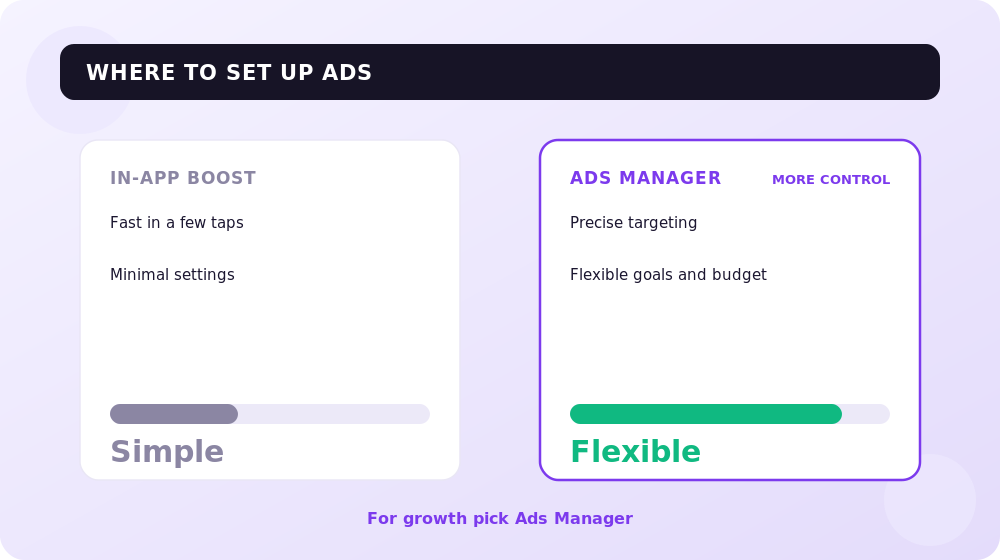
This is the simplest path — literally 5 minutes. Inside the app you use an already-published post or Reel as the ad. This is called a "promotion" (boost). Before launching, edit the text if needed, and then:
- Click the "Promote" button.
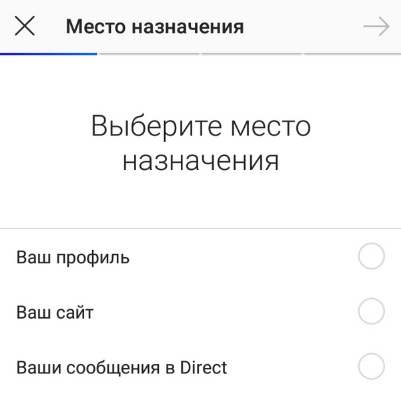
- Choose your goal: visits to the profile, the site, or Direct messages — the call-to-action button depends on what you pick.
- Set up the audience. There aren't many options here: gender, age, geography, and interests. You can also trust Advantage automatic selection — the algorithm finds people similar to your active followers itself. In 2026 this option more often beats manual setup: with limited tracking, AI modeling "guesses" the paying audience more accurately.
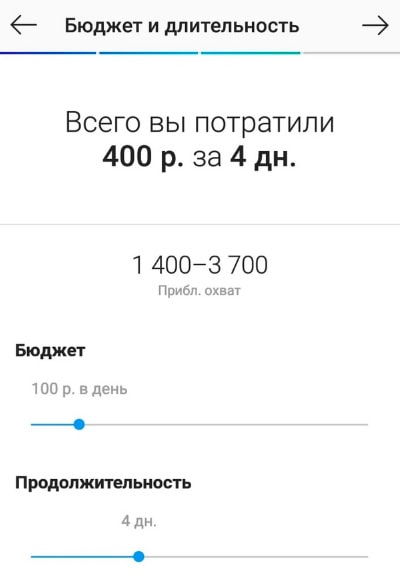
- Specify the duration of impressions and the budget. The minimum daily budget formally starts from a symbolic amount, but for the algorithm to gather data, in practice set aside at least a few hundred hryvnias per day for a single promotion.
- Check everything and click "Create." On the final screen you can see how the ad will look in the feed, in Stories, and in Reels, which audience is selected, and the budget.
After launch, the post will appear in the "Promotions" section — you can reach it right from the main profile screen:


Check the statistics in the same "Promotions" section: clicks, reach, impressions, new followers, and expenses. In exactly the same way you can set up post promotion in Stories and Reels.
Recommended reading:
Creating Instagram advertising through Ads Manager
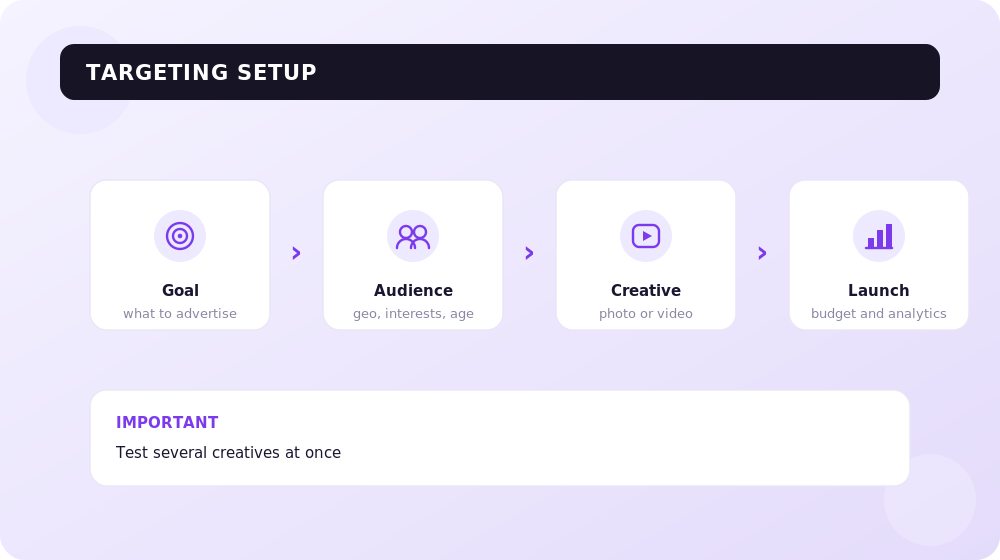
This is the path for those who want full control and maximum options. We launch through Meta's advertising cabinet — Ads Manager. The logic in 2026 is a little different than before, but the interface remains step by step.
- Choose the campaign objective.
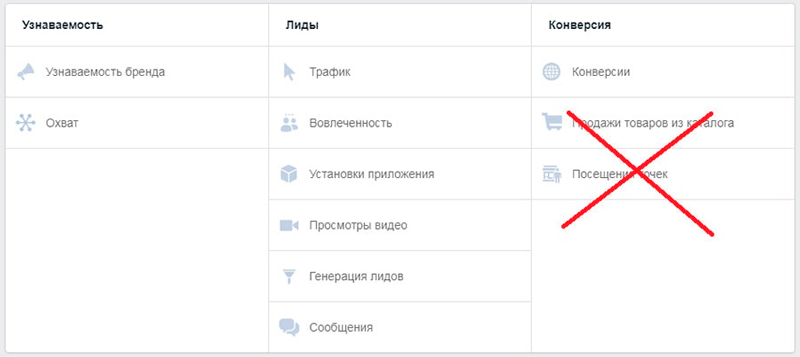
The objective determines what the campaign optimizes for (sales, leads, traffic, awareness), so don't poke at random. For most business tasks Meta will offer an Advantage+ campaign by default — an automated mode that Andromeda was built for. It distributes impressions across the feed, Stories, and Reels itself and finds the audience itself.
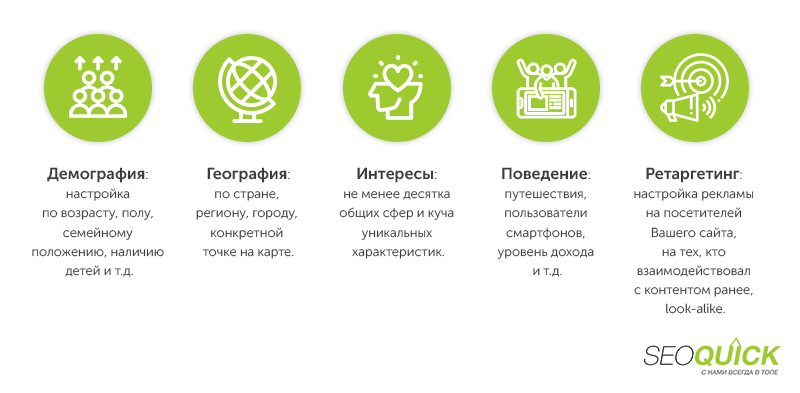
- Set up the audience.
Here is the main change of 2026. In Advantage+ mode the settings split into two groups:
- Hard controls — what the algorithm is obliged to respect: geo, language, minimum age, exclusions, and special categories (housing, credit, employment).
- Audience suggestions — age, gender, interests, Custom and Lookalike audiences. These work as "starting hints," not hard boundaries: the AI will go beyond them if it finds conversions there.
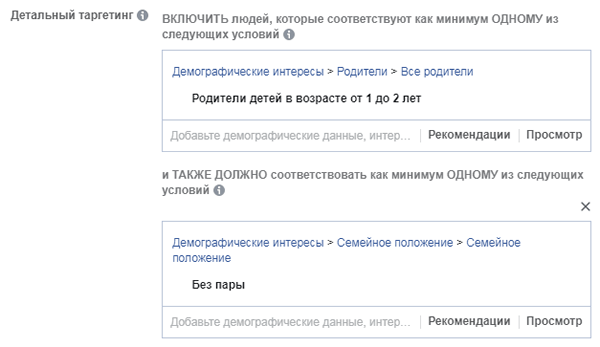
If you want to show the ad to, say, unmarried moms with children aged 1–2, set this as a suggestion, but don't be surprised when the algorithm adds adjacent segments too.
The main tip for 2026 — lean on your own data. The most reliable audience type right now is a Custom Audience from your CRM: uploading email + phone + name delivers a 60–80% match rate on B2C lists. Build a Lookalike on top of such a base — it sagged after ATT, but "similar to your real buyers" still works better than cold interests.
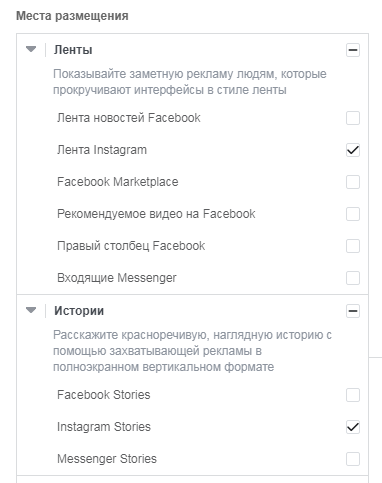
- Set up the placements.
If you're only interested in Instagram, choose the corresponding placements. In 2026 be sure to enable Reels: they deliver CPMs 30–50% lower than the feed and clicks about a quarter cheaper. Reels already account for roughly 26% of all Instagram ad impressions. The optimal budget split among strong advertisers is about 60–70% in the feed, 20–30% in Reels, and 10–20% in Stories.
- Set the budget.
You can set spending at the campaign or ad-group level, daily or for the entire period (for example, $200 for a week will be charged evenly over 7 days). The key rule of 2026: the algorithm needs about 50 conversions per week per ad group to exit the learning phase. Simple formula: multiply your target cost per conversion by 50 to get the weekly ad-group budget. Don't shred your budget across a dozen tiny groups — the algorithm simply won't finish learning.
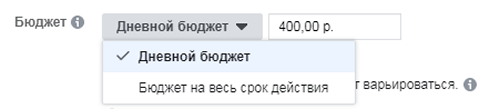
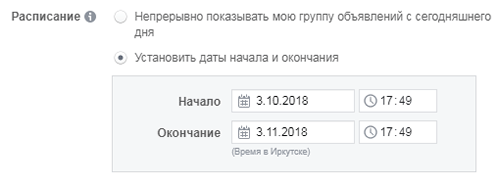
As for bidding, Meta in 2026 penalizes manual "tweaks": start with automatic bidding, and switch to manual only once you've accumulated data and know exactly what a qualified lead is worth. Here you also configure the impression schedule.
- Create the ad.
Since targeting is handed to the AI, the main lever of cost and result becomes the creative. For the feed, photo, video, or a carousel will do (recommended image size 1080×1080). For Reels and Stories — vertical 9:16 only, size 1080×1920.

What actually works in Reels in 2026: a native "hook" in the first 1.7 seconds (that's how long a viewer takes to decide whether to keep watching), then the client's pain, a product demonstration, and a clear call to action in the finale. Creator-style content (talking head, shot on a phone) consistently beats polished "ad" spots. Vertical video with sound delivers a CPA roughly 34% lower than a static image.
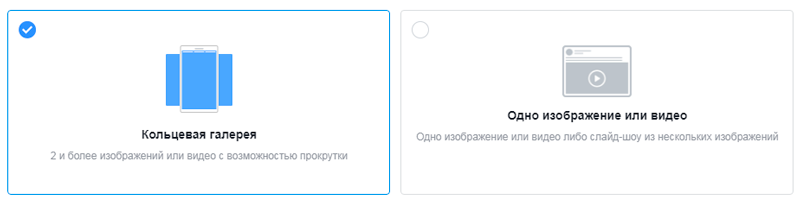
Don't forget to provide a link to the landing page and add UTM tags so you can later correctly track the statistics in Google Analytics 4. Adjust the button text to your goal: buy, sign up, book. If you use Meta's generative AI tools to create creative variations, note that since 2026 the platform requires you to label ads with AI-generated content, otherwise the ad will be rejected. Send the finished ad for moderation: "Save draft" → "Publish." Review usually takes 2–3 hours.
Audience types in Meta Ads: what to choose in 2026
To avoid confusion, let's lay out which audiences are available and when to use each.
- Custom Audience. Built on your first-party data: CRM uploads, pixel events, video views, Instagram profile interactions, lead-form opens. The most reliable type in 2026, because every signal is yours, not dependent on Apple's tracking. The match rate on consumer lists with email + phone + name is 60–80%. Refresh the base quarterly.
- Lookalike. The algorithm looks for people similar to your source Custom Audience. After ATT the accuracy sagged, but a Lookalike at 1–3% off a quality buyer base is still one of the working tools for cold reach.
- Interest / Detailed targeting. The classic targeting by interests and behavior. In 2026 it is "probabilistic" and is gradually being displaced by automation: use interests more as a hint for Advantage+ than as a hard boundary.
- Advantage+ Audience. An AI mode that decides who to show the ad to itself, based on your creative and goal. Essentially a shell over Andromeda; in most accounts it is already the default for sales, leads, and app objectives.
The practical 2026 strategy is simple: collect your own data (email lists, the pixel, registrations), feed it into Custom and Lookalike audiences, and entrust cold reach to Advantage+ — with limited tracking, AI modeling consistently beats manual setup.
A few more important recommendations
Technical settings are only half the battle. Here's what else matters:
- Creative visuals are your hook. In the Andromeda era it's the creative, not the audience settings, that determines the cost of an impression. The picture or clip should relate to your business topic and the offer.
Strong video marketing for Reels matters more today than any "secret" cabinet settings.
- The text should hit the client's pain. A person will only become interested if you solve their problem. Explain clearly and concisely how you're useful.

- Brevity is the soul of wit. Make commercial ads concise: advantages and benefits right off the bat.
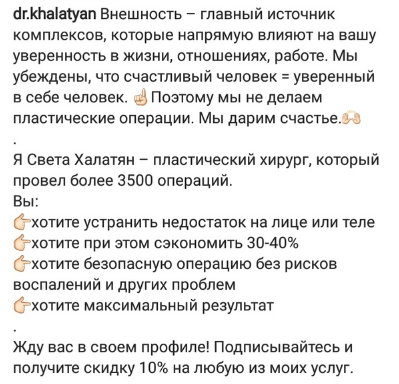
- Be appropriate. Crudeness and vulgarity should be cut at moderation, but the automation sometimes lets "masterpieces" through — don't stoop to that level.

And tie Instagram to your other channels: the same audience that has seen you in context advertising and in search promotion converts noticeably better.
Frequently asked questions
What is Advantage+ and should you abandon manual targeting?
Advantage+ is Meta's automated mode where the AI picks the audience and placements itself based on your creative and goal. In 2026, with limited tracking, it more often beats manual setup. You don't need to abandon manual targeting entirely, but use it as a "hint," not a hard frame.
Do Lookalike audiences still work after iOS ATT?
They work, but worse than before. Because of users opting out of tracking, Meta has fewer signals, and the "lookalike" is built off a trimmed sample. The fix is to feed your Lookalike a quality Custom base from your CRM: the cleaner the source data, the more accurate the result.
What minimum budget do you need for Instagram ads in 2026?
Formally you can start with a symbolic amount per day, but for the algorithm to learn, budget so that the ad group gathers about 50 conversions per week. Simple formula: target cost per conversion × 50 = the weekly ad-group budget.
Reels or the feed — where to put your budget?
Enable all placements, but don't ignore Reels: CPMs there are 30–50% lower and clicks are cheaper. A working split is about 60–70% in the feed, 20–30% in Reels, 10–20% in Stories — and then follow your own statistics.
Do you need to label ads made with AI?
Yes. Since 2026 Meta requires disclosing the presence of AI-generated or AI-modified content in ads. Skipping this label is one of the common reasons ads get rejected at moderation.
Which audience type is the most reliable in 2026?
A Custom Audience based on your first-party data (CRM, pixel, lead forms). It's the only type where every signal belongs to you and doesn't depend on Apple's tracking. On consumer lists with email, phone, and name, the match rate reaches 60–80%.
Conclusion
You can set up Instagram advertising in two ways: quickly through the app (for beginners, launch in 15 minutes) and finely through Ads Manager (full control and Advantage+). But the main shift of 2026 is that targeting moved from manual interest picking to the trio of "strong creative + your own data + the Andromeda AI engine." Give the algorithm quality vertical video for Reels, feed it a Custom Audience from your CRM, budget for the learning phase — and the automation will do the rest better than the cleverest manual setup. Remember: the main weapon in 2026-era advertising is creative that hooks from the first second.
Recommended articles on the topic
2 SECRET WAYS TO USE INSTAGRAM FROM A COMPUTER: UPLOADING PHOTOS, VIDEOS, STORIES
135 MOST POPULAR HASHTAGS: HOW TO SEARCH FOR AND USE THEM (FULL GUIDE)

H1 vs Title: how many H1 tags you need and how they differ
H1 in SEO 2026: how many H1 headings are acceptable, optimal length, how it differs from title, empty H1 and H1 as an image. Based on a measurement of 77 pages from the Ukrainian top and data on how often Google replaces your title with the H1.
Read →
Pagination SEO: how to index list pages without breeding duplicates
Pagination SEO in 2026: canonicals on list pages, noindex, rel=next/prev, infinite scroll, crawl budget. Based on a check of 36,000 traffic-driving URLs across twelve Ukrainian retailers, plus a teardown of pagination at Foxtrot, Epicentr and our own blog.
Read →
URL Structure: The Full Guide to Addresses You Can't Change After Launch
How to get URLs right: transliteration or Cyrillic, slug length, duplicates from case and filters, pagination, UTM tags, redirect maps. A breakdown of Rozetka, Comfy, Prom and Makeup URLs plus 2026 research data.
Read →Want to apply this to your site?
We will review the current situation, find the first growth levers, and suggest a practical working format.