Local SEO for Small Businesses in Ukraine: How to Attract Customers in Your City
When a customer searches for something 'near me', it's not the biggest website that wins — it's the best-maintained profile. A step-by-step guide for small businesses in Ukraine on getting into maps, the local pack, and AI recommendations.


Introduction
Local search engine optimization (SEO) is one of the most effective strategies for small businesses in Ukraine that want to attract customers from their own city or neighborhood.
With competition growing, optimizing for local queries increases a company’s visibility on Google — and Google is the country’s dominant search engine, handling over 90% of all searches in Ukraine (SimilarWeb, 2024).
For small enterprises — retail stores, cafes, workshops, service centers — local SEO becomes a key competitive tool. It helps them stand out among countless offers and build a connection with the local community, which matters especially in the Ukrainian market, where consumers often choose whatever is closest.
In short: how does a small business reach the top of local search? Complete and verify your Google Business Profile, collect reviews regularly and respond to them, optimize your website for geo-targeted queries like “service + city,” keep your NAP data (name, address, phone) consistent across all directories, and make your site mobile-friendly. The first results usually appear within 2–3 months.
Why does this matter? People increasingly search for everything from their phones — at home, in the park, even while standing in line at the bakery. According to Backlinko’s roundup (2025), 46% of all Google searches have local intent, and 76% of users who searched for something “near me” on a smartphone visit a business within 24 hours. Meanwhile, per On The Map (2025), about 93% of local searches show a Google Maps block (Map Pack) — if you’re not in it, the customer goes to a competitor.
In local business, decisions are made very quickly, and being present in local search results is decisive for lead generation.
Setting Up Google Business Profile
One of the first and most important steps in a local SEO strategy is creating and optimizing a profile in Google Business Profile (GBP, formerly Google My Business).
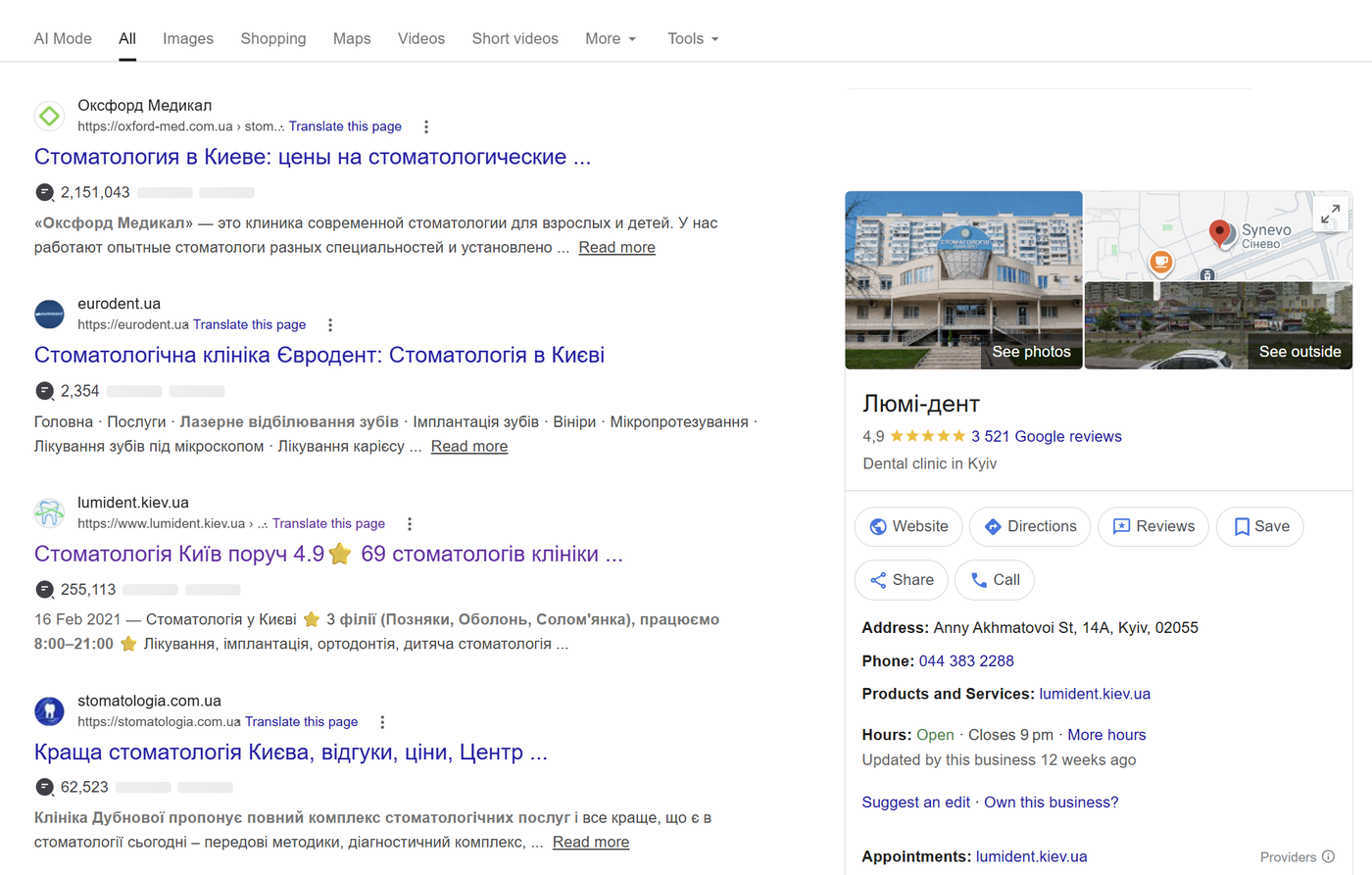
This free tool from Google lets companies manage their presence in Search and on Google Maps, giving potential customers the key facts about the business.
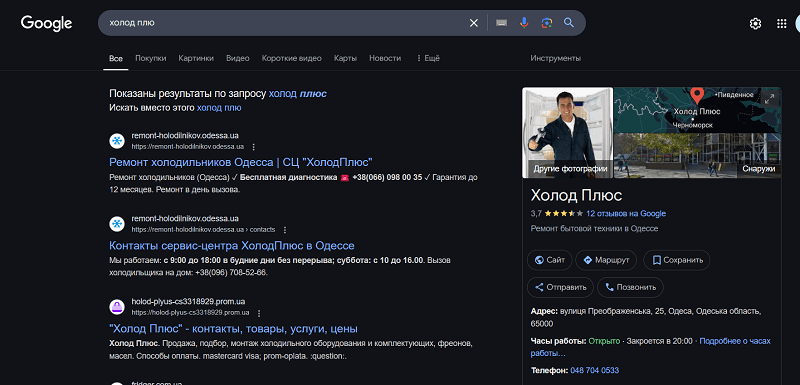
Creating a Profile
First, the business owner needs to register the company in Google Business Profile. This requires entering accurate data: the company’s full name, physical address, phone number, and business hours.
It’s important to enter information that matches your official documents to avoid discrepancies that could undermine the search engine’s trust. Go to Google Business Profile, click “Get started,” and add your business. For example, I enter “Oknodom-Odesa” (a window company in Odesa), the address (street and building), phone number, and business hours — say, 8 a.m. to 8 p.m. A tip for Ukrainian businesses: it’s best to fill everything in Ukrainian — it complies with local language law, and Google respects it.
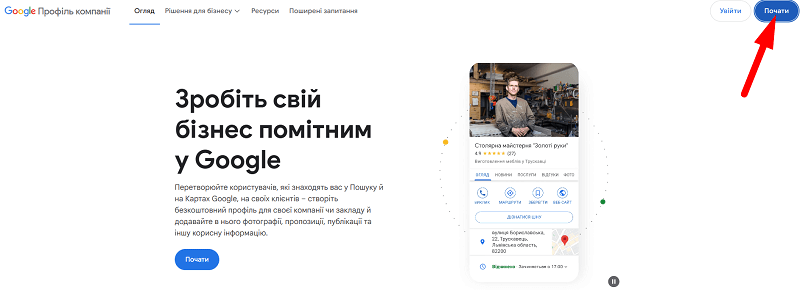
Verification
After filling in the data, you’ll need to go through verification, which can happen via a postcard with a code, a phone call, or an email — the method depends on the business type and region.
And here’s something to be ready for: you may be asked to record a video of yourself entering your office or store, showing whether there’s a sign outside. The reason is simple — a huge number of scammers create fake “businesses” on the maps just to gain visibility.
Optimizing the Listing
Once the account is verified, focus on optimizing it. Adding high-quality photos — the storefront, interior, products, or services — significantly increases the profile’s appeal to users.
Regularly updating information (posts about special offers, events, changes in business hours) keeps the audience engaged. It’s also important to select the categories that most accurately describe your business so that Google can classify the company correctly in search results.
Asking for Reviews
Customer reviews play a decisive role in how a business is perceived by both consumers and search algorithms. Actively encouraging customers to leave reviews — for example, through a personal request after a purchase or a convenient link to your GBP review page — substantially boosts the company’s reputation.
Getting the link is easy: search for your company’s name on Google (you need access to the GBP profile) and select “Ask for reviews.”
It’s important to request reviews consistently — and don’t forget to respond to them. Reply to every review, including negative ones: it demonstrates professionalism, builds trust, and improves your local search rankings.

Optimizing Your Website for Local Search
While Google Business Profile is an essential tool, a complete local SEO strategy is impossible without an optimized website. Your site should clearly signal its geographic focus and relevance for local queries to search engines.
Using Local Keywords
Integrating region-specific keywords into your site’s content is the basic step for improving visibility. For example, a company serving Kharkiv can use phrases like “appliance repair in Kharkiv” or “best beauty salon Kharkiv” in headings, page copy, and URLs.
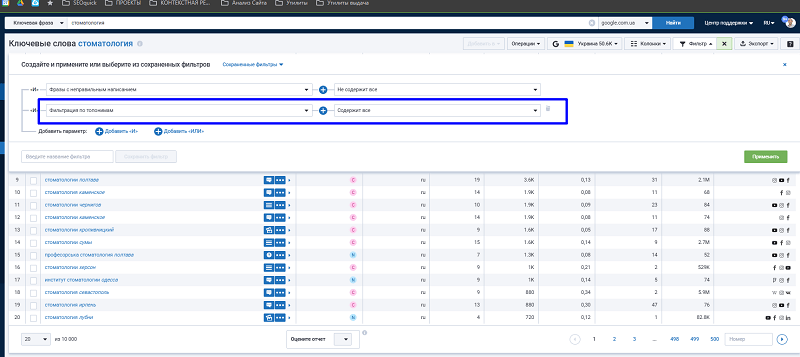
How do you find the local keywords for your business? Use Serpstat (a keyword research platform popular in Eastern Europe) and filter for queries containing place names. This shows how people google your type of business in the region: for example, the toponym queries in the “Dentistry” category alone include more than 50,000 keywords.
The second option is Google’s Keyword Planner. It’s free, and you can collect a large batch of keywords at once (the downside: it doesn’t return data for some niches). Enter a query with your city — and the planner will suggest plenty of geo variations.
From there, it’s just process:
- Feed the list to GPT and ask it to find all region and district names.
- Review the resulting list and decide which pages you need.
- Work the relevant queries organically into your copy — the ones most relevant to your business.
Setting Up Meta Tags
Meta tags such as title and description are the first elements users see in search results. They should be concise, informative, and include local keywords.
The key meta tags for a page:
- Title — most often displayed in search results when you view the SERP.
- Description — may be displayed if written well, but is often replaced by a snippet pulled from the page content.
These elements not only improve click-through rates but also help search engines better understand the site’s geographic focus.
Our tool Unmiss Website Audit helps you check your site’s meta tags quickly. Add your site, review the meta tags, and use the filter to find pages whose Title and Description don’t mention your city. Rewrite the metadata, download the Excel file, and update the meta tags on your site accordingly.
Creating Local Pages
If a business operates in several cities or districts, creating a separate page for each location becomes a necessity. These pages should contain unique content: the address, contact details, a description of services, and, where possible, customer reviews from that specific region.
For example, the URL structure might look like “site.ua/lviv” or “site.ua/dnipro.” This increases the site’s relevance for queries tied to each specific area.
There are several ways to create local pages:
- Set up a dedicated URL for the local page and list the addresses of your branch in that city.
- Optimize individual site sections for each city’s data, displaying regional prices and in-store availability.
- Create tag pages targeting the query: their content may mirror the main page, but the copy and metadata are tuned for geo queries.
SEOquick’s experience. For a massage salon in Kyiv, we built exactly this kind of local strategy: geo pages for services, a well-developed GBP profile, and systematic review management. The result: #1 on Google for “Thai massage Kyiv” and 120–150% traffic growth in a year. Details are in our massage salon SEO case study (in Russian).
Implementing Structured Data
Using structured data markup (Schema.org LocalBusiness) helps search engines interpret business information more precisely: the address, phone number, business hours, and service categories are provided in a format algorithms can easily read. This markup can improve how your site appears in search results by adding rich snippets with contact information.
You can set up the markup with dedicated plugins, or write the code manually and place it in the page source. Generating it with GPT is trivial these days. Check the result in the schema markup validator.
Working with Reviews and Local Links
A business’s online reputation and its ties to the local community directly affect local SEO success. Reviews and local backlinks are the two key elements of this strategy.
Earning Local Links
Local backlinks are mentions of your website on other resources connected to your region. You can earn them by taking part in local events, sponsoring community initiatives, or collaborating with regional media and bloggers.
Getting listed in local online directories and business listings also strengthens local authority. Make sure your company information (name, address, phone — NAP) is identical across all platforms: this increases search engines’ trust.
To find directories, use our free utility, which combines your keywords with various search operators. The utility works for both Ukrainian- and English-language queries.
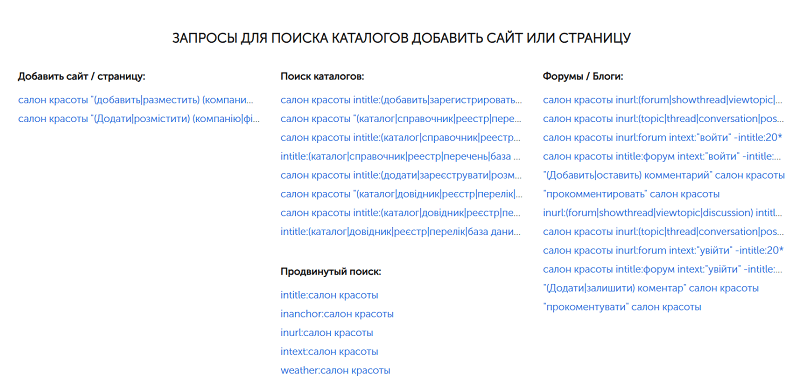
Never use automated submission software — it hasn’t worked for a good 10 years. Only manual registration in directories with meaningful traffic is worth it. You can check traffic with the Similarweb Chrome extension.
Working with Local Review Platforms
Customer reviews not only build trust with potential buyers but also signal service quality to search engines. Develop a systematic approach to collecting reviews: for example, send customers a message asking for feedback after a completed transaction.
Where should you concentrate reviews? Start by checking your competitors: take a competitor’s company name plus the word “reviews” — and study the search results.
Use every platform where you can get listed. It’s better to encourage customers to leave reviews evenly across different platforms — usually 2 to 5 of them. And don’t forget Google Maps: the lion’s share of your reviews should live there.
Social Media and Local SEO
Social media plays an important role in promoting a small business, especially in a local market. It lets you not only engage your audience but also strengthen signals for search engines.
Creating Local Content
Publishing posts with geotags and region-related hashtags helps capture the attention of a local audience. For example, a cafe in Chernivtsi can post photos of its dishes tagged with the city and hashtags like #ЧернівціКава (“Chernivtsi coffee”).
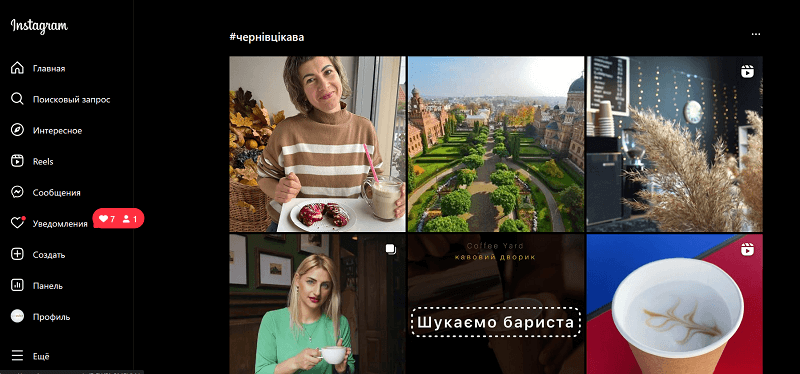
Regular content updates keep followers engaged and increase the chances that they’ll mention your business in their own posts.
Don’t neglect hashtags or location tags. To have your own address on Instagram, link your Facebook business page to your Instagram business account — then you’ll be able to publish local posts tagged with your address.
Integration with Google Business Profile
Connecting your social profiles with GBP — for example, by listing identical contact details and website links — reinforces the consistency of your business information online. It also makes it easier for customers to move from social media to a purchase or a visit. As a result, Google understands that the content across your social channels belongs together and factors your activity in.
Engaging with the Local Community
Active participation in local groups and discussions on platforms like Facebook or Telegram helps you build a reputation as an expert in your niche. Share useful information, answer questions, and offer solutions while avoiding excessive self-promotion.
Among the examples I can point to are local stores and clubs that build their own audiences, run promotions, and maintain private chats where customers can ask the management questions and talk freely with each other.
Mobile Optimization
Given the significant growth in mobile search, mobile optimization is an integral part of local SEO. For a business, this means adapting the website for smartphones and tablets.
Responsive Design
The site should automatically adjust to the device’s screen size, ensuring easy navigation and readable text. This reduces bounce rates and improves the user experience, which has a positive effect on rankings.
How to check: you can no longer test responsiveness with the Mobile Friendly Test (Google shut the tool down), but you can check it in Chrome via developer tools. The downside of that method is that the report is hard to share. Our tool Unmiss Website Audit provides a convenient page-by-page analysis.
Faster Loading
Slow-loading pages scare visitors away and lower search rankings. Image optimization, file compression, and caching are the minimum set of actions to improve speed. Tools like PageSpeed Insights will help you identify specific issues and suggest solutions.
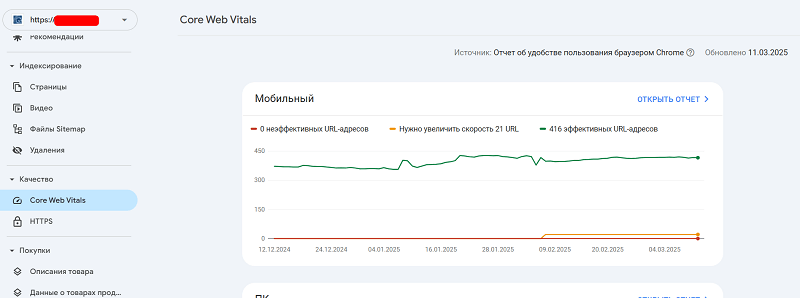
Easy Interaction
Adding “Call” or “Message us” buttons makes it easier for mobile users to contact the business. It’s also worth considering local context — for example, mentioning nearby landmarks or the areas you serve.
Local Business in AI Answers
Local search is no longer limited to classic results and maps. Increasingly, customers ask ChatGPT or see AI Overviews in Google — “best dental clinic in Dnipro,” “where to repair a laptop in Kyiv” — and get a ready-made shortlist of 3–5 companies instead of ten blue links.
The scale of the shift is striking. According to BrightLocal’s research (Local Consumer Review Survey, 2026), the share of consumers using AI tools to find local businesses jumped from 6% to 45% in just one year — AI became the third most popular source of recommendations after Google and Facebook, overtaking Yelp and TripAdvisor. And 40% of consumers already trust AI recommendations.
Where does AI get its recommendations? Each system has its own sources, but the logic is shared:
- Google Business Profile. Google’s AI Overviews and AI Mode rely first and foremost on GBP data: categories, rating, reviews, photos, and how current the information is. A complete, active profile is the entry ticket.
- Reviews and ratings. Language models “read” review texts and retell them: if customers write “the best Thai massage in Podil” (a Kyiv district), that’s exactly what the AI will remember. An important nuance: ChatGPT can’t see reviews inside Google — it relies on open platforms, directories, and media mentions. If your reputation exists only on Google Maps, you’re nearly invisible to ChatGPT users.
- NAP consistency. AI cross-references company data from dozens of sources. If the name, address, and phone number differ between your website, directories, and social media, the system can’t confidently “identify” the business — and simply won’t recommend it.
- Website content. Clear answers to customer questions, service pages with prices and service areas, LocalBusiness schema markup — all of this increases your chances of being cited.
What a local business should do right now:
- Get your GBP profile to 100% completeness and publish updates regularly.
- Collect reviews not only on Google but on 2–3 open platforms (industry directories, maps, review sites).
- Ask customers to mention the specific service and neighborhood in their reviews — that’s the “raw material” for AI recommendations.
- Align your NAP data everywhere the company is mentioned.
- Add direct-answer blocks and an FAQ to your site — AI loves quoting ready-made phrasing.
The good news: most competitors aren’t doing this yet, so a small business that starts now has a real window of opportunity. In our projects, we’re already seeing leads that come directly from ChatGPT and Google’s AI answers — it’s a new channel, and it’s growing.
Conclusion
Local SEO is a powerful tool for small businesses in Ukraine, helping them attract customers from their immediate surroundings and strengthen their market position. A comprehensive approach — setting up Google Business Profile, optimizing the website, managing reviews and links, social media, mobile adaptation, presence in AI answers, and analytics — can take a company to a new level of visibility and profitability.
Implementing these strategies takes time and effort, but the payoff — a larger customer flow and growing revenue — justifies the investment. For business owners ready to invest in their digital presence, local SEO is no longer optional; it’s a necessity.
FAQ
What is local SEO?
Local SEO is the optimization of a business’s online presence for geographically tied search queries: “service + city” or “near me.” It includes working with your Google Business Profile, reviews, geo pages on your website, and local links. The goal is to get into the Map Pack and the top organic results for your region.
How much does local SEO cost for a small business?
The basic steps are free: you can set up a Google Business Profile, collect reviews, register in directories, and optimize meta tags yourself. Costs appear at the stage of website improvements, geo page creation, and link building. For a small business operating in one city, it’s one of the cheapest customer acquisition channels.
How quickly does local SEO deliver results?
The first results — growing GBP profile impressions, calls from maps — usually show up 2–3 months after optimization. Reaching the top of organic results for competitive geo queries takes 4–8 months, depending on the niche and the level of competition in your city. Reviews and profile updates deliver the fastest effect.
Which matters more: the website or the Google Business Profile?
For a start, GBP matters more: it’s the profile that appears in the Map Pack, on maps, and in Google’s AI answers, and 93% of local searches include a map block. But without a website, you lose organic rankings, geo pages, and the ability to present your services in detail. The best results come from the combination: a well-developed profile plus an optimized website.
How do I get into ChatGPT recommendations and AI Overviews?
Fill out your Google Business Profile 100%, collect reviews on several open platforms (not just Google), keep your NAP data identical everywhere, and add direct answers to customer questions with LocalBusiness schema markup to your site. AI systems recommend businesses with a strong, consistent reputation across open sources.

H1 vs Title: how many H1 tags you need and how they differ
H1 in SEO 2026: how many H1 headings are acceptable, optimal length, how it differs from title, empty H1 and H1 as an image. Based on a measurement of 77 pages from the Ukrainian top and data on how often Google replaces your title with the H1.
Read →
Pagination SEO: how to index list pages without breeding duplicates
Pagination SEO in 2026: canonicals on list pages, noindex, rel=next/prev, infinite scroll, crawl budget. Based on a check of 36,000 traffic-driving URLs across twelve Ukrainian retailers, plus a teardown of pagination at Foxtrot, Epicentr and our own blog.
Read →
URL Structure: The Full Guide to Addresses You Can't Change After Launch
How to get URLs right: transliteration or Cyrillic, slug length, duplicates from case and filters, pagination, UTM tags, redirect maps. A breakdown of Rozetka, Comfy, Prom and Makeup URLs plus 2026 research data.
Read →Want to apply this to your site?
We will review the current situation, find the first growth levers, and suggest a practical working format.