Merchant Center for AI Mode: Getting Your Product Feed Ready for Conversational Shopping in 2026
Shoppers don't type 'buy sneakers' anymore. They ask Google a full sentence — and your feed has to answer it.


I will look at your site and answer your questions on the topic of this article. 30 minutes, no slide decks, no pressure.
Book a consultationGoogle AI Mode builds product answers from the Shopping Graph, not from a ranked list of links. To get in, a plain feed with a price and a photo isn't enough anymore: in 2026 Merchant Center gained six new "conversational" attributes, and Google now bans stores whose feed and site don't match far more aggressively than a year ago.
If you sell anything online, you've watched the same thing happen all year. Impressions in your reports look higher, but clicks and orders don't follow. Some of your buyers now get their answer straight inside Google: a panel of hand-picked products, a quick comparison, a recommendation. That's AI Mode. Google says it passed one billion monthly active users by May 2026 (Search Engine Land).
Here's where it gets interesting. The products in those panels come from your feed. And the feed was designed fifteen years ago for short queries like "men's winter jacket." Today the query sounds nothing like that.
What actually changed in product search?
People used to search with a keyword. Now they write Google a whole sentence: "I need a warm jacket for a mountain hike in autumn, windproof, with a hood." Google itself says AI Mode queries run about three times longer than traditional ones (Channel3).
Under the hood, all of this shopping runs on the Shopping Graph — Google's database of products from across the web. By mid-2026 it holds roughly 60 billion products, with two billion listings refreshing every hour (FeedOps). This is the pool Google draws from when it decides whether to show your product in AI Mode, AI Overviews, the Gemini app, or the new Universal Cart unveiled at Google I/O 2026.
The catch: the structured data that was fine for a regular shopping ad often falls flat in a conversational answer. A short title and a price have nothing to say to a long question.
Why isn't a normal feed enough now?
In May 2026, at Google Marketing Live, Google added six new fields to Merchant Center and called them conversational attributes. They're optional and they don't affect product approval. But they're what lets AI understand the nuances of a product when someone asks in plain language (Search Engine Land).
The fields are: question and answer, document link, related product, item group title, variant option, and popularity rank. Three of them — question and answer, related products, and document links — simply don't exist in a standard feed. The format was never built to carry that kind of information.
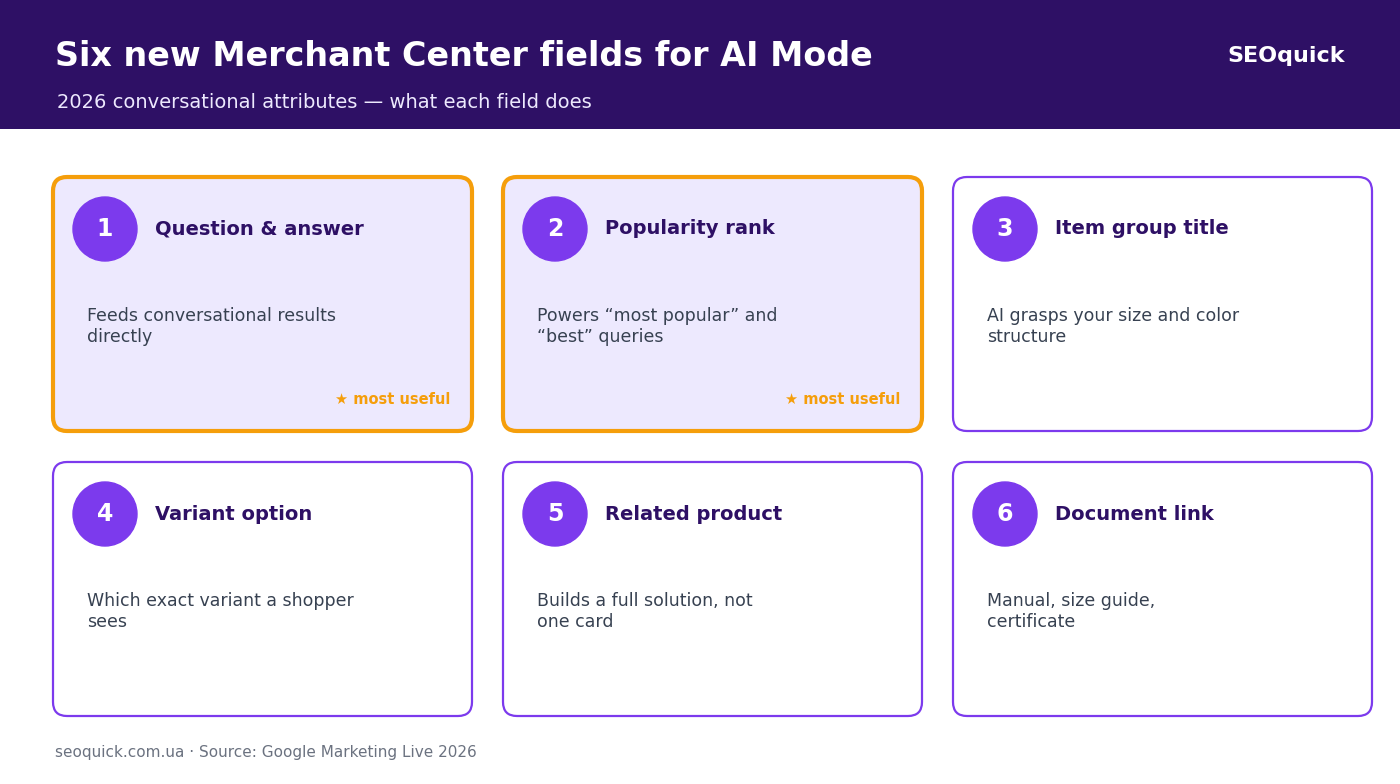
The workhorse of the six is question and answer. These are pairs of "what people ask before buying — a short reply." They feed the conversational results directly: a shopper asks "is it safe for a dishwasher?" and the answer is already sitting in your feed. Second by usefulness is popularity rank — it's hard to derive from the outside, and it's exactly what powers "most popular" and "best" queries (SKU Analyzer).
Item group title and variant option sound boring, but without them AI just guesses how your sizes and colors are structured. For a clothing or footwear store, that's half the catalog.
The last two are document link and related product. The first sends AI to your manual, size guide, or certificate — the stuff that backs your claims with facts. The second tells it what to show alongside: a case for the phone, a filter for the vacuum. For AI, that's how it assembles a full solution instead of a single card.
Why are stores getting banned right now?
While everyone debates the new fields, a quieter problem has grown. Google got much stricter about the data itself. Nikolay Shmichkov broke this down in a short video and put it bluntly:
"Google is getting pickier and pickier. It used to look the other way on small feed errors — now that's a risk of getting your whole account banned. So spend the time cleaning up your data, instead of long, painful attempts to get the account unbanned later."
What triggers the ban. A mismatch between feed and site. Price is 1490 in the feed and 1450 on the page — already a risk. Availability says "in stock," but the product page has no buy button. No dedicated page for your return policy or shipping terms. A formality on paper — a blocked account in practice.
"Be very careful with loud claims like 'cheapest anywhere' or 'number one' with no proof or source. Lately Google bans Merchant Center more and more often with the wording 'misrepresentation.'"
It sounds abstract, but the meaning is simple: Google thinks you're feeding it unreliable data. And here's the catch — you fill the new conversational fields yourself, by hand or through a supplemental source. Write something in the question-and-answer field that the product can't do, and you've built that "misrepresentation" with your own hands. More data means more ways to slip.
On product-feed audits, the warning we see most often at SEOquick traces back to one thing: a price that drifts after a sale. The marketer changes it on the site, but the scheduled export to Merchant Center only refreshes a day later. For a full day the store runs ads at a price the site no longer shows — and that's exactly what earns a "misrepresentation" flag.
Where should a store owner start this week?
Don't rush to fill all six fields at once. Foundation first, extension later.
Match feed and site one to one — price, availability, shipping. It's boring and it's the single most important thing. Next, make sure your site has real pages for returns, shipping, and privacy, not a line in the footer. Only then reach for the conversational fields — and start with just one, question and answer. Collect five real questions people actually ask you in chat and on the phone before buying, and write short, honest answers. After that, popularity rank based on your own sales.
By the way, Merchant Center also picked up a beta that works the other direction: add products with AI. As Nikolay put it, "the system can scan your site itself and create products with no feed — for now it's a one-time import." Handy for a start, but it's no substitute for a proper feed — more of a crutch if you don't have one yet.
And check your reports. Since mid-July 2026 Google has been piloting AI Performance Insights — a section that shows how your products get discovered in AI Mode, AI Overviews, and Gemini (Search Engine Land). It's rolled out to a slice of US accounts for now, but it'll reach the rest.
If you want the full picture of promoting products under AI, not just the feed, read our breakdown of Google AI Mode and the big guide to ecommerce SEO in 2026. And for where all this is heading next, we covered agentic commerce in a separate piece.

Quick FAQ
Do I need to fill all six new attributes right away?
No. They're optional and they don't affect product approval. Clean up the basic feed and its match with your site first, then add question-and-answer and popularity rank — the two most useful fields.
Can the new fields get me banned?
Indirectly, yes. Put something in them that your product doesn't do, and Google reads it as misrepresentation. Only write the truth.
Will my product show in AI Mode without Merchant Center at all?
Very unlikely. AI Mode pulls products from the Shopping Graph, and data gets there mainly through Merchant Center. No feed, no seat at the conversational table.
Ecommerce SEO in 2026: A Checklist for AI Search and Zero-Click
An ecommerce SEO checklist for 2026: a product feed tuned for AI Mode, Product schema, AI-citable product content, technical SEO for checkout and cart. A hands-on breakdown with real numbers from SEOquick.
Read →
Google AI Mode in 2026: What It Is and How to Prepare Your Site for Conversational Search
What Google AI Mode is, why CTR is falling and how to get cited in its answers. A SEOquick breakdown: 1B users, 93% zero-click queries and a working 2026 checklist.
Read →
Search Everywhere Optimization: Ranking on TikTok, YouTube, Reddit and AI Search
Your customer does not only search on Google: 49% of consumers search on TikTok, Reddit pulls 842M organic clicks a month, and YouTube is the source of roughly one in four AI Overview citations. Here is how a business owner picks 2–3 platforms without burning the budget.
Read →Want to apply this to your site?
We will review the current situation, find the first growth levers, and suggest a practical working format.