20 Google Ads Mistakes That Burn Your Budget: A 2026 Checklist
Google Ads in 2026 means automated bidding, Performance Max, and conversion tracking that breaks without Consent Mode v2. The old mistakes haven't gone anywhere — new ones have just joined them. Here are the 20 most expensive, each with a concrete fix.


Paid search is the only channel that brings in a customer at the exact moment they are searching for your product. That’s why it works: you’re not interrupting anyone — you’re answering their query.
But there’s a flip side. According to Dentsu’s forecast, the global ad market will pass $1 trillion for the first time in 2026, and search remains the largest digital channel. Competition for every click grows each year — and every setup mistake costs more than it did five years ago.
Over 18 years at SEOquick we’ve audited hundreds of ad accounts. And here’s the interesting part: the Google Ads interface has changed beyond recognition, yet roughly seventy percent of advertiser mistakes are the same. The classics (“no negative keywords,” “the ad doesn’t match the query”) have simply been joined by new ones: broken conversion tracking, unrestricted Performance Max, automated bidding with no data to learn from.
This article covers the 20 mistakes I see most often in 2026. For each one: what it is, what it costs you, and how to fix it.
In short: the main reasons budgets burn in Google Ads are launching without doing the math on click economics, weak negative keyword lists, broad match without Smart Bidding, misconfigured conversion tracking (no Enhanced Conversions or Consent Mode v2), and Performance Max launched “as is” with no exclusions or feeds. Fixing these five areas typically cuts cost per conversion by 30–50% without increasing the budget.

Block 1. Strategy and Preparation
Most budgets are lost before the campaign even launches. Not in the interface — in the planning.
Mistake 1. Launching without doing the math on click economics
The most expensive mistake isn’t technical. An advertiser launches a campaign without knowing how much they can afford to pay per click and per conversion while staying profitable.
Example: you sell a product for $30 with an $8 margin. Your site converts at 2%. That means your ceiling is $0.16 per click. If clicks in your niche cost $0.50, no amount of optimization will make the campaign profitable: the problem is your unit economics, not Google Ads.
How to fix it. Before launch, calculate: margin × site conversion rate = maximum click price. Check real bids in your niche with Keyword Planner or a tool like Serpstat. If the math doesn’t work — fix your site’s conversion rate, average order value, or LTV first, not the ads.
Mistake 2. Choosing the wrong contractor
“I’ll set up Google Ads for $50” is the most expensive freelance offer in the world. A cheap setup almost always means: one campaign, broad match, zero negative keywords, no conversion tracking. Money gets spent, leads don’t come — and the client concludes that “PPC doesn’t work.”
How to fix it. Vet the contractor on four points: Google certification (current, not from 2015), case studies with numbers (ROAS, CPA — not “we grew traffic”), account access stays with you, and reporting built around conversions and conversion value rather than clicks. And never hand your advertising to a contractor who didn’t ask about your margin.
Mistake 3. Advertising a product Google won’t allow
E-cigarettes, restricted medical services, financial products, gambling — Google has strict advertising policies, and they keep getting tighter. You can spend weeks building a campaign only to have every ad disapproved or the account suspended.
How to fix it. Before starting, check your vertical against the Google Ads policy help center. For restricted categories (healthcare, finance), find out whether advertiser certification is required in your country. If your vertical is banned outright — build traffic through SEO and content: for many niches it’s the only channel.
Mistake 4. Ignoring competitors on the results page
Your ad doesn’t exist in a vacuum — it sits next to three competitors. If their price is lower, their delivery faster, and their site easier to use, you’ll pay for the clicks while they get the sales.
How to fix it. Before launch, search your main queries and study the paid results: competitors’ prices, offers, extensions, landing pages. Use the Auction Insights report in Google Ads — it shows who you actually compete with and how often you lose. Tools like Serpstat or Semrush reveal competitors’ keywords and ad history. If you lose on price and offer — fix the offer first.
Block 2. Keywords and Match Types
Keyword strategy in Google Ads 2026 doesn’t work the way it did in 2016. Broad match modifier is dead, phrase match has absorbed its logic, and broad match itself has gone from “budget incinerator” to a working tool — but only paired with smart bidding.
Mistake 5. Informational queries instead of commercial ones
A classic that never gets old: bidding on “how to build a wooden house” when you sell houses. The query is on-topic, but the person wants information, not a contractor. In a pay-per-click search campaign, you’re paying to educate the audience.
How to fix it. In search campaigns, use commercial markers: “buy,” “order,” “price,” “with installation,” city names. Hand informational queries to SEO and content — a blog post will capture that traffic for free. The exception is complex B2B products with long sales cycles, where an informational query leads to a lead magnet and remarketing takes over from there.
Mistake 6. Broad match without Smart Bidding and signals
The biggest shift of recent years: broad match is no longer an absolute evil. According to Google, broad match + Smart Bidding delivers on average 10% more conversions — the algorithm evaluates query meaning, audience, and conversion probability, not just the keyword text.
But it only works under three conditions. The mistake is enabling broad match on manual bids or in an account with no conversion history: then it’s the same budget vacuum it was ten years ago, showing your ads against anything remotely related to the topic.
How to fix it. Enable broad match only if: (1) a conversion-based automated strategy (tCPA/tROAS) is in place, (2) conversions are tracked correctly and the account collects at least 30–50 per month, (3) audience signals are connected — remarketing lists, customer lists (Customer Match), similar segments. Until those conditions are met, stick to phrase and exact match. And in every scenario: a weekly review of the search terms report is non-negotiable.
Mistake 7. Weak negative keyword lists
The eternal pain of paid search. You advertise “copywriting services” — you get clicks for “song lyrics,” “write text for free,” “check text for errors.” Every such click costs money and drags down CTR, and a low CTR pushes up the click price for the whole campaign.
In 2026 negative keywords matter even more: broad match and Performance Max expand reach automatically, and your exclusion list is the only brake you have.
How to fix it. Build a baseline negative list before launch: “free,” “DIY,” “used,” “reviews,” “jobs,” “download” — plus your niche specifics. Create shared negative keyword lists at the account level and apply them to campaigns. Then make it a ritual: once a week, open the search terms report and negate everything irrelevant. It’s the highest-ROI routine in PPC.
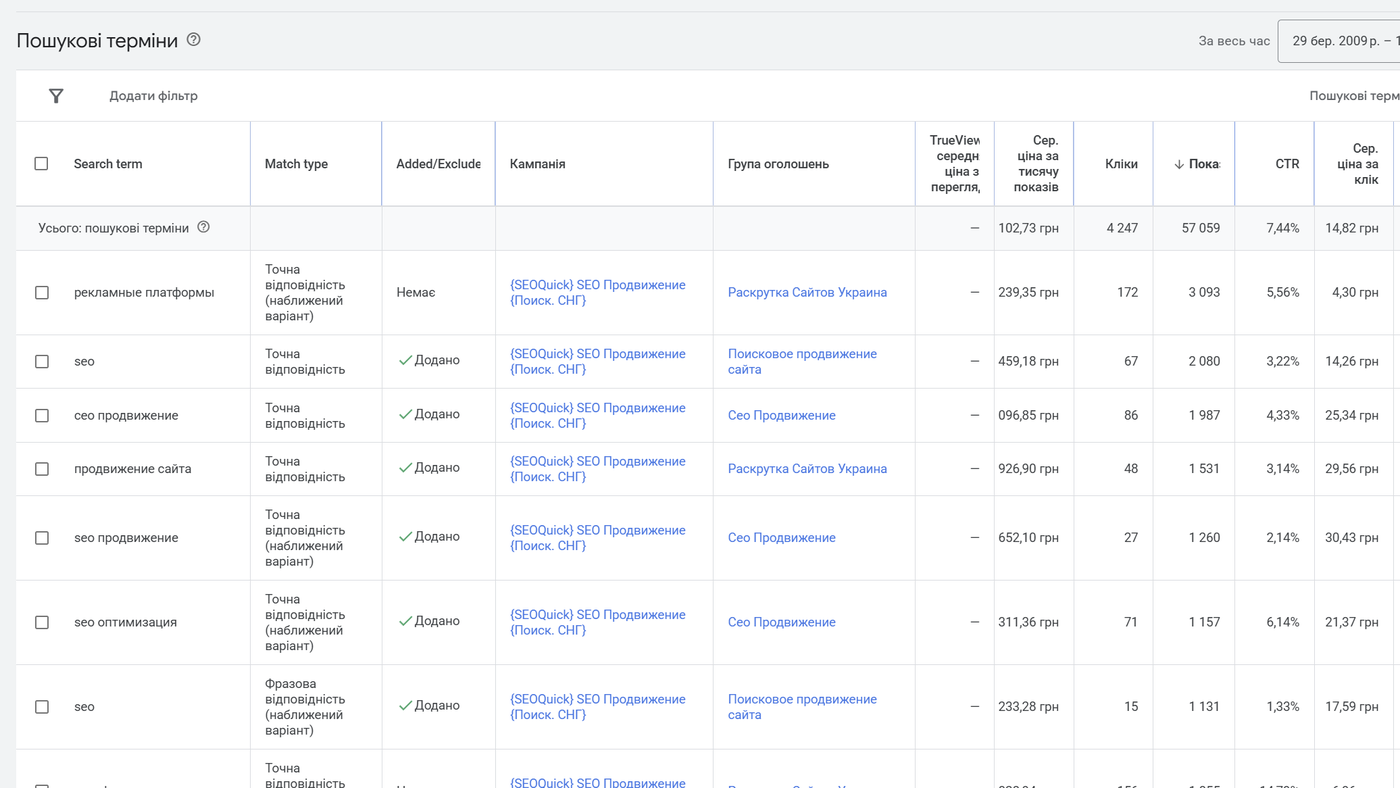
SEOquick experience. For a window installation service in Odesa, Ukraine, we built a list of 7,093 negative keywords — one of the main reasons the campaign achieved a 10.93% CTR at a CPA of UAH 73.71 (Ukrainian hryvnia — roughly $2) in a highly competitive niche. Details in our full-cycle PPC setup case study (in Russian).
Mistake 8. A bloated, scattered campaign structure
In 2016 the doctrine was “one keyword — one ad group — one ad” (SKAG). In 2026 it’s an antipattern. Smart Bidding learns from data, and when you spread 20,000 keywords across hundreds of micro-groups, none of them accumulates statistics — the algorithm flies blind and bids swing wildly.
The opposite extreme is also a mistake: dumping every keyword into one group where a single ad serves both “buy iphone” and “iphone case.”
How to fix it. Group keywords by intent and landing page: one group = one query meaning = one relevant page. That’s usually 5–20 keywords per group. Split campaigns by what genuinely needs separate management: region (different bids and competition), product category, margin. Put high-margin products in a dedicated campaign with its own budget and target ROAS.
Block 3. Ads: The RSA Era
Google retired expanded text ads back in 2022. Today, search runs exclusively on responsive search ads (RSA): you provide up to 15 headlines and 4 descriptions, and the algorithm assembles combinations for each query. That changed the rules — and spawned new mistakes.
Mistake 9. Three near-identical headlines instead of fifteen different ones
The most common RSA mistake: filling in 3–5 headlines that all say the same thing — “Buy Windows in Odesa,” “Cheap Windows in Odesa,” “Windows Odesa Price.” The algorithm has nothing to test, the ad repeats one idea, and Ad Strength sits at “Poor.”
How to fix it. Fill in 10–15 headlines and make them genuinely different: the keyword itself, your USP (warranty, turnaround), price/discount, call to action, brand, objection handling (“installed in 1 day”), social proof (“2,000+ installations”). Same for descriptions — all 4, from different angles. A practical tip: AI handles headline drafts quickly — we’ve published a collection of prompts for ChatGPT and Gemini, including templates for ad copy. But the final distillation of your USP should come from a human who knows the product.
Mistake 10. Over-pinning headlines
The opposite extreme: trying to regain control by pinning every headline to a fixed position. Pin everything and you’ve turned the RSA back into a static ad, stripping the algorithm of its ability to match combinations to queries. Ad Strength drops, and so does combination coverage.
How to fix it. Pin only what must always appear: your brand or a legally required disclaimer — and pin 2–3 variants to a position rather than one. Leave the rest free. Treat Ad Strength as a guide, not a KPI: an “Excellent” rating doesn’t guarantee sales — watch conversions.
Mistake 11. The ad doesn’t match the query or the landing page
The chain “query → ad → landing page” must be seamless. If the query “buy kids’ shoes” triggers an ad for “Clothing for the Whole Family” and the click lands on the store’s homepage, you’re paying for visitors who leave in three seconds.
How to fix it. Every ad group should lead to the most specific page possible: a query about red sneakers goes to the red sneakers page, not the footwear catalog. RSA headlines should include the group’s keyword phrasing. Once a month, check Quality Score at the keyword level: low “ad relevance” or “landing page experience” tells you exactly where to fix things.
Mistake 12. Empty extensions (assets)
Sitelinks, callouts, structured snippets, prices, promotions, images, a phone number — all of it expands your ad’s real estate and CTR for free. In 2026, an ad without assets looks like a business card without a phone number — it loses the attention auction before the click even happens.
How to fix it. The minimum set for any campaign: 4+ sitelinks (delivery, reviews, promos, categories), 4+ callouts, structured snippets, images. For local businesses — location assets (linked to Google Business Profile) and call assets. Assets get tested too: Google shows performance stats for each one.
Block 4. Measurement: Conversions, GA4, and Privacy
If conversions are tracked incorrectly, nothing else matters: automated strategies optimize toward garbage, and you make decisions on distorted data. In 2026 this is the number-one problem area we find in audits.
Mistake 13. Conversions not set up — or set up for show
We still see accounts where a “conversion” is “time on site over one minute” or “visited the contact page.” The automated strategy dutifully optimizes toward these “goals” — and delivers people who browse for ages and never buy.
How to fix it. A conversion is an action with money behind it: a submitted lead form, a placed order, a phone call, a purchase. Set them up in GA4 as key events and import them into Google Ads — or create conversions directly with the Google tag. Mark micro-actions (catalog views, add-to-cart) as “secondary” — useful for audiences, but the automated strategy should learn only from primary ones. For e-commerce, always pass transaction value: ROAS optimization is impossible without revenue numbers.
Mistake 14. No Enhanced Conversions — a third of your data is lost
Because of cookie blocking (Safari and Firefox block them by default, worldwide), the standard tag loses an estimated 30–50% of real conversions. You see a $40 CPA when the real one is $25; you switch off an “underperforming” campaign that was actually profitable.
How to fix it. Enable Enhanced Conversions: the tag sends Google a hashed email or phone number from the order form, and conversions get matched to signed-in users even without cookies. It takes a couple of hours via Google Tag Manager. For offline sales and long B2B deals, add offline conversion imports from your CRM — then the automated strategy learns from real deals, not just leads.
Mistake 15. Ignoring Consent Mode v2
For traffic from the EEA and the UK, Consent Mode v2 has been mandatory since March 2024, and since July 2025 Google has been forcibly disabling remarketing and personalization for accounts without it. If you target Europe (a typical export market for Ukrainian businesses, for example) and haven’t implemented consent — your remarketing audiences quietly stop refilling and your conversions go undercounted.
How to fix it. Install a consent banner from a certified CMP (from Google’s partner list) and configure consent state passing to your tags (advanced consent mode). For users who decline, Google will then model conversions — implementations typically recover 15–25% of lost conversions in reports. Check your status: in Google Ads → Goals → Conversions → the conversion diagnostics tab shows whether the system sees consent signals.
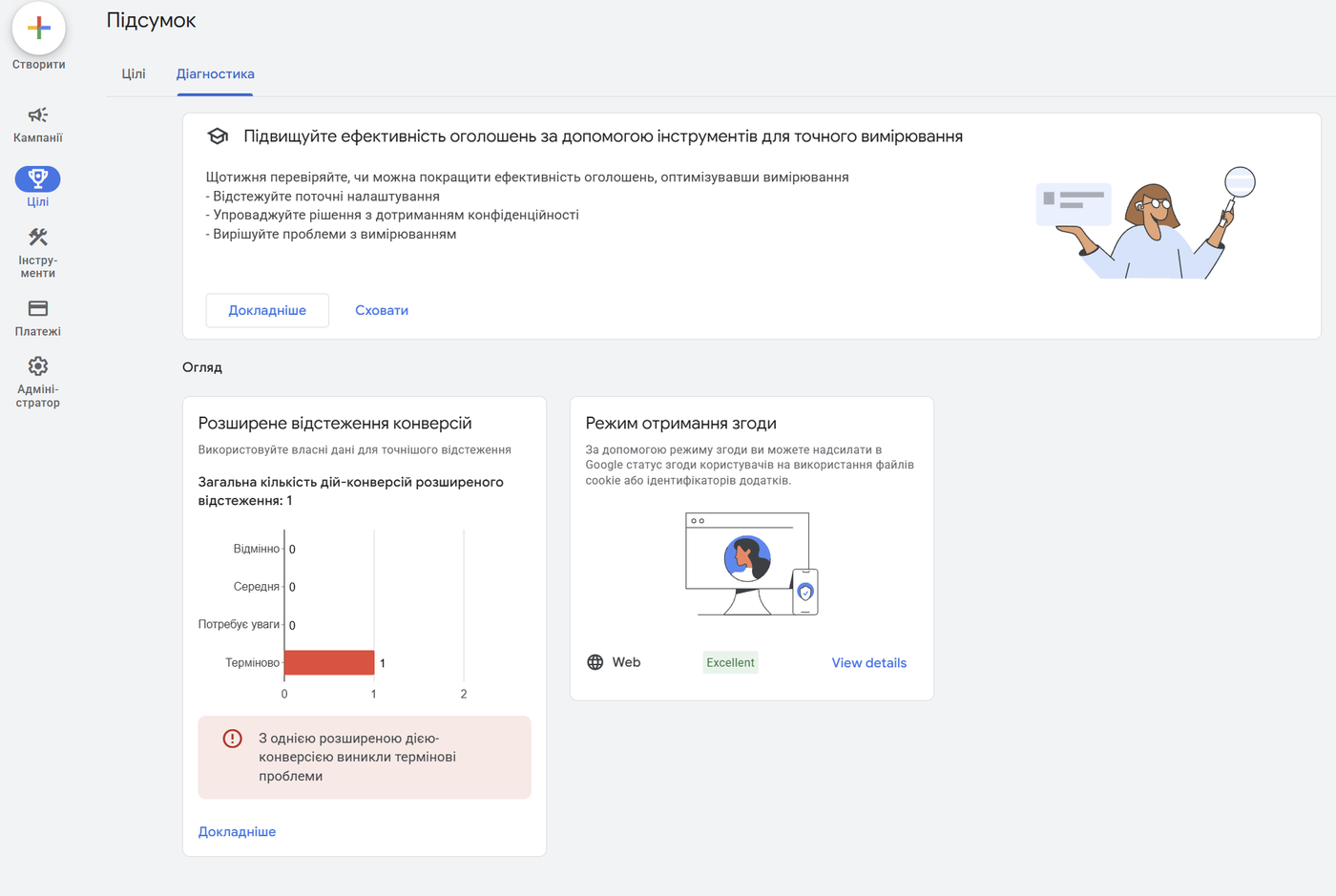
Mistake 16. Optimizing for clicks, not money
Reports where the headline metrics are clicks, impressions, and CTR are reports about spending, not results. A campaign with a 15% CTR can lose money, while a “boring” 4%-CTR campaign brings in 80% of the profit.
How to fix it. Build reporting around three metrics: cost per conversion (CPA), return on ad spend (ROAS), and conversion volume. Add the “Conversions,” “Cost/conv.,” and “Conv. value/cost” columns in Google Ads. Tag campaigns with UTM parameters and cross-check against GA4 and your CRM: what matters isn’t how many leads you got, but how many turned into revenue. Make pause/scale decisions on those numbers only.
Block 5. Automation: Smart Bidding, PMax, and Control
Google Ads 2026 is machine learning. Performance Max, by Google’s own data, already generates the majority of clicks in the ecosystem, and bids are set by the algorithm almost everywhere. The mistakes in this block are about mishandling automation: either resisting it or trusting it blindly.
Mistake 17. Automated bidding with no data — or manual bids forever
Two extremes. The first: launching a brand-new account straight on Target CPA — the algorithm has nothing to learn from, bids are chaotic, and the budget goes to exploration. The second: sitting on manual bids for years “for control” — no human can factor in the device, time, audience, and user-history signals that Smart Bidding processes in every auction.
How to fix it. The ladder looks like this: a new account starts on Maximize Clicks with a bid cap, or on manual CPC — the goal is to collect the first conversions. At 15–30 conversions per month, move to Maximize Conversions; at 30–50, add a target CPA/ROAS based on actual statistics (not wishful ones!). Change targets gradually, 10–15% per step: tightening the goal sharply collapses impressions. And remember: an automated strategy is only as good as your conversion data is clean (see Block 4).
Mistake 18. Performance Max out of the box, with no guardrails
PMax is a powerful campaign type that shows everywhere: Search, Display, YouTube, Gmail, Discover, Maps. The main risk: by default it happily spends budget on your brand queries (cannibalizing cheap traffic you’d have gotten anyway) and on placements you don’t control. Meanwhile the reports show a beautiful ROAS — courtesy of those same brand conversions.
How to fix it. When launching PMax: (1) add brand exclusions so the campaign doesn’t buy your own brand traffic; (2) for e-commerce, connect a Merchant Center feed and keep it healthy — that’s half the battle; (3) upload audience signals: customer lists, past converters, site visitors; (4) supply quality creatives in every format — otherwise Google generates its own, and you won’t like the result; (5) once a month, review spend distribution across channels (via reports or scripts) and the placements list. PMax complements search campaigns — it doesn’t replace them.
SEOquick experience. For a jewelry e-commerce store we rebuilt Performance Max with regional segmentation and a properly structured feed: ROAS grew from 2.8 to 5.1, impressions increased 5.6x, and in Odesa ROAS hit 116. Full breakdown in our jewelry store case study (in Russian).

Mistake 19. No remarketing or audience work
In most niches, 95–98% of visitors don’t buy on the first visit. If you don’t bring them back, you paid for the introduction and a competitor closed the deal. The other side of the same mistake: not using your own data — customer lists, subscribers, CRM leads.
How to fix it. The minimum: remarketing on visitors of key pages and abandoned carts (7–30 day windows with a dedicated offer). Upload your customer list via Customer Match — it’s both a standalone audience for special offers and the strongest signal for Smart Bidding across all campaigns. Segment: first-purchase offers for new customers, upsells for existing ones. And don’t forget: without Consent Mode v2, remarketing to European audiences simply doesn’t work (see Mistake 15).
Mistake 20. “Set and forget” — and blindly accepting recommendations
A campaign without regular optimization degrades: new competitors arrive, creatives wear out, search queries drift. But the mirror-image mistake exists too — mindlessly clicking “Apply” on every Google recommendation and leaving auto-apply turned on. Some suggestions are useful; others simply increase your spend (broaden targeting, raise budgets, add broad match).
How to fix it. Turn off auto-apply for recommendations. Establish a working rhythm: weekly — search terms and negatives, budgets, anomalies; monthly — ad and asset performance, audiences, Quality Score, PMax spend distribution; quarterly — account structure, tests of new formats, revision of target CPA/ROAS. The Optimization Score in the account header is food for thought, not a to-do list.
Checklist: Audit Your Account in 15 Minutes
- Economics: you know your maximum click price and target CPA/ROAS.
- Conversions: money-actions are tracked, value is passed, Enhanced Conversions enabled.
- For EU/UK traffic: Consent Mode v2 implemented via a certified CMP.
- Negative keywords: shared lists exist, search terms reviewed weekly.
- Broad match — only with Smart Bidding and audience signals.
- RSA: 10–15 genuinely different headlines, pinning used sparingly.
- Assets: sitelinks, callouts, images, prices — all filled in.
- PMax: brand exclusions, feed, audience signals, channel monitoring.
- Remarketing and Customer Match enabled and segmented.
- Auto-apply recommendations off; optimization runs on a calendar.
If you fail even three of these, the account is losing money right now.
By the way, buyer behavior is shifting on the search side too: more and more people arrive through AI answers in Google and ChatGPT, and landing pages should be prepared for that as well — I covered how in my article on GEO: optimizing your site for AI search.
Conclusions
Google Ads in 2026 is less forgiving than ever: clicks keep getting pricier, automation keeps getting stronger, and conversion data has become fragile thanks to privacy changes. But the logic of success hasn’t changed: do the math before launch, feed the algorithms clean conversion data, keep a tight grip on everything that expands automatically (broad match, PMax), and optimize for money, not clicks.
Advertising is a system, not a “get customers” button. A well-built system pays for itself; a button burns the budget.
If you have doubts about your account, order a PPC audit and setup from us — we’ll show you in numbers where the money leaks. And if you’d rather figure it out yourself, start with our guide to paid search advertising.
FAQ
What is the most common Google Ads mistake?
Weak negative keyword lists and skipping the regular search terms review. As a result, ads show for irrelevant queries, budget goes to “free,” “DIY,” and “reviews,” while CTR and Quality Score drop, making every click more expensive. A weekly negative-keyword routine is the highest-ROI habit in PPC.
Can you use broad match in 2026?
Yes, but only together with Smart Bidding (target CPA or ROAS), correct conversion tracking, and audience signals. According to Google, that combination delivers on average 10% more conversions. Without an automated strategy and clean data, broad match still burns budget on irrelevant queries.
Why does Google Ads report fewer conversions than I actually get?
Because of browser cookie blocking and privacy requirements, the standard tag loses up to 30–50% of conversions. The fix is enabling Enhanced Conversions (passing hashed emails/phone numbers) and implementing Consent Mode v2: modeling recovers a significant share of lost data and gives automated strategies the full picture.
Does Performance Max replace search campaigns?
No. PMax is a complement: it covers Display, YouTube, Gmail, Discover, and Shopping placements, but only a search campaign gives you precise control over key commercial queries. Run PMax with brand exclusions and audience signals alongside search, and compare incremental impact rather than blended ROAS.
When should I switch to Smart Bidding?
Once the account consistently collects 15–30 conversions per month with conversion tracking set up correctly. Start with Maximize Conversions, then move to target CPA/ROAS based on actual statistics. Don’t set a target more aggressive than your real numbers right away: the algorithm will sharply cut impressions.
How much does Google Ads management cost, and can I set it up myself?
Setting up a basic campaign yourself is realistic — Google walks you through onboarding step by step. The problem is the nuances: conversions, negatives, structure, bidding strategies. A mistake in any of them costs more than a specialist’s fee. As a benchmark, on the Ukrainian market (where our agency operates) setup starts at $300–500 and management at $200–400 per month or a percentage of ad spend; in Western markets rates are typically several times higher.

H1 vs Title: how many H1 tags you need and how they differ
H1 in SEO 2026: how many H1 headings are acceptable, optimal length, how it differs from title, empty H1 and H1 as an image. Based on a measurement of 77 pages from the Ukrainian top and data on how often Google replaces your title with the H1.
Read →
Pagination SEO: how to index list pages without breeding duplicates
Pagination SEO in 2026: canonicals on list pages, noindex, rel=next/prev, infinite scroll, crawl budget. Based on a check of 36,000 traffic-driving URLs across twelve Ukrainian retailers, plus a teardown of pagination at Foxtrot, Epicentr and our own blog.
Read →
URL Structure: The Full Guide to Addresses You Can't Change After Launch
How to get URLs right: transliteration or Cyrillic, slug length, duplicates from case and filters, pagination, UTM tags, redirect maps. A breakdown of Rozetka, Comfy, Prom and Makeup URLs plus 2026 research data.
Read →Want to apply this to your site?
We will review the current situation, find the first growth levers, and suggest a practical working format.