Pagination SEO: indexing list pages without breeding duplicates
We pulled the 36,000 highest-traffic URLs from twelve Ukrainian retailers and found exactly fifteen pagination pages among them. That's 0.04%. The conclusion is simple and inconvenient: list pages don't bring traffic — they exist so the crawler has a road to your products. Below I break down how to build that road and why half the sites out there break it for no reason.


I will look at your site and answer your questions on the topic of this article. 30 minutes, no slide decks, no pressure.
Book a consultationShort answer: don't optimise pagination pages for keywords — they almost never rank. Their job is different: to walk the crawler to products and articles it could not otherwise reach. So every page needs its own URL, its own self-referencing canonical, plain <a href> links in the markup, and different content. The three most common mistakes: canonicalising every page to page one, pagination that exists only in JavaScript, and identical content across all list pages. We found the last one on our own site.
The topic looks boring right up until you open Search Console and see that half of your indexed URLs are ?page=2, ?page=3 and onwards to a hundred. Then the questions start: block or not, canonical or not, and what does Google even think about this now, given it retired rel=next back in 2019.
I did not want to answer from textbooks: half the articles out there still recommend rel=next/prev, which has done nothing for seven years. So I ran two measurements — one on the SERPs, one on live sites — and looked at how this is actually solved in the wild. Along the way I found a problem on our own site; it gets its own section.
How much traffic pagination pages actually bring
Let me start with the number this was all for. Through Serpstat I pulled the 3,000 highest-traffic top-20 URLs for each of twelve Ukrainian retailers — 36,000 URLs in total — and counted how many of them were pagination pages. I matched on the markers ?page=, ?p=, PAGEN_1=, /page/, ?offset=, ?start=.
| Retailer | Traffic URLs | Of them pagination | Share |
|---|---|---|---|
| kasta.ua | 3000 | 12 | 0.40% |
| hotline.ua | 3000 | 2 | 0.07% |
| eva.ua | 3000 | 1 | 0.03% |
| rozetka.com.ua | 3000 | 0 | 0% |
| comfy.ua | 3000 | 0 | 0% |
| epicentrk.ua | 3000 | 0 | 0% |
| foxtrot.com.ua | 3000 | 0 | 0% |
| makeup.com.ua | 3000 | 0 | 0% |
| prom.ua | 3000 | 0 | 0% |
| allo.ua | 3000 | 0 | 0% |
| moyo.ua | 3000 | 0 | 0% |
| intertop.ua | 3000 | 0 | 0% |
| Total | 36,000 | 15 | 0.04% |
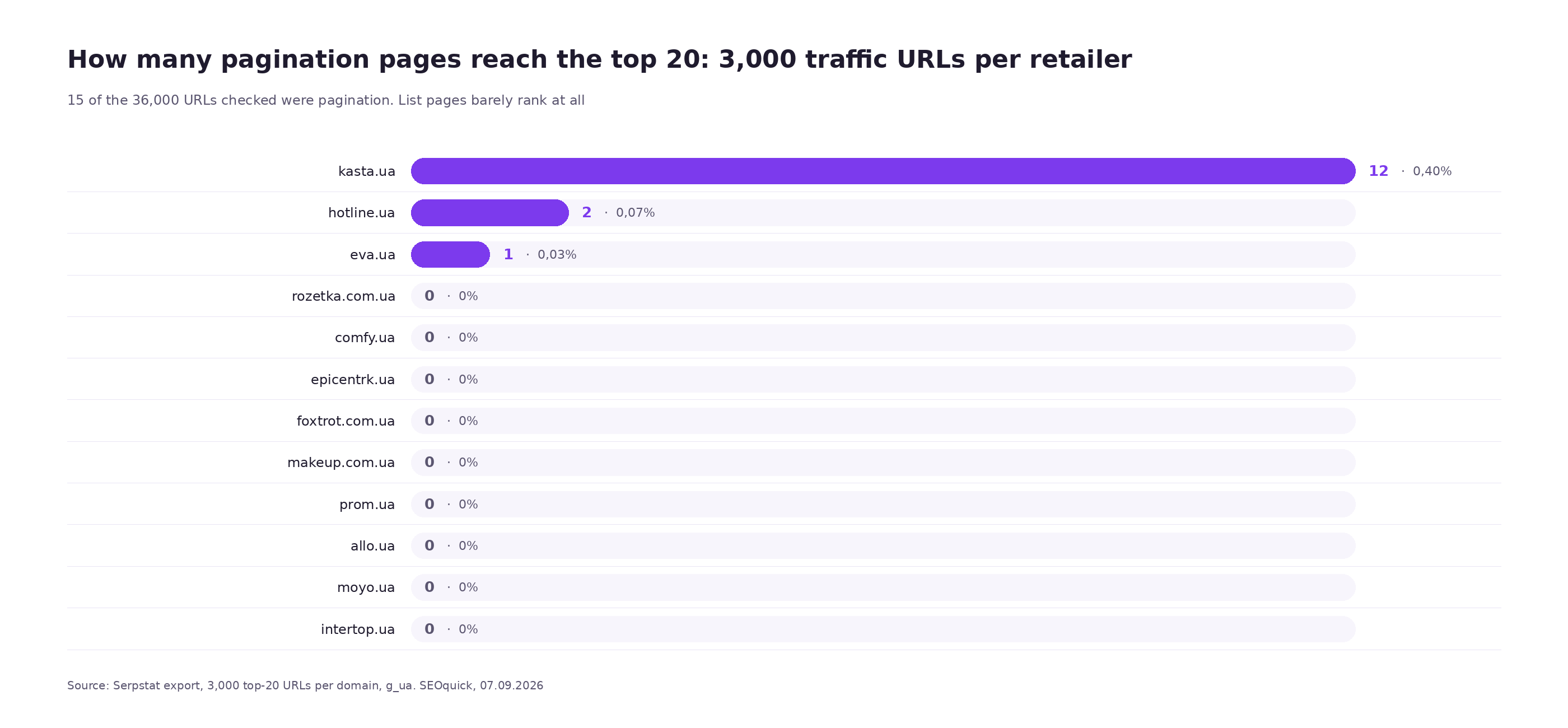
Fifteen URLs out of thirty-six thousand. And if you look at those fifteen up close, the picture gets even duller: Eva's single URL is catalog.eva.ua/flipbook/?Page=2 — a paper-catalogue flipbook, not a category. Hotline's two are review pages, /yp/4005/reviews/?p=2. Real catalogue pagination in the top 20 exists only at Kasta, and even there as ?offset=72.
One methodological note, because it is easy to fool yourself here. My first pass used a broader pattern that also caught /p\d+/ — and it "found" 145 pagination pages at Rozetka. Those are product cards: a Rozetka product lives at /hammer-tel000844/p458511719/, where p means product, not page. I had to tighten the expression. If you repeat this measurement, eyeball your markers on a dozen URLs first, or you will get a pretty but wrong number.
Western data says the same thing. In his case study of a client site where pagination made up 67% of all indexed URLs, Glenn Gabe counted its contribution in clicks: 5,000 out of 1,620,000 over three months. That is 0.3%.
Exactly one practical conclusion follows, and it is not about "how to optimise pagination pages". It is that you should not optimise them for keywords at all. Copy, keywords in titles, category descriptions on every page — that work does not pay for itself. Pagination has a different job: to be a passable road for the crawler to your products, without spawning duplicates along the way.
What Google asks of pagination today
There are few requirements, they live in the e-commerce section of the docs, and almost all of them are phrased as prohibitions. I will quote them verbatim, because paraphrases usually lose half the meaning.
Every page gets its own URL. "Give each page a unique URL. For example, include a ?page=n query parameter, as URLs in a paginated sequence are treated as separate pages by Google." The key part is the second half: Google treats the URLs in a sequence as separate pages. Not variants of one page — separate ones.
Don't canonicalise everything to page one. "Don't use the first page of a paginated sequence as the canonical page. Instead, give each page its own canonical URL." That is a direct prohibition, and it is the most commonly broken one.
Don't put the page number in a fragment. "Don't use URL fragment identifiers (the text after a # in a URL) for page numbers in a collection. Google ignores fragment identifiers." A URL like /catalog/#page=3 does not exist for search — it is the same first page.
Links have to be links. Google asks you to connect the pages with plain <a href> tags, and separately recommends linking back to page one from every page, so it is clearer which one is the main landing page.
Filters and sorts are not pagination. "To avoid indexing variations of the same list of results, block unwanted URLs from being indexed with the noindex robots meta tag or discourage crawling of particular URL patterns with a robots.txt file." In other words, "page + filter + sort" combinations should be kept out of the index.
What happened to rel=next and rel=prev
These tags are still recommended in articles, and it is the most persistent error in the topic. Let's get the dates straight.
On 21 March 2019 Google announced it had stopped supporting them. The wording was: "As we evaluated our indexing signals, we decided to retire rel=prev/next. Studies show that users love single-page content, aim for that when possible." John Mueller put it more bluntly at the time: "We don't use link-rel-next/prev at all."
One detail stung a lot of people: it turned out Google had not been using them for several years before the announcement. So the industry spent years shipping markup that did nothing, and Google simply forgot to mention it.
Today the docs put it like this: "In the past, Google used <link rel="next" href="..."> and <link rel="prev" href="..."> to identify next page and previous page relationships. Google no longer uses these tags, although these links may still be used by other search engines."
Practical takeaway: don't add them, but don't rip them out for the sake of it either. They do no harm, and other engines read them. If your template already has them, leave them. If it doesn't, don't add them and don't spend a dev sprint on it.
Three strategies on live sites: what the check showed
Theory is theory, but it is more interesting to see how the sites that actually live in these SERPs solve it. I took one category from each site that serves without a captcha and ran page one and page two through curl: response codes, canonical, meta robots, title, word count.
| What I checked | foxtrot.com.ua | epicentrk.ua | seoquick.com.ua (us) |
|---|---|---|---|
| URL format | ?page=2 | ?PAGEN_1=2 | /blog/page/2/ |
| Status code, page 2 | 200 | 200 | 200 |
| Canonical on page 2 | self | page one | self |
| Meta robots on page 2 | index, follow | noindex, follow | not set |
| Title, page 2 | "Сторінка - 2 | Мобільні телефони…" | same as page one | "SEO Блог: страница 2" |
| Description, page 2 | prefixed "Сторінка - 2" | same as page one | empty |
| Words, page 1 / page 2 | 4235 / 2953 | 4286 / 3680 | 49,516 / 49,512 |
| rel=next/prev | no | no | no |
| Pagination links in HTML | yes | yes | yes |
| robots.txt rule | none | Allow: /*?PAGEN_1=* | none |
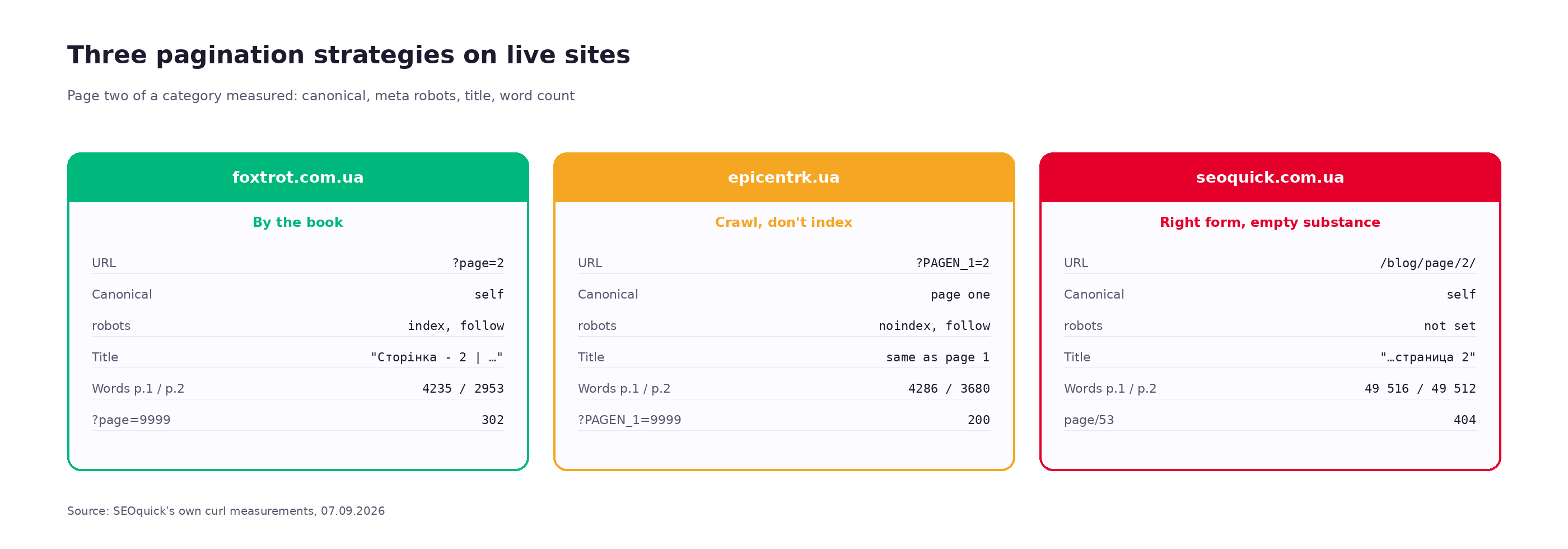
Three sites, three different strategies, and each of them is internally consistent.
Foxtrot does everything by the book. Self-canonical, index, follow, title and description prefixed with the page number. That is exactly what Google asks for. Note the difference in word count: 4,235 words on page one against 2,953 on page two — the category description is rendered only on the first page, and that is correct.
Epicentr chose the opposite — and did it consistently. The canonical on page two points to page one, plus noindex, follow. Formally the canonical is redundant here and Google will ignore it (more on that below), but noindex, follow works: the pages get crawled, link equity flows through them to products, and they stay out of the index. It also lines up with their robots.txt, which carries Allow: /*?PAGEN_1=* while almost every other parameter is blocked. So the decision was deliberate: crawl yes, index no.
Our blog looks respectable in this table right up to the last row. 49,516 words against 49,512. A four-word difference. There is a separate section on that below, and it is not a pleasant one.
Who blocked pagination outright
While I was at it, I read the robots.txt of eight retailers and wrote out everything touching list pages:
epicentrk.ua   Allow: /*?PAGEN_1=*          — pagination explicitly opened
               Disallow: */server/page/*    — internal pagination blocked
hotline.ua     Disallow: */page/            — pagination blocked entirely
prom.ua        Allow: *?p=*
               Allow: *reviews?page=*
eva.ua         Allow: /*?p=
foxtrot.com.ua — no pagination rules
comfy.ua       — no pagination rules
allo.ua        — no pagination rules
makeup.com.ua  — no pagination rules
Note Hotline: Disallow: */page/ blocks pagination from crawling completely. It is the harshest solution I found, and it has a price — if products are reachable only through pagination, the crawler will never get to them. It only works when there is another path: a sitemap, internal links, feeds.
The infinity test: what page 9999 returns
There is a quick check that takes thirty seconds and immediately shows whether pagination is bounded or the site will happily generate URLs forever. Request a list page that obviously does not exist and see what comes back.
curl -s -o /dev/null -w "%{http_code}\n" "https://site.ua/catalog/?page=9999"Results for our three test subjects:
| Site | URL | Code | What's inside |
|---|---|---|---|
| foxtrot.com.ua | ?page=9999 | 302 | redirect, no such page |
| epicentrk.ua | ?PAGEN_1=9999 | 200 | 1,454 words — an empty list inside the template shell |
| seoquick.com.ua | /blog/page/53/ | 404 | the space is bounded — but see the section below |
Foxtrot closes the space with a redirect — correct. Epicentr returns 200 for any number, so in theory it can spawn any number of URLs; only noindex saves them. Our boundary is in place: pages exist from two to fifty-two, and fifty-three returns 404. Our problem, as it turned out, is somewhere else entirely.
Back in 2021, in a teardown of zombie pages, Nikolay described this exact scenario:
"There are pagination pages that are infinite, they can simply be infinite, and crawl budget may be spent on them."
The correct behaviour for a number beyond the list is 404. A 301 to the last existing page or to page one is acceptable. What is not acceptable is 200 with an empty list: that is precisely the case where a site generates an infinite URL space for itself and then wonders why the "Discovered — currently not indexed" report runs to forty thousand rows.
Canonicalising every page to page one: why it doesn't work
The decision looks logical: page one is the main one, the rest are its continuation, so canonicalise to it. Human logic; the mechanics are different.
John Mueller explained it in one sentence: "Page 2 isn't equivalent to page 1, so the rel=canonical like that would be incorrect." A canonical means "this page is a duplicate of that one". Page two of a list is not a duplicate of page one: it has different products on it. Google sees the mismatch and ignores the canonical.
Then it gets interesting. Since the canonical was ignored, the page gets indexed as a normal page. Except you do not know it, because you were sure the matter was closed. In Search Console this shows up as "Duplicate, Google chose different canonical than user" or as indexed ?page= URLs in the Pages report.
There is a second, less obvious effect. If the canonical on page two points to page one, you are effectively saying that the products from page two onwards are the same as the ones on page one. On a thirty-page catalogue that means you have declared twenty-nine pages of your range to be copies of the first. That hits product indexing directly: the path to those products runs through pages you have declared unimportant.
The correct scheme is simple: each page's canonical points to itself. With the page parameter, and without filter and sort parameters.
<!-- on /catalog/?page=3 -->
<link rel="canonical" href="https://site.ua/catalog/?page=3">

<!-- on /catalog/?page=3&sort=price -->
<link rel="canonical" href="https://site.ua/catalog/?page=3">
The second line is the case where a canonical genuinely belongs: sorting does not change the set of products, only their order, so the sorted version honestly is a duplicate.
When noindex, follow is acceptable
Epicentr's approach looks crude, but it has its own logic, and in two cases it is justified.
Case one: a catalogue with hundreds of pages in a single category. If a category has 200 pagination pages and they bring zero traffic from the index (see the first section), their presence in the index is pure noise in your reports. noindex, follow removes the noise and keeps the crawling.
Case two: pagination combined with filters. When the URL looks like ?page=7&sort=price&color=red, the number of variants grows multiplicatively, and opening that to the index is never a good idea.
An important caveat about how noindex, follow behaves. Google has repeatedly warned that over the long run it acts like noindex, nofollow: a page that goes unindexed for a long time gets crawled less often, and its links lose weight. For pagination that is more of a theoretical risk than a practical one — list pages get crawled often because their content changes. But if products are reachable only through pagination, pick Foxtrot's approach and leave the pages indexable.
What you definitely should not do is combine noindex with a robots.txt block. A crawler that is forbidden to crawl will never see the meta tag, and the page can still land in the index through external links, without content. Either crawl plus noindex, or a crawl block — not both.
JavaScript-only pagination: where the crawler's road ends
The most expensive technical mistake, because it does not show up in any report.
Of the sites I checked, two — allo.ua and hotline.ua — have not a single pagination-like link in the HTML of their first category page. The pages return 200 and weigh two megabytes and 320 kilobytes respectively, but the page switcher is not in the markup: it is drawn by a script after load.
Google's docs say it plainly: "Google's crawlers don't 'click' buttons and generally don't trigger JavaScript functions." A "Load more" button, infinite scroll, a switcher bound to an event handler — none of it exists for the crawler. It sees the first twenty products and leaves.
One command checks it — look at the raw HTML, without executing scripts:
curl -s "https://site.ua/catalog/" | grep -oE 'href="[^"]*page[^"]*"' | headIf it comes back empty, the switcher is drawn by a script. That is not a death sentence: Google renders JavaScript and often finds links that appear after rendering. But rendering costs resources and happens with a delay, and on a large catalogue that delay means some products land in the index weeks later and some never do.
The working solution is a hybrid: script-loaded content for humans and real <a href> links for the crawler, hidden with CSS or moved into an "All pages" block at the bottom. Google explicitly allows this and even recommends it.
Our own case: 51 blog pages with identical content
Now for what I found on our own site while writing this. The story is instructive because it shows how a problem appears without a single wrong decision.
Back in 2021, going through zombie pages, I said this:
"For example, our own site has no pagination, so individual articles — well, we're thinking about a method to actually make them rankable, maybe a list of all articles where they're all reachable through a switcher."

Since then the blog moved to a different engine and pagination appeared. Here is what it actually amounts to today.
Pages /blog/page/2/ … /blog/page/52/ return 200; the fifty-third returns 404. All fifty-one sit in the sitemap — that is, we are asking Google to index them ourselves. Each has its own self-canonical and its own title along the lines of "SEO Blog: page 7". By the formal criteria everything is correct.
Now the measurement:
# comparing page one against page two and page forty
curl -s https://seoquick.com.ua/blog/          -o b1.html
curl -s https://seoquick.com.ua/blog/page/2/   -o b2.html
curl -s https://seoquick.com.ua/blog/page/40/  -o b40.html

size:              3,064,292 / 3,063,733 / 3,064,795 bytes
links to articles: 203 / 203 / 203
overlap:           203 of 203
ItemList elements: 1186 / 1186 / 1186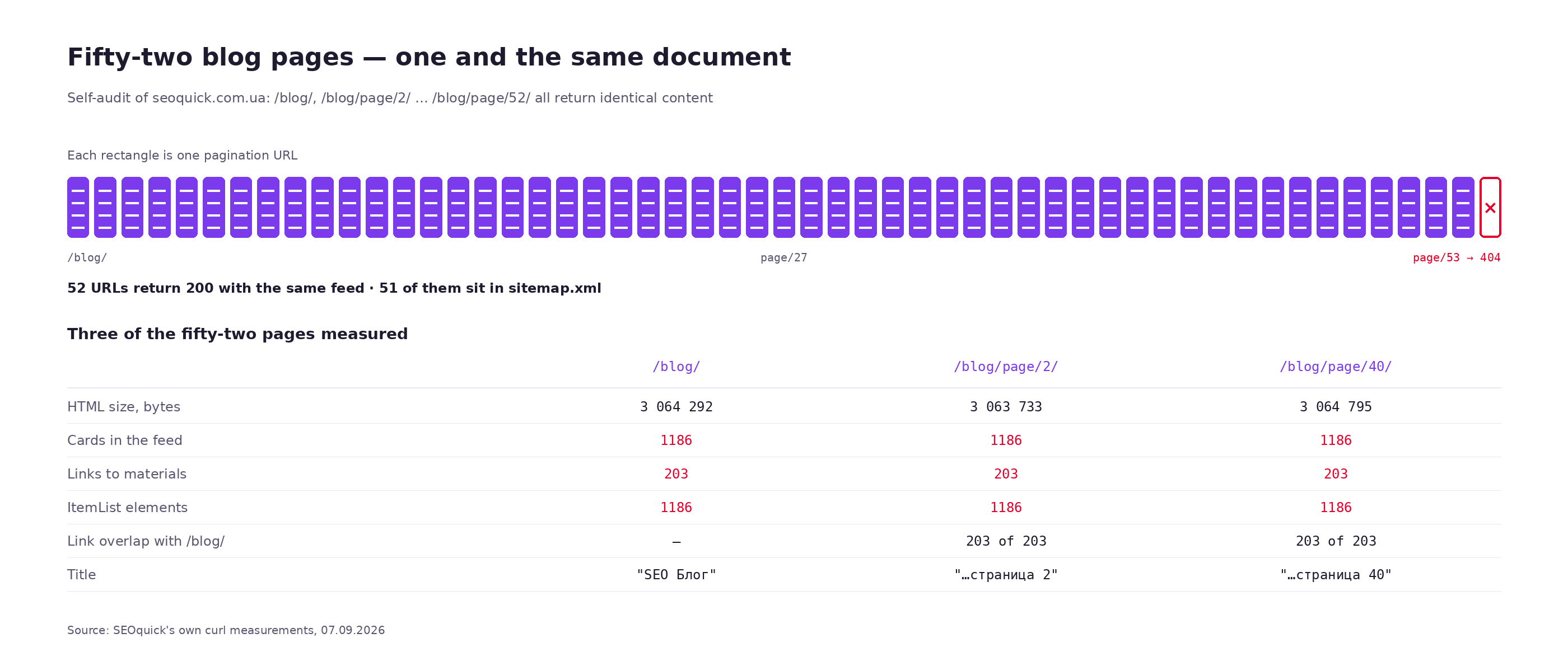
All fifty-two pages — page one plus fifty-one paginated ones — carry the same 203 article links and the same ItemList markup with 1,186 elements. Only the title differs.
The cause is technical and rather ordinary: the article list is filtered and paged on the client, while the server returns the entire feed for every URL. For a human it works — they see the page they asked for. For a crawler it is fifty-two near-identical three-megabyte documents, which we ourselves put in the sitemap.
What is wrong here, point by point:
- Content is not paginated server-side.
/blog/page/7/should contain articles 61 through 70; it contains all 203. - The ItemList markup is not paginated. 1,186 elements on every page also means 130 kilobytes of JSON-LD, multiplied by 52.
- All of it is in the sitemap. 51 URLs that we are actively asking Google to crawl and index.
- The Ukrainian and English versions have no pagination at all —
/ua/blog/page/2/returns 404. So in two languages out of three, older articles are reachable only through internal links.
One thing makes this story typical: no single decision was a mistake on its own. Client-side filtering is a normal approach for a blog. A self-canonical is by the book. A title with the page number is correct. A sitemap with the full list is fine too. The error appeared at the seam: server-side pagination of URLs on top of client-side pagination of content.
What we are doing about it — the ticket is already in flight, and it has three points: paginate the content and the ItemList server-side, return 404 beyond the end of the list, and remove pagination pages from the sitemap (page one stays; the crawler will reach the rest through links). The third point gets its own section below, because it is debatable.
The counter-argument: does it actually hurt?
In fairness, there is data suggesting indexed pagination is not as scary as it is made out to be.
Glenn Gabe studied a site where pagination made up 67% of all indexed URLs: 18,600 indexed pages against a crawl footprint of 200,000. The site did everything "by the 2012 textbook" — self-canonicals, rel=next/prev, text navigation. He watched it for sixteen months. The result: stable visibility, growth intact, no signs of crawl budget being wasted, fresh content indexed on time.
Gabe's conclusion: "Google has a long history of handling pagination and it typically will not cause many problems" — provided the implementation is correct.
How does that square with everything above? Fairly easily, once you separate two different questions.
| Question | Answer |
|---|---|
| Do pagination pages bring traffic? | Practically none: 0.04% in our data, 0.3% in Gabe's |
| Does their presence in the index hurt by itself? | With a correct implementation, no |
| What does hurt, then? | Identical content, an infinite URL space, canonicals to page one, no links in the HTML |
| When does sheer volume hurt? | On large catalogues where crawling is finite — see the thresholds below |
So there is no need to panic over the mere fact that ?page= URLs are indexed. You need to dig in when those pages duplicate each other, multiply without limit, or block the path to your products.
When pagination really does eat crawl budget
Crawl budget is a topic buried in myths, so again let me start with what Google itself says. The crawl budget management docs give thresholds at which it is worth thinking about at all:
- "Large sites (1 million+ unique pages) with content that changes moderately often (once a week)";
- "Medium or larger sites (10,000+ unique pages) with very rapidly changing content (daily)".
Google immediately notes this is a "rough estimate", not a hard boundary. But the order of magnitude is clear: a two-hundred-page services site can ignore crawl budget entirely, while a store with a hundred thousand products cannot.
What specifically eats crawling, per the same docs: duplicates and near-duplicates ("this wastes a lot of Google crawling time on your site"), long redirect chains ("Avoid long redirect chains, which have a negative effect on crawling"), and "infinite scrolling pages that duplicate information on linked pages" — a direct description of our blog situation.
A practical benchmark for a store: if a large share of requests in the Crawl stats report goes to URLs with ?page= while product pages take weeks to get indexed, then pagination really is in the way. If product pages index within a day and the ?page= URLs just sit in the index, it is cosmetic.
Pagination plus filters: where combinatorics is born
A standalone list page is nothing. The problem starts when the page number combines with the rest of the parameters. How a URL is put together, and which of its parts breed duplicates, is covered in our article on URL structure.
The arithmetic is trivial. A category with twenty pagination pages, four sort orders and ten brands gives 20 × 4 × 10 = 800 URLs. Add size and colour and the count runs into the tens of thousands. All of them return 200, all of them carry nearly identical product lists.
The order of solutions, from safe to risky:
| What | What to do | Why |
|---|---|---|
Sorts (sort, order) | Canonical to the URL without the sort | Same set of products, only the order changes — an honest duplicate |
| Pagination inside a sort | Don't index at all | There is no demand for "page 7, sorted by price" |
| Pagination inside an open filter | Index the filter's first page; the rest get noindex, follow or a canonical to that filter's first page | The filter is a landing page in its own right; its page two is not |
| Pagination inside a blocked filter | Block it together with the filter, in one rule | If the facet is blocked, its pagination is even less needed |
| Utility parameters (city, warehouse, currency) | Keep them out of the URL entirely | They multiply the catalogue by the number of values |
One nuance from the open-filter row. Here a canonical from the filter's page two to the first page of that same filter is an exception to the "don't canonicalise to page one" rule. It is justified because you consider the filter itself to be the landing page and its pagination a technical continuation. Google will most likely ignore this canonical too, for the same reason ("page 2 is not page 1"), so noindex, follow is the more reliable option.
The "view all" page: when it makes sense
This used to be a separate Google recommendation — build a full-list version and canonicalise pagination to it. There is no dedicated support now, but the idea did not die, because the 2019 announcement said: "Studies show that users love single-page content, aim for that when possible."
When it works: the list fits into a reasonable size (say up to 200–300 items), the page loads fast, and the split into pages exists only out of habit.
When it doesn't: a catalogue with thousands of products. A five-megabyte page with two thousand cards will kill LCP and the mobile experience, and no indexing gain pays that back.
A practical compromise for a mid-sized store is to raise the number of products per page. Twenty-four products per page on a thousand-item catalogue gives 42 pagination pages. Ninety-six products gives eleven. That is a fourfold difference for crawling, and noticeably less of a hit to speed than it sounds, if the cards lazy-load their images.
Should pagination pages go in the sitemap?
The question is contested and the docs give no definitive answer. I will lay out both sides, because we are currently on the wrong one ourselves.
The case for: a sitemap is the most direct way to tell the crawler these URLs exist. If pagination is implemented in JavaScript and there are no links in the HTML, the sitemap is the only road left. Google recommends exactly this as a workaround in its infinite scroll section.
The case against: a sitemap is a list of pages you consider worth indexing. Pagination pages, as we established in the first section, do not bring traffic. Putting them there dilutes the sitemap with URLs that should not rank and spends crawling on them instead of on product pages.
My working rule is this. If pagination links are in the HTML as plain tags, don't put them in the sitemap — the crawler will get there through the links. If pagination is script-only, put them in, but treat it as temporary; the real fix is to return the links to the markup.
Our blog is currently in the worst of both worlds: the links are in the HTML, and 51 URLs are in the sitemap anyway. Duplication with no benefit.
Category copy on pagination pages
A small thing that ruins your duplicate statistics for no reason.
A 1,500–2,500 character category description rendered on all thirty pagination pages gives you thirty documents with an identical block of text. At Foxtrot you can see it in the numbers: 4,235 words on page one against 2,953 on page two — the difference is precisely the category description, which renders only on the first page. At Epicentr the gap is smaller (4,286 against 3,680), but it is there too.
The rule is simple: category SEO copy renders on the first page only. The same goes for an FAQ block, if you have one, and for "popular brands" round-ups — anything that is not the product list.
What should differ on every page:
- the title — with the page number, so the duplicate-titles report doesn't turn to mush;
- the description — either with the number, or not rendered at all from page two onwards;
- the H1 — debatable: you can keep it identical or add the number. I have not seen a practical difference, but an identical H1 with differing titles reads more logically to a human;
- the product list itself — obvious, and yet that is exactly what we tripped over.
How to check pagination on your own site
A set of checks that takes about fifteen minutes and covers almost every scenario.
Are the pagination links in the raw HTML?
curl -s "https://site.ua/catalog/" \
  | grep -oE 'href="[^"]*(page|PAGEN|offset)[^"]*"' | sort -u | head -20
Empty means the switcher is drawn by a script — see the JavaScript section.
What about the canonical and robots on page two?
curl -s "https://site.ua/catalog/?page=2" \
  | grep -oE ']*canonical[^>]*>|]*robots[^>]*>'
You want a canonical pointing at ?page=2. If you see the first page's URL, that is the error from the section above.
Is the URL space bounded?
for n in 2 50 500 9999; do
  printf "page=%-5s " "$n"
  curl -s -o /dev/null -w "%{http_code}\n" "https://site.ua/catalog/?page=$n"
done
Beyond the real list you want 404 or 301. If everything returns 200, the space is infinite.
Does the content actually differ?
for n in 1 2 3; do
  curl -s "https://site.ua/catalog/?page=$n" \
    | grep -oE 'href="/product/[^"]+"' | sort -u > p$n.txt
done
comm -12 p1.txt p2.txt | wc -l   # the overlap should be close to zero
This is exactly the test that exposed our problem. If the overlap equals the number of products per page, the content is not being paginated.
What to look at in Search Console
- Pages report → Not indexed. The "Duplicate, Google chose different canonical than user" and "Discovered — currently not indexed" buckets are the first candidates to dig into.
- Crawl stats. Look at the share of requests going to URLs with a page number. If it is comparable to the share going to product pages, crawling is going to the wrong place.
- URL Inspection on a specific
?page=2: which URL does Google consider canonical for it?
And one trick from that same zombie-pages teardown that still works: find pagination in your analytics reports by a high exit rate.
"It seems there's no way to reach the pagination any more, but technically it exists somewhere, and users can click it — and that's how you spot it turning up in this report."
The method surfaces exactly the pages nobody on the team remembers exist.
Symptom → cause → fix
| What you see | Likely cause | How to check | What to do |
|---|---|---|---|
| Products from page two onwards are not indexed | Every page canonicalised to page one | Look at the canonical on ?page=2 | Give each page a self-canonical |
Tens of thousands of page URLs in the index | Pagination combined with filters and sorts | site:site.ua inurl:page | Block the combinations, keep clean pagination |
| "Discovered — currently not indexed" grows without limit | Pages beyond the list return 200 | ?page=9999 | 404 or 301 beyond the end of the list |
| Only the first page of a category gets indexed | Pagination is drawn by a script | curl + grep for href | Real <a href> tags in the markup |
| Many pages share the same title | The title has no page number | Crawler, duplicate-titles report | Add a prefix or suffix with the number |
| Search Console: "Duplicate, Google chose different canonical" | List pages contain the same thing | Compare the sets of product links | Paginate the content server-side |
| Crawling goes to lists while product pages take weeks | Too many pagination pages on a large catalogue | Crawl stats | More products per page, noindex, follow on lists |
| Deep catalogue products are not indexed at all | Pagination is blocked in robots.txt with no other path | robots.txt tester on ?page=2 | Open crawling, or provide a path via sitemap and internal links |
The developer ticket: what to write in the task
"Set up pagination for SEO" is guaranteed to end in an argument about what counts as done. Below is a specification you can paste into a ticket and accept the work against.
1. URLs. Every list page is reachable at its own URL, either /catalog/?page=N or /catalog/page/N/ — your choice of format, but one format across the whole site. The first page is reachable only at the URL without a number: ?page=1 returns a 301 to /catalog/.
2. Boundaries. A page number greater than the real number of pages returns 404. A non-numeric or negative number returns 404. Verified with ?page=9999, ?page=abc, ?page=-1.
3. Canonical. Every page carries a self-canonical including the page number. Sort and display parameters do not appear in the canonical.
4. Meta tags. The title contains the page number from page two onwards. The description either contains the number or is not rendered from page two onwards. The H1 stays unchanged.
5. Content. Page N renders only that page's products. The category description, the FAQ block and any text blocks render on the first page only.
6. Links. The page switcher is rendered in HTML with <a href> tags before JavaScript runs. Verified by viewing source without executing scripts.
7. Structured data. If the page renders an ItemList, it contains only that page's items, not the whole catalogue.
8. Sitemap. Only the first page of each list goes into the sitemap.
9. Combinations. URLs combining a page number with sort or filter parameters outside the allow-list return noindex, follow.
10. Acceptance. The output of the commands from the "How to check" section is attached for three arbitrary categories.
Checklist
- Every list page has its own URL; the first one is reachable without a number.
- Every page's canonical points to itself.
- A number beyond the list returns 404 or 301, not 200.
- Pagination links are present in the HTML before scripts run.
- Page content genuinely differs — verified by comparing product lists.
- Category copy renders on the first page only.
- Titles from page two onwards contain the number.
- The
ItemListmarkup, if present, is paginated along with the list. - Only first pages of lists are in the sitemap.
- Combinations of pagination with sorts and blocked filters are not indexed.
- Pagination is not blocked in robots.txt if products are reachable only through it.
rel=next/previs not added to new templates — Google has not used them since 2019.
If you are not sure where you stand, start with the on-page audit tool — it shows response codes, canonical links and duplicates for specific URLs. If the catalogue is large and you suspect crawling is being wasted, that is a conversation about a technical audit: there we look at server logs and crawl stats, not just markup.
Frequently asked questions
Do pagination pages need to be blocked from indexing?
Not necessarily. With a correct implementation — self-canonicals, differing content, a bounded URL space — their presence in the index does no harm by itself. Blocking makes sense in two cases: a very large catalogue where crawling is finite, and pagination combined with filters. The mechanism there is noindex, follow, not a robots.txt block.
Should you use rel=next and rel=prev in 2026?
Not in new templates. Google announced it was retiring them on 21 March 2019 and, as emerged at the same time, had not been using them for several years before that. If the markup is already in an old template, there is no need to strip it out — other search engines still read it.
What should you do about infinite scroll?
Keep it for humans and give the crawler ordinary URLs in parallel. Google states outright that its crawlers do not click buttons and do not trigger JavaScript functions, so a "Load more" without links in the markup does not exist for it. The working pattern: script-based loading plus real pagination links in the HTML, plus updating the URL via the History API as the user scrolls.
How many products per page?
A trade-off between speed and the number of URLs. A thousand-item catalogue at 24 products per page gives 42 pages; at 96 it gives eleven. Fewer pages means less crawling spent on lists and fewer near-identical documents. The limiting factor is speed: make sure a bigger page doesn't kill LCP on mobile, and lazy-load your images.
Is it worth writing unique copy for pagination pages?
No. These pages don't rank — by our measurements they account for 0.04% of traffic URLs, and 0.3% of clicks in Glenn Gabe's. Unique copy across thirty list pages is work that will never pay off. The first page of a category needs copy; the rest do not.
What if pagination is needed inside filters too?
The first page of an open filter is a landing page in its own right — index it. Page two onwards gets noindex, follow. Combinations of pagination with sorts are never indexed: there is no demand for "page 7, sorted by price".
What matters more — fixing pagination or working on content?
It depends on what exactly is broken. If products from page two never make it into the index, that is a blocker and it outranks any content work, because you are losing your range in the SERPs. If ?page= URLs merely sit in the index without stopping product pages from being indexed, it is cosmetic and it can wait.

Broken Links and Redirect Chains: Clearing 3XX, 4XX and 5XX Without Bleeding Link Equity
Broken links and extra redirects quietly steal traffic, crawl budget and link equity — and they push your pages out of AI answers. Here's what actually goes wrong and how to get your hops down to zero.
Read →
URL Structure: The Full Guide to Addresses You Can't Change After Launch
How to get URLs right: transliteration or Cyrillic, slug length, duplicates from case and filters, pagination, UTM tags, redirect maps. A breakdown of Rozetka, Comfy, Prom and Makeup URLs plus 2026 research data.
Read →
Link Building in 2026: What a Backlink Really Costs
I checked 19 Ukrainian link building price lists: 8 name a price per link, 2 name selection thresholds, 5 say what is left behind. Plus our own traffic test.
Read →Want to apply this to your site?
We will review the current situation, find the first growth levers, and suggest a practical working format.