Performance Max Setup for Google Ads
Performance Max is a single campaign that hands Google's algorithm the entire inventory: Search, YouTube, Display, Discover, Gmail and Maps. We break down how PMax works, when it's worth launching, how to build asset groups and set up signals — with the 2026 Google Ads updates in mind.


What Performance Max (PMax) is
Performance Max is a goal-based campaign in Google Ads that gives access to all of Google's ad inventory within a single campaign: Search, Display (banners), YouTube, Discover, Gmail and Maps. The essence is a combination of Smart Bidding, an automatic asset mix and smart budget allocation to hit your conversion goals with minimal manual control.
The key value of PMax is broader reach and the discovery of new conversions that often "slip past" individual campaign types, thanks to optimizing impressions on the placements where conversion probability is highest.
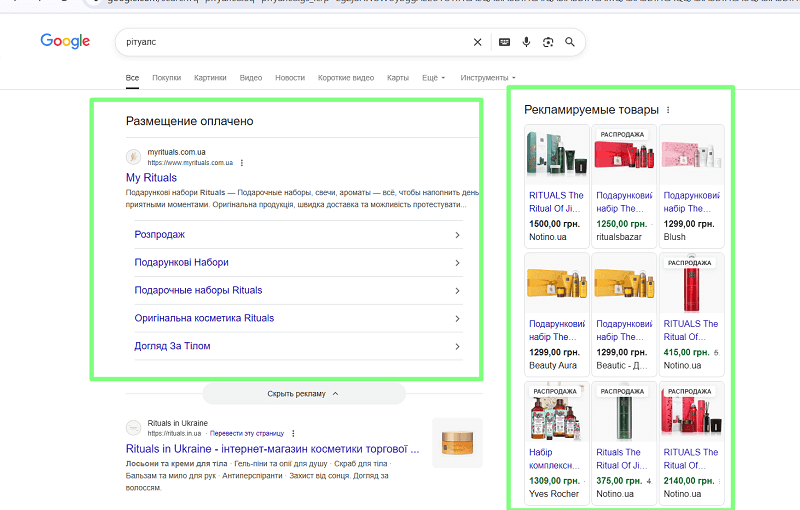
Think of PMax as an "add-on" to Search campaigns: Google states directly that PMax complements keyword-based Search rather than replacing it, helping find additional conversions. In 2026, the same logic gained AI Max for Search campaigns — a set of AI targeting and creative features that left beta in spring 2026 and runs alongside PMax: the pairing is usually used so that Search with AI Max covers query intent, while PMax scales demand across the remaining surfaces (Google Ads Blog).
Where do PMax ads show?
Ads can appear in Search, Display (banners), on YouTube, in Discover, in Gmail and on Maps — within a single campaign with one goal and a shared budget.
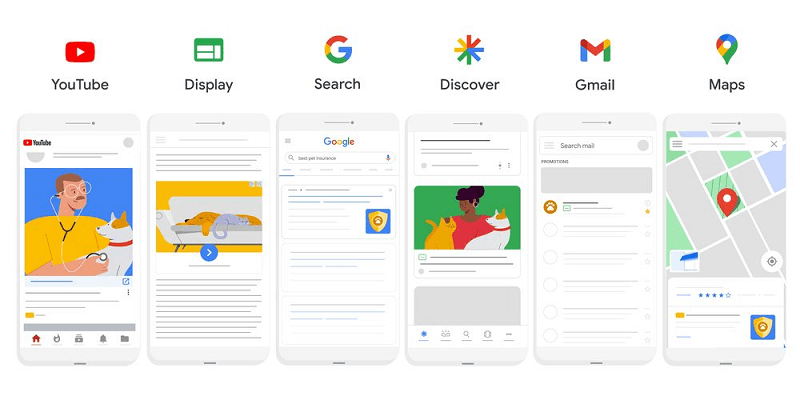
PMax campaigns show across many platforms at once
Impression and budget distribution happens automatically: the system raises bids and channel weight where it expects higher conversion probability or value, based on signals and a conversion forecast.
A common mistake. Trying to "manually" limit every placement. PMax is designed for autonomous traffic distribution across channels — drop the micromanagement and instead feed it quality data and assets.
How PMax works: from goal to result
Setting a business goal
Start with a clear goal: sales, leads, traffic or local actions. It's the goal that determines how Google AI will optimize bids, creatives and placement across all surfaces of the ecosystem. Accurate conversion tracking is "fuel" for the algorithms: without the right event, value and attribution, the system can't learn and make an adequate forecast of impression/click value.
Goals mini-checklist
- Define the macro goal (purchase / qualified lead). Your macro goal is the sale, and the micro goals are all the user's preceding actions.
- Specify the conversion value.
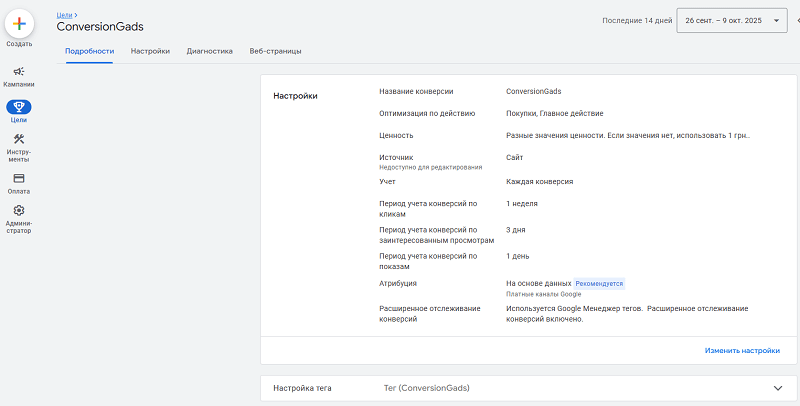
It's important to set the value of goals, configure enhanced conversion tracking and test conversions before launching ads.
- Enable enhanced / offline conversions if you have a sales cycle.
Passing signals and assets
The core element when building any campaign is the asset group.
Each of them roughly consists of three things:
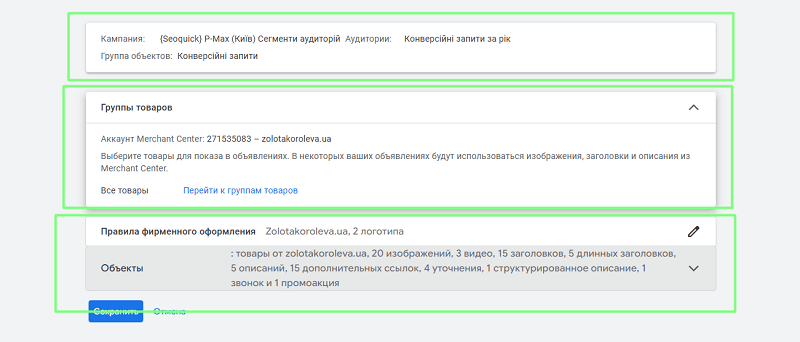
- What we target the campaign at (search themes, audience signals).
- Product groups (for Ecommerce) — what exactly we show the audience. Usually products in stock.
- And the assets themselves — up to 20 images, up to 6 videos, 15 headlines, 5 long headlines, 5 descriptions, 15 sitelinks, 4 callouts, 1 structured snippet, 1 phone number and 1 promotion, usually per asset group.
When creating a new asset group, you choose these elements
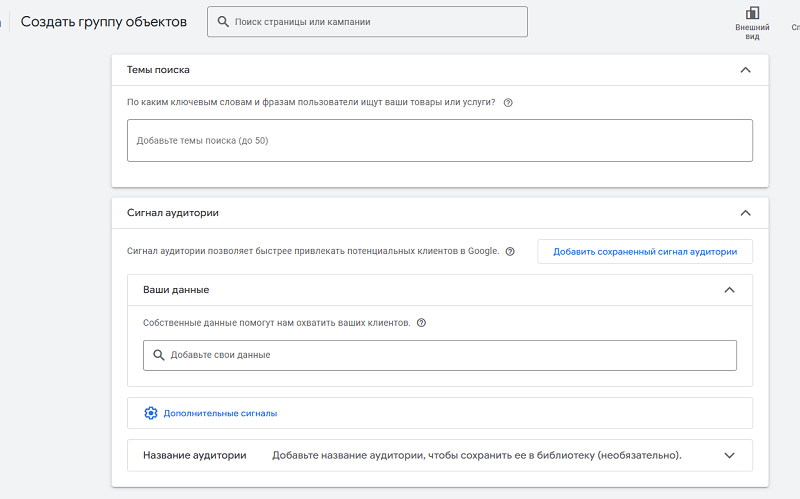
For example, at the search-themes and audience-signal stage you add all elements manually. To do this you need to create your segments in advance. For instance, you can collect semantics and build custom segments for it.
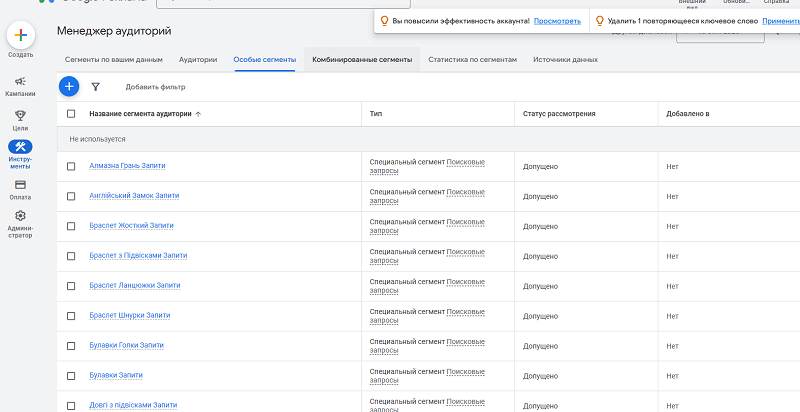
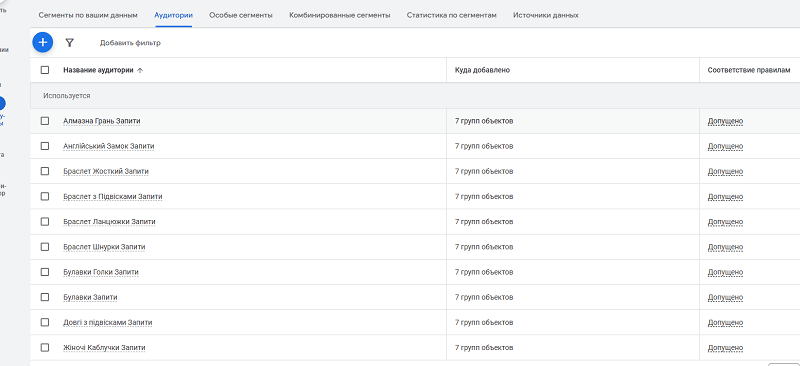
Based on them you then create the audiences you'll use when configuring PMax asset groups.
Upload various texts, images and videos. You need to upload everything, as it affects quality.
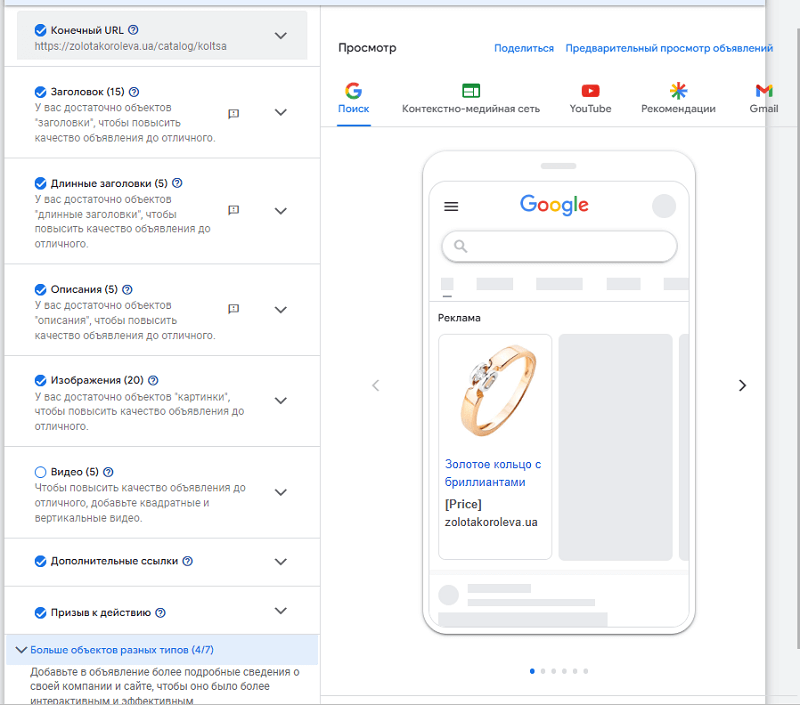
For e-commerce, feeds from Google Merchant Center are mandatory.
Variety and relevance of assets increase Ad Strength and expand placement coverage, giving the algorithm more combination options.
Audience signals (Customer Match, remarketing, custom segments) speed up learning but don't "lock" targeting — the system will still go beyond signals if it leads to the goal.
Pro tip. Add as many quality elements as possible to the asset group and regularly replace the "weak" ones based on reports — that's the direct path to better Ad Strength and broader impressions.
Customer Match, remarketing and custom segments are the optimal "starting hints"; at the same time the system may go beyond the signals if it sees a chance at conversion. For B2B, add offline-conversion import so the algorithm learns on more valuable events.
Automated optimization
PMax combines Smart Bidding and an automatic asset mix tailored to specific placements, while the budget flows in real time toward more effective channels. Bids are adjusted dynamically depending on the expected probability and value of a conversion, which strengthens ROAS/CPA in line with your goals.
Avoid sharp, frequent changes: every serious intervention restarts learning, and the result will fluctuate for a while.
The learning period can take from 6 days (initial, up to 6 weeks)
When PMax fits / when it doesn't
When it's worth it
PMax is appropriate when you need to scale conversions across several channels at once and open up additional demand beyond Search. It's especially effective with quality assets, correct tracking and (for e-commerce) a well-developed GMC feed — it's exactly the feed quality that determines the relevance of impressions in Shopping / Free listings.
When it's not worth it / limitations
I don't recommend this campaign type to every client. I always run an audit of the client's account and site to advise which campaigns exactly to set up.
If you need a free audit, send me your contacts and grant access to the account, and I'll run it and recommend how to optimize your campaign.
Short experiments and narrow R&D tests that require strict control of placements/creatives are not the best scenario: PMax needs a learning period of at least ~6 weeks before drawing conclusions. There's also a risk of "junk" leads without validation; use reCAPTCHA, double opt-in and server-side checks so the algorithm doesn't optimize for spam.
| Yes | No |
|
|
Campaign and asset-group structure
Structuring logic
Keep the minimum necessary number of campaigns and structure asset groups by categories/products/personas — this makes feeds, creatives and goals easier to manage. If the unit economics differ (margin / cost per lead), split campaigns or set different tROAS/tCPA for autonomous learning of each segment.
Tip. Use brand lists: exclude/include brands where it affects economics, especially when competing with your own brand traffic Google Help+1.
Asset requirements per group
Your asset is a universal ad. In it you embody everything you can — from text to video, from photos to a product list.
Technically it's very similar to the old responsive search ads, but a few things have changed. We no longer pin headlines in first position as before. They go in one pool of 15 items. The length is the same — 30 characters.
The long headline (5 items, 1 shown at a time) is placed on the first line of the ad and is used for impressions in large ad slots. Its length is up to 90 characters. Description lines can appear below it (sometimes they aren't shown). The headline length depends on the site where the ad shows. When text is truncated, an ellipsis "…" is added at the end.

Fill the group "to the brim": several images, headline/description variations and at least one video to cover all impression surfaces.
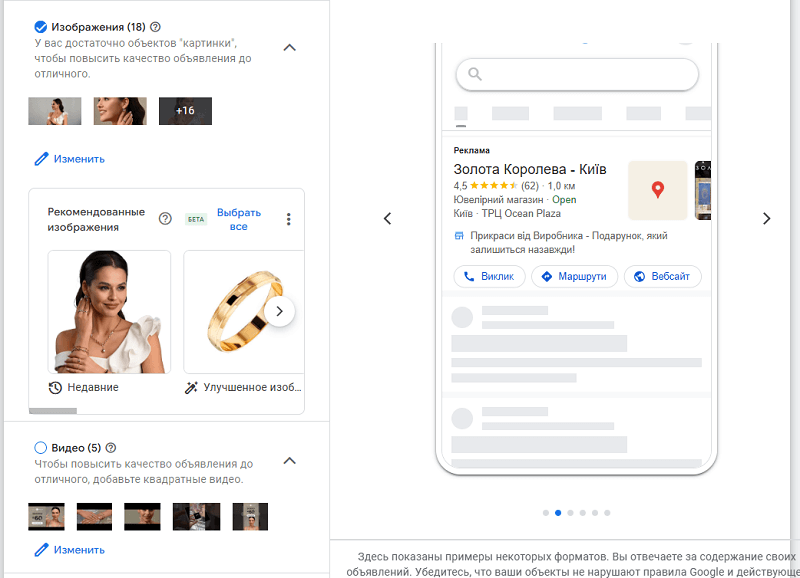
Video isn't formally required, but having it unlocks YouTube impressions and lets the algorithm mix more combinations, which often improves reach and results. Regularly review asset-group reports and Ad Strength to decide when to add/update video.
Video should be added in three formats:
- 16:9 — the standard horizontal format for YouTube.
- 9:16 — the Shorts format.
- 1:1 — the square video format.
Upload such ad videos to the channel, either publicly (e.g. Shorts) or via a link.
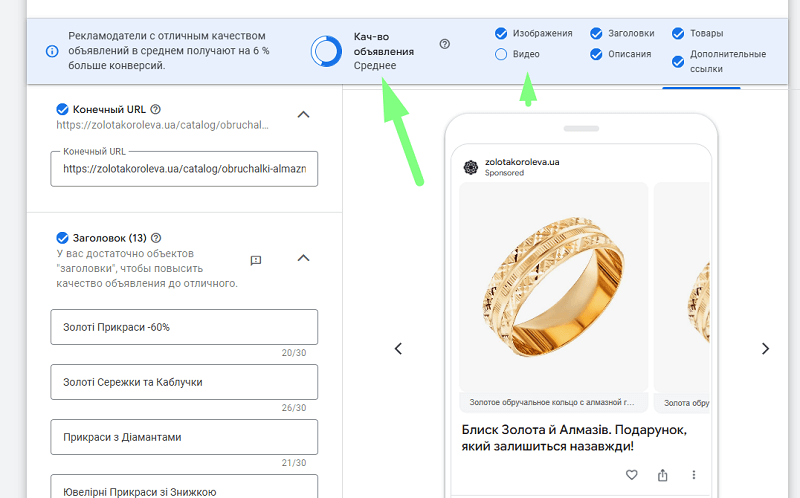
Regularly review Ad Strength and asset-group reports, replacing weak elements with new ones — that's basic PMax hygiene.
For example, it's better to use images with the background removed.

Ads itself has a built-in AI editor with a background-removal feature.

And then saves it in all convenient formats.

Also pay attention to text, image and additional elements.
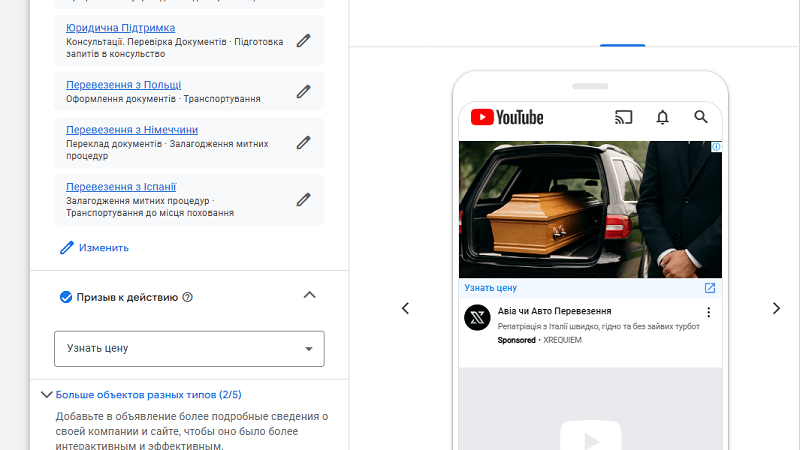
Asset quality and the right signals affect your campaign's current CTR and cost.
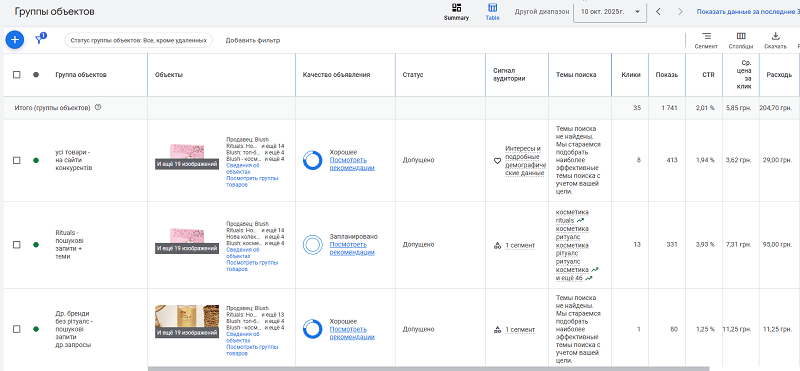
The role of feeds and landing pages
You can upload a feed of pages on which the ad should show.
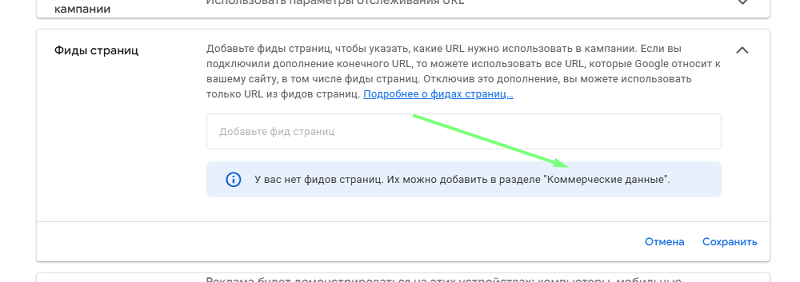
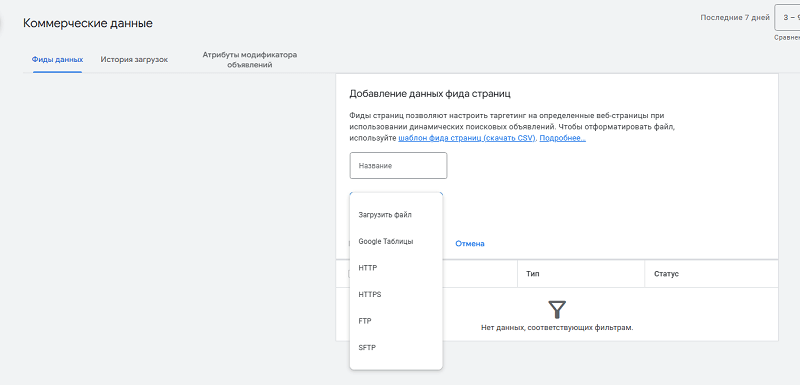
In the "Business data" section you can provide, for example, all the subpages of your services. Page feeds let you target specific web pages when using dynamic search ads.
Audience signals and targeting
The foundation of how PMax campaigns work isn't keywords or retargeting audiences — it's AI. You entrust the targeting conditions to it, providing data in three formats: audience segments, search themes, the type of site content (product feeds or your page). And you help it by spelling out the offer in the ad text.
Which signals to add?
Add Customer Match, remarketing lists and your own segments — these are "starting hints" for Google AI that speed up reaching goals, even though the system will expand beyond the signals if it sees a chance at conversion.
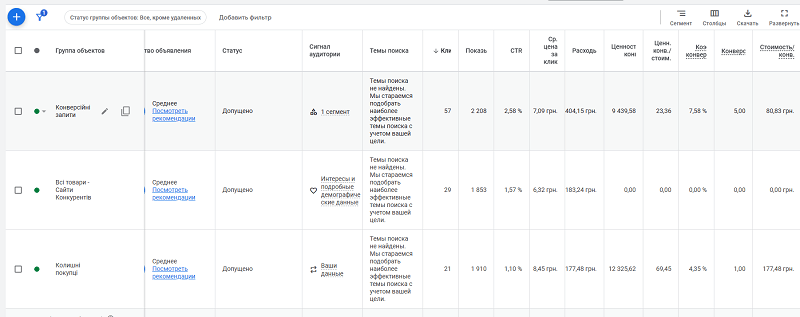
For example, you can collect all converting queries for the year, competitor sites, the audience of past buyers, abandoned carts — and build your segments for them.
A separate hint tool for PMax is search themes: up to 50 themes per asset group. These aren't keywords in the classic sense but guidance that steers the system toward relevant queries, complementing the feed and landing-page data. Search themes don't replace account-level negative keywords — use those to exclude junk traffic.
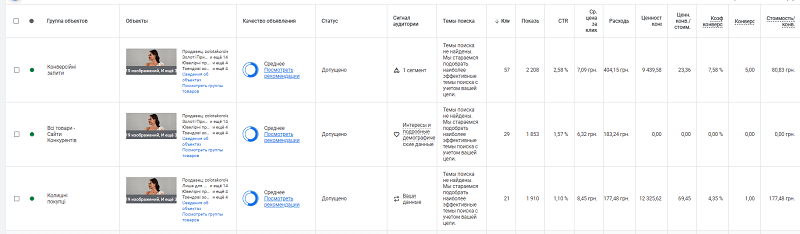
You can even add nothing at all, and if you simply have Google Merchant and a properly set-up asset, the system will figure out through learning exactly what you sell and to whom.
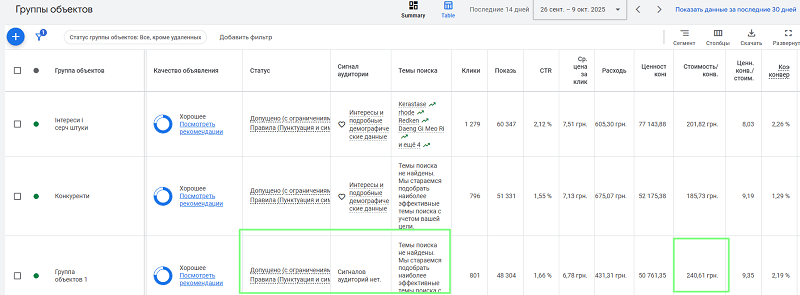
Example of an asset with neither signals nor search themes that still drives conversions, slightly worse than the neighboring ones
For B2B it's useful to import offline events (MQL/SQL/Closed-Won) to train the algorithm on real value.
Brand control
Sometimes you need your campaign not to show under a specific brand in a region — but how do you protect yourself? There's a way.
At the account/campaign level, apply Brand Exclusions in PMax to avoid unwanted queries and not cannibalize cheap brand clicks, if that conflicts with a strategy of scaling new users.
Google provides separate settings for including/excluding brands in Search/PMax, including multilingual brand recognition. In 2026 this gained an expanded campaign-level negative-keyword limit — up to 10,000 (it used to be lower), giving far more room to "carve out" irrelevant search traffic and avoid cannibalizing the brand (AdNabu).
Bidding strategies and budget
Smart Bidding for goals
The choice between tCPA and tROAS depends on the available data and the priority of scale vs. efficiency: for lead generation with a known cost — tCPA; for e-commerce with values — tROAS.
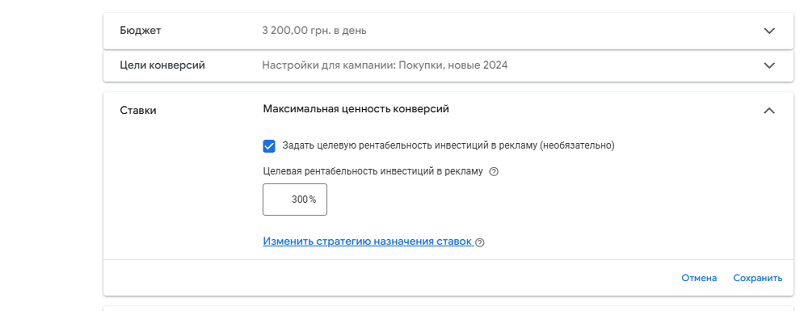
Don't "starve" the budget during the learning phase: with constraints, the campaign won't reach a critical mass of signals and stabilization will drag on.
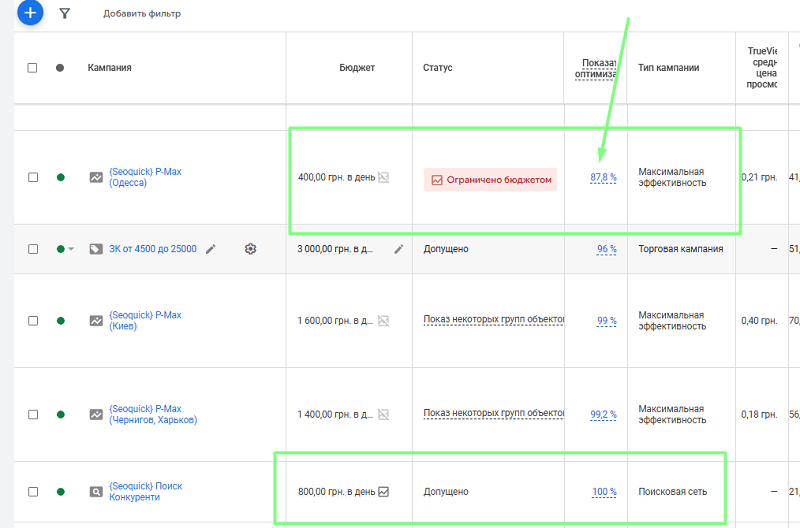
Always adjust budgets for the learning period first, otherwise it leads to an incorrect operating strategy.
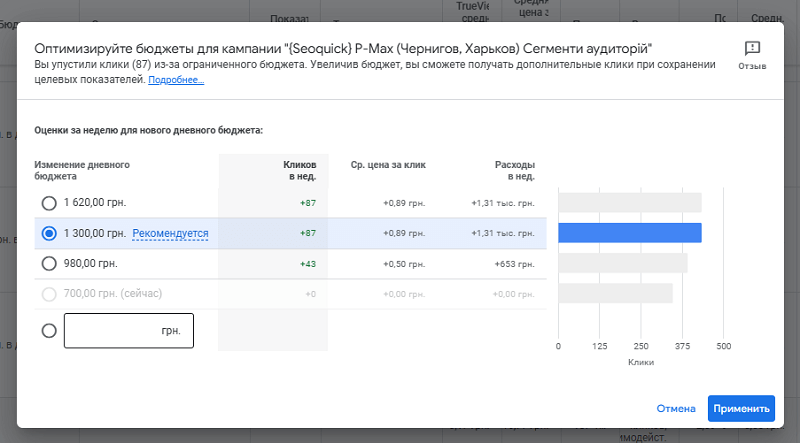
A frequent question: what minimum budgets are acceptable? There's no universal "minimum," but Google recommends giving the campaign at least 6 weeks to collect data and avoiding hard budget caps during this time, otherwise the model won't have time to "gain momentum."
Learning period and stabilization
The first 2-3 weeks are active signal collection and combination testing; stabilization is usually observed after ~6 weeks, depending on conversion volume and cycle length. Google directly advises waiting at least six weeks before evaluation and serious changes, since any intervention restarts learning.
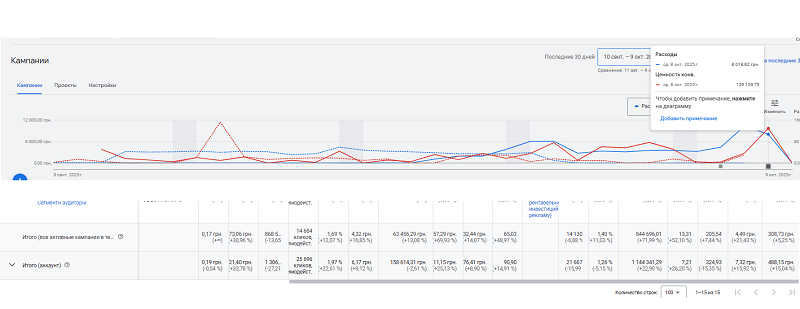
An example of how, in a month at a spend of UAH 8,000, campaigns delivered UAH 120,000 in sales per day. Over 30 days of operation, PMax campaigns showed +25.13% profit (compared to the previous month), while costs decreased by 2.61%.
And the main rule of running a PMax campaign is not to interfere with it.
A common mistake. Making daily bid/goal adjustments throws off the algorithm and "smears" the data.
Reporting, insights and quality control
Insights and asset-group reports
Use the Insights tab and asset-group reports to see demand trends, audience insights, top search themes and the performance of creative combinations.
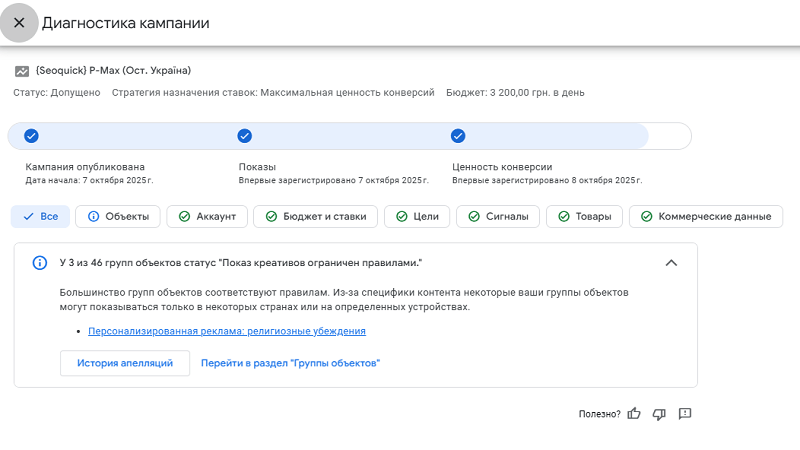
It's exactly these reports that suggest which assets to add/replace and where growth potential is hidden. You can also review issues and run campaign diagnostics here.
In 2026, Google significantly expanded PMax transparency. A channel performance timeline report appeared — a visual graph showing how Search, YouTube, Display, Discover, Gmail and Maps contributed to campaign results over a selected period. In parallel, asset-group reporting got deeper: a breakdown of results by channel and creative theme helps you understand more precisely which assets work and where (Google Ads Blog).
Lead quality (for B2B/services)
What happens if someone accidentally performs an action on the site and it counts as a conversion? Yes, it will spoil the statistics and make the campaigns ineffective.
So protect your forms and data-collection processes:
- reCAPTCHA;
- double opt-in;
- server-side validation
This reduces fraud and "junk" leads that the algorithm might accidentally optimize for. Import offline conversions and use Enhanced Conversions for Leads so the algorithm optimizes for real revenue, not just for a "submitted form."
Define macro conversions with real values and connect Enhanced Conversions / offline import; avoid "easy" proxy goals without business value. This helps Smart Bidding optimize for revenue rather than for random interactions.
Conversion analytics
Check that goals, events and their values are configured correctly, and that the chosen attribution aligns with business KPIs.
Analytics setup must be done before you launch campaigns — for now you can configure them and leave them in "drafts." Analytics, however, will need to be set up so that Google Ads receives information about conversions.
So at first you can set up a regular Search campaign and verify that quality conversions and their unit cost reach Ads.

Here's an example of a conversion with a value — counted as a purchase.
For long sales cycles it's critically important to import funnel stages (MQL > SQL > Won) so bidding models see the difference between a "cheap" and a "valuable" lead.
PMax for e-commerce
For Ecommerce we previously used a combination of two campaigns: Display Network campaigns and Shopping campaigns. And now it can be confusing which one to choose?

Shopping shows exclusively on the right, whereas PMax shows in both places
PMax covers all Google channels and automatically reallocates budget by efficiency, whereas standard Shopping focuses on shopping placements and requires more manual control. PMax is often used to scale / open up new demand, while Shopping is used for more controlled management of shopping traffic and search demand.
Feeds and Merchant Center
Yes, here you need to fully set up Google Merchant Center turnkey and connect it to your Google Ads account.
Optimize titles, descriptions and key attributes (brand, GTIN, categories), and watch for the absence of feed errors — this is exactly what ensures relevant impressions and contributes to ROAS / volume.
For stores, the accuracy of titles/descriptions/attributes in Google Merchant Center is critical: it's the feed that drives the relevance of search queries and impressions in Shopping / Free listings; so track errors and maintain clean product data.
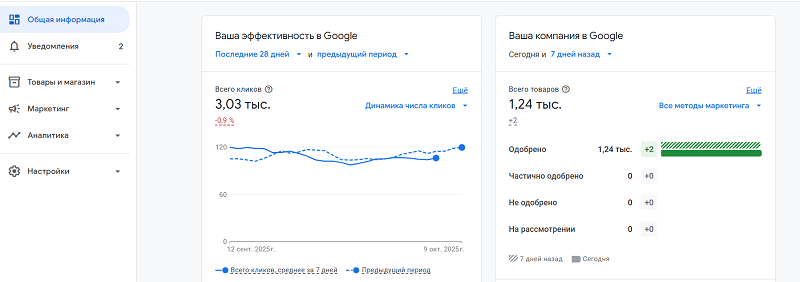
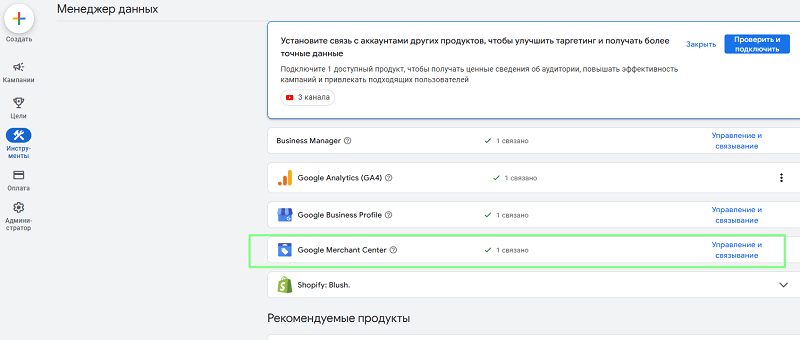
You must have a clean feed in Merchant that you add to your Google Ads account. Don't forget to add it in Data Manager.
The page where the product is located must reflect the feed attributes, otherwise the likelihood of user bounces and a drop in traffic quality increases.

The person who sees your product in an ad must see a correspondingly well-configured landing page for the product.

Google Merchant Center emphasizes directly: product-data quality shapes the behavior of ads and free listings, so maintain feed cleanliness and completeness systematically.
Follow GMC recommendations: clean and complete attributes (title, brand, GTIN), landing-page consistency and no errors/disapprovals in the feed. This directly affects visibility and the relevance of impressions in Shopping/PMax.
Group your assortment: bestsellers — into separate asset groups; high-margin categories — under their own tROAS goals and separate budgets for accelerated learning. Use seller labels (Custom_label) for this.
PMax for B2B and complex sales
Aligning with the funnel
Define conversions in stages: micro events (scroll/interactions), MQL, SQL and closed deals.
For this, think through all the paths to reaching this macro goal. Usually the "page views" conversion isn't added to accounts, so sometimes the chart looks like this.
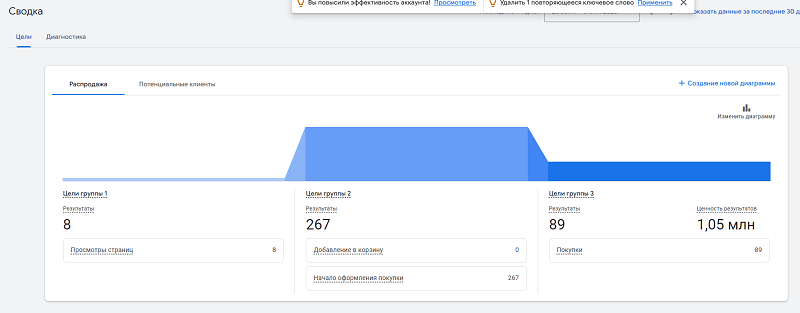
Connect this with offline-data import and Customer Match so the models focus on value rather than "cheap" clicks/leads.
Align KPIs with sales and run lead scoring to clean the data for bid training.
Number of campaigns per account
As you've seen, our number of campaigns is definitely more than one. And there's logic to that.
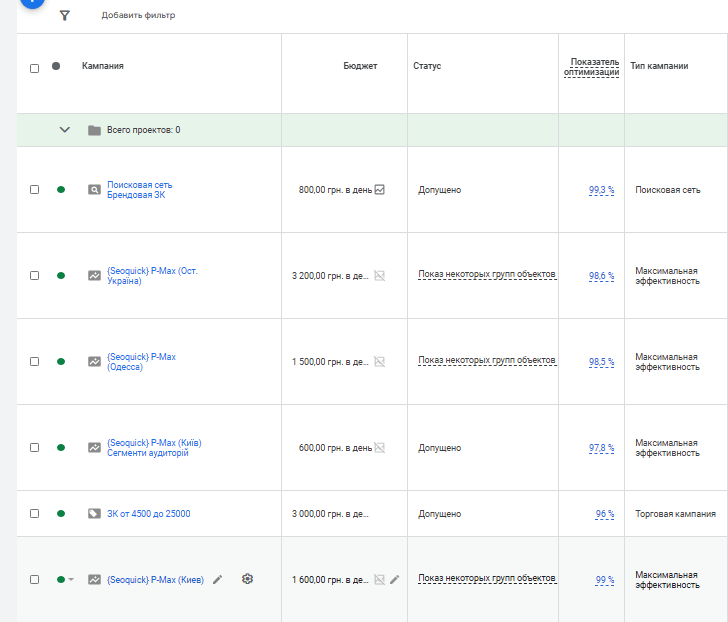
For example, we recommend creating campaigns:
- Search campaigns — branded, on competitors.
- Regular shopping for high-margin products.
- Performance Max, split by regions and interaction types: search queries, retargeting signals, competitor signals.
But at the first stage, start with the minimum number of campaigns and split asset groups by categories/brands/value. High-margin products or bestsellers are worth separating under their own goals/budget so the models learn and scale faster.
When the unit economics differ substantially (margin/logistics/demand), create separate campaigns or tROAS goals with separated budgets for clear learning and forecasts. Then it's better to distribute campaigns by region — this lets you add geo elements to ad texts.
Common mistakes and how to avoid them
Too few or irrelevant assets
An insufficient number of creatives "narrows" the inventory and combinations, so the system shows less often. Expand the asset set and replace weak ones — following the hints from reports and Ad Strength.
Premature conclusions
Don't "kill" the campaign before learning finishes: hold out for at least ~6 weeks and plan changes no more often than once every 1-2 weeks so you don't restart the model. If you need to compare different configurations (one broad asset group vs. several segmented ones, product-focused creative vs. benefit-focused), use PMax Experiments — they let you test variants against your current campaign without cloning it, and also need 4-6 weeks for valid conclusions.
Poor tracking
Incorrect/duplicate goals, missing values and offline data are the most common cause of weak optimization. Configure measurement and (if needed) Enhanced Conversions for Leads for more accurate bidding.
Our client reviews

"Very happy working with Nikolay, an exceptionally individual approach to the project. Huge experience in SEO. I wish him and his team further success, new ideas and rapid growth."
- Site optimization
"We held our first meeting and agreed to cooperate; before that there had been about ten meetings with Google Premier partners who hold the status. However, I want to note that the first meeting and conversation with Nikolay and the SEOquick company exceeded all expectations, which the whole team of more than six people confirmed. Undoubtedly, there's still a long road ahead, and you count your chickens in the fall, but the first impressions and the colleagues' opinions match mine — that this company deserves attention, and we decided to cooperate. A high-level specialist.
Team: Stock.ua ;)"

"So far only positive emotions working with seoquick. I hope it stays that way in the future too!"
- Region – Ukraine
- Niche – website hosting
- Site traffic – 11,100

"A really great SEO consultation from Nikolay. Honest, deep, clear! Many thanks"

"Advantages:
Promptness, Quality, Professionalism, Cost"

H1 vs Title: how many H1 tags you need and how they differ
H1 in SEO 2026: how many H1 headings are acceptable, optimal length, how it differs from title, empty H1 and H1 as an image. Based on a measurement of 77 pages from the Ukrainian top and data on how often Google replaces your title with the H1.
Read →
Pagination SEO: how to index list pages without breeding duplicates
Pagination SEO in 2026: canonicals on list pages, noindex, rel=next/prev, infinite scroll, crawl budget. Based on a check of 36,000 traffic-driving URLs across twelve Ukrainian retailers, plus a teardown of pagination at Foxtrot, Epicentr and our own blog.
Read →
URL Structure: The Full Guide to Addresses You Can't Change After Launch
How to get URLs right: transliteration or Cyrillic, slug length, duplicates from case and filters, pagination, UTM tags, redirect maps. A breakdown of Rozetka, Comfy, Prom and Makeup URLs plus 2026 research data.
Read →Want to apply this to your site?
We will review the current situation, find the first growth levers, and suggest a practical working format.