How to Increase Google CTR in 2026: Research and 12 Tactics
Position #1 no longer guarantees clicks: AI Overviews eat up to 61% of CTR on informational queries. We've updated our click-through research and gathered the tactics that win clicks back in 2026.


Back in 2019, I ran my own study: I analyzed more than 15,000 queries from Google Search Console across our agency’s major clients and our own site to find out which query types deliver the highest CTR in search.
Since then, Google’s results page has changed more than it did in the previous ten years: AI Overviews and AI Mode arrived, and the click-through curve sagged across every position. That’s why this article has two layers: fresh 2025–2026 data on what’s happening to CTR in the age of AI answers, and the findings of our 2019 study — a historical baseline that still largely holds up.
To increase your Google CTR in 2026, you need to: optimize your title for intent (up to 60 characters, with numbers and the current year), write your description like an ad, implement structured data, keep publication dates fresh, set up a favicon, and earn citations in AI Overviews — according to Seer Interactive (2025), pages cited in an AI answer get 35% more organic clicks.
What Is CTR in Search
CTR (click-through rate) in search is the ratio of clicks on your snippet to the number of times it was shown in the results, expressed as a percentage. If a page appeared for a query 1,000 times and got 100 clicks, its CTR is 10%.
Organic CTR follows a curve: the lion’s share of clicks goes to the top 3, noticeable values hold up to roughly positions 6–7, and then comes a steep drop. Advanced Web Ranking publishes a live, continuously updated curve.
The key takeaway that hasn’t changed since 2019: not all keywords are equally useful. In PPC, everyone learned long ago to pick queries wisely — in paid traffic you pay for impressions on queries, not for leads. The same logic applies to organic: some keywords simply don’t generate clicks, and chasing rankings for them is a waste of resources. And in 2026, a new filter was added on top: some queries get “eaten” by AI answers.
CTR in the Age of AI Overviews
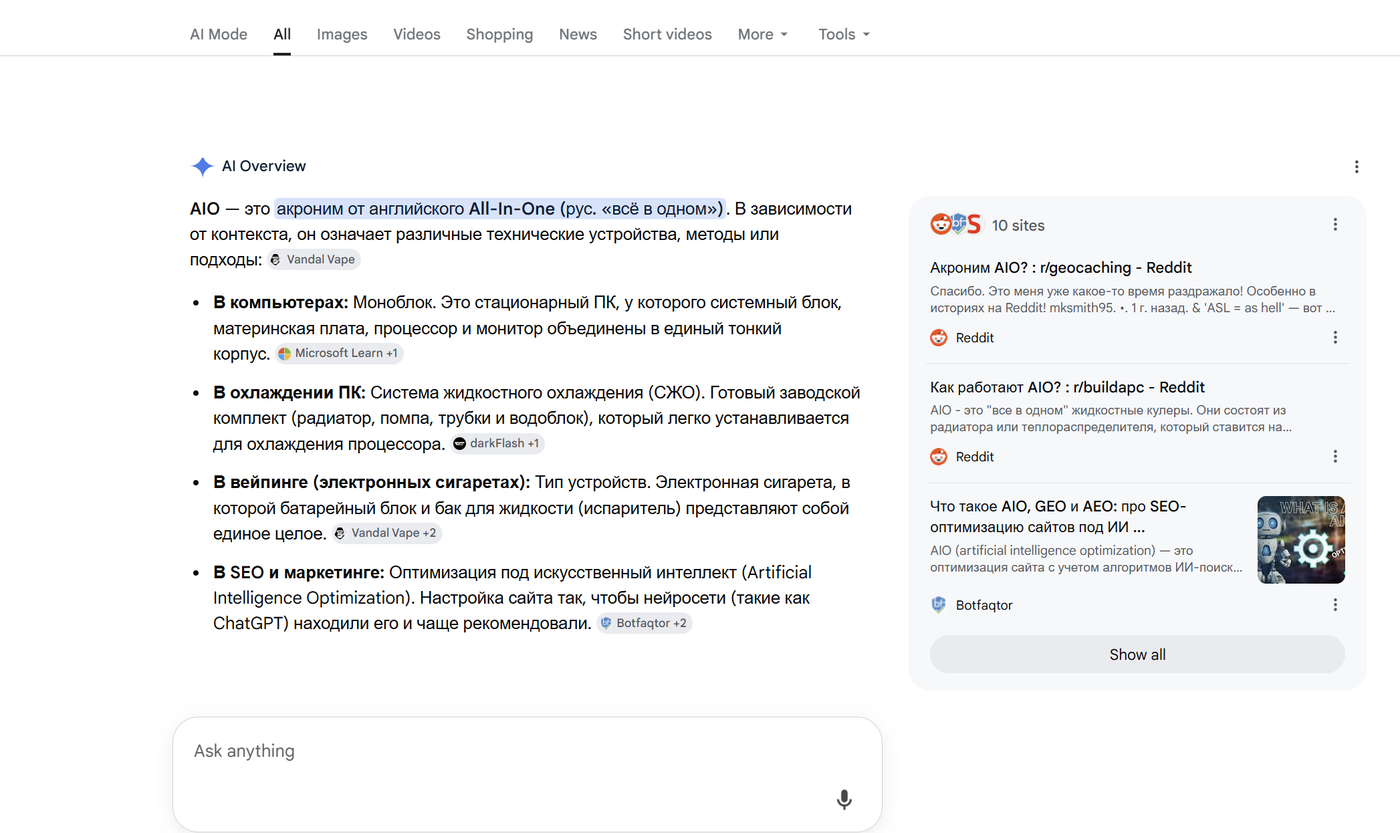
AI Overviews are AI-generated answers that Google displays above the organic results. They launched in May 2024 and, by various estimates, appeared on roughly a third of all search results pages by 2025. For CTR, this was the biggest blow in the entire history of organic search.
What the 2025–2026 Data Shows
Seer Interactive analyzed 3,119 queries across 42 companies — 25 million organic impressions from June 2024 to September 2025. The results:
- On queries with AI Overviews, organic CTR fell by 61% — from 1.76% to 0.61%. Paid CTR on the same queries dropped even harder — by 68%.
- Even queries without AI Overviews lost 41% of their click-through rate in a year: user behavior itself is changing as people get used to receiving answers without visiting a site.
- There’s good news too: sites that are cited inside an AI Overview get 35% more organic clicks than those that aren’t.
These figures are confirmed by independent studies. Ahrefs, in its updated research, recorded a 58% drop in clicks to top-ranking pages when an AI answer is present. Pew Research Center (2025) studied the real behavior of 900 users in the US: with an AI summary present, users clicked a regular result in only 8% of searches versus 15% without one — meaning click-through rates nearly halve. Links inside the AI summary itself were clicked in just 1% of cases, and users ended their session after an AI answer more often (26% vs. 16%).
The entire CTR-by-position curve has shifted as well: according to a GrowthSrc study of 200,000 keywords, the average CTR of position one fell from 28% in 2024 to 19% in 2025, and position two dropped from 20.8% to 12.6%.
The picture isn’t static, though. According to Search Engine Land, the CTR of links inside AI Overviews, after bottoming out at 1.3% in December 2025, grew to 2.4% by February 2026 — users are gradually learning to click from AI answers too. This channel can no longer be ignored.
Which Queries Were Hit Hardest
According to Pew Research, AI summaries appear on 60% of question-type queries (“how,” “what,” “why”) and on 53% of long queries of 10+ words — and on only 8% of short one- or two-word queries.
Here’s the bitter irony: it was precisely informational question queries that our 2019 study named among the most clickable (CTR of 7–29%). Today, it’s the category most cannibalized by AI answers. Branded, navigational, and narrowly commercial queries (SKUs, model names, “buy X in city Y”) suffered far less — for those, users still need a specific website, not a summary.
What This Means for Snippet Optimization
In 2026, CTR optimization splits into two tracks:
- The classic snippet. It now competes not with nine blue links but with a ready-made AI answer. A generic title that restates the obvious is doomed: the user has already read the obvious in the summary. What works is specificity, numbers, signals of first-hand experience (“we tested,” “research,” “case study”), and a current year — things an AI answer can’t offer.
- Getting cited in AI Overviews. Direct answers to questions in the opening paragraphs, clear “X is…” definitions, and content structured with lists and tables increase your chances of making it into the summary — and that’s +35% CTR, according to Seer Interactive.
SEOquick’s experience. For a medical website, we built the content exactly this way — direct answers, structure, expertise. The result: the site is cited in Google’s AI answers for 26,714 queries and holds the TOP-2 spot for “dental clinic Kyiv.” Details are in our medical website promotion case study (in Russian).
How to Measure CTR in Google Search Console in 2026
Measurement has become trickier, and you need to account for this before panicking over a sagging CTR:
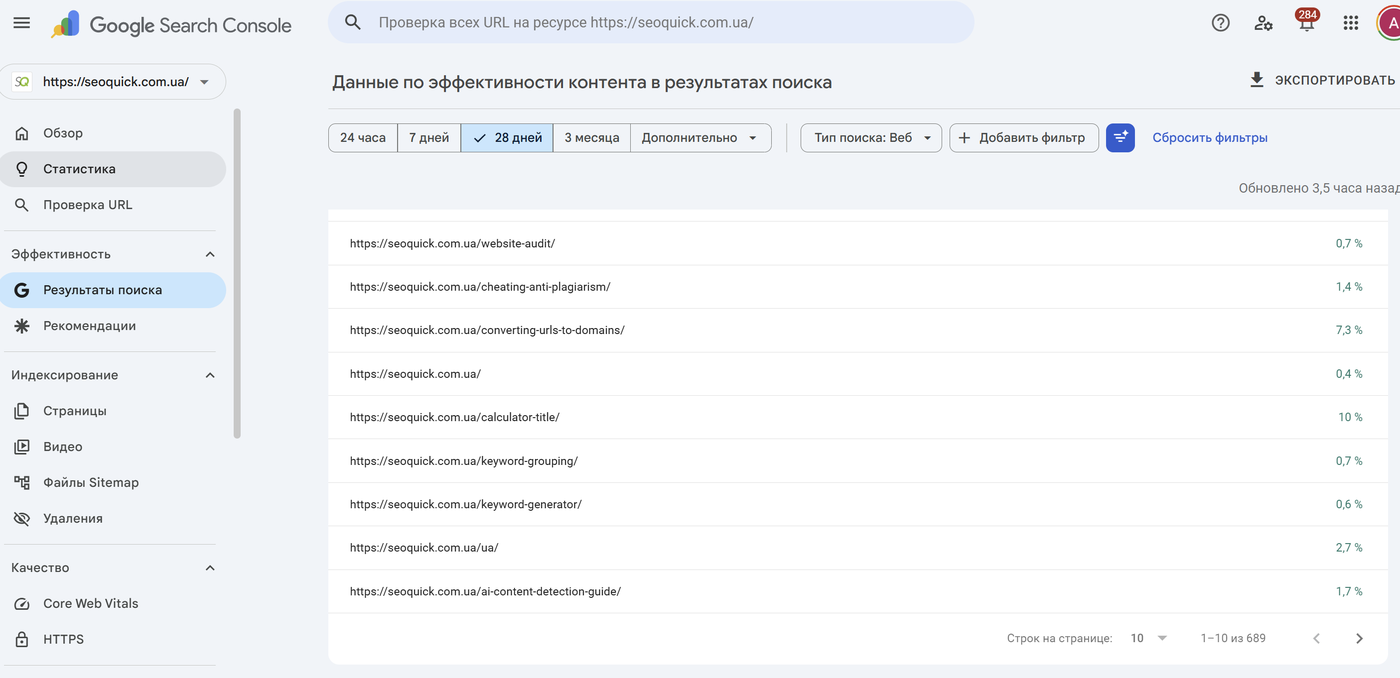
- Impressions and clicks from AI Overviews are counted under the regular “Web” search type — there’s no separate AI-answer filter in GSC. Since June 17, 2025, AI Mode data has been blended in there as well.
- If a URL appears both in the AI summary and in the regular results on the same page, only one impression is counted, and the position is taken from the topmost block.
- In April 2026, Google confirmed a logging bug: since May 2025, Search Console had been inflating impressions. Inflated impressions with the same clicks = artificially deflated CTR. Compare trends, not absolute values.
A practical diagnostic workflow:
- In the Performance report, segment queries by intent using regular expressions: question-type (
^(how|what|why|which)), branded, commercial. - Look for the pattern “position stable, impressions stable or growing, CTR falling” — that’s almost always AI-answer cannibalization, not a snippet problem.
- Check problem queries manually or with third-party tools: is there an AI Overview for them, and are you cited in it?
Our 2019 Research: What Worked Before AI
Below are the findings of our study, conducted in late 2019 on a sample of more than 15,000 Search Console queries from various projects, cross-checked against Ahrefs data. The numbers are given as is — an honest snapshot of the “ten blue links” era. Wherever a conclusion is outdated or needs adjusting, we say so.
Branded Queries: 25–62% CTR
Branded queries are searches where users look not for a product or service but for the name of your company, brand, or domain.
In the study, this turned out to be the most clickable query type: CTR from 25% to 62%, accounting for up to 40% of a site’s total traffic. Our own site’s branded CTR was 28.83%, while a client of ours — a manufacturer of EV charging stations — hit 57.47%, with branded queries making up 32% of all traffic.
Why branded queries pay off:
- This is the warmest audience with the highest conversion potential.
- Google shows an enhanced snippet for them, with sitelinks and a Knowledge Panel — and for local businesses, a card in Google Maps.
- Often, the entire first page of results belongs to you.
What to keep in mind: track every spelling variant of your brand (different scripts, transliterations, typos) — the results for each can differ. Set up a Google Business Profile, work through a local SEO checklist, and don’t skimp on branded PPC — otherwise competitors’ ads will steal the clicks on your own brand.
A separate pain point is naming. If a company is named after a generic service, or its name coincides with a popular homonym, branded CTR will be weak: users simply won’t find you above the fold. Check the search results for your future name before launching the business.
Status in 2026: more relevant than ever. Branded queries suffer the least from AI Overviews, and a strong brand is a citation factor in AI answers.
Commercial and Product Queries: Precision Wins
Generic commercial queries produced mixed CTR: some of them are half-informational by intent. But precise product queries — with an SKU or model name — showed a CTR of up to 17% versus 6.98% for queries without a model specified. Queries containing words like “installments,” “leasing,” or “financing” also consistently got more clicks.
A product-query optimization checklist (still valid today):
- Create dedicated product pages; write the title and H1 based on the product nomenclature.
- Pay attention to the description — borrow phrasing ideas from your competitors’ PPC ad copy.
- Add Product structured data in JSON-LD format.
- Include the product description and specifications.
- Equip the page with photos and ALT tags.
Status in 2026: still works. Narrow transactional queries trigger AI Overviews the least, and Product markup puts price, availability, and rating right in the snippet.
Informational Queries: 6.9–27% CTR
Queries with “how,” “what,” and “where” ranking in the top 3 delivered a CTR of 7 to 29%. The hypothesis held: question keywords were the gold mine of article traffic — our articles built around such queries held top positions for years with a CTR above 20%.
A convenient way to find question keywords is our free keyword generator: enter your seed queries in the first column and question words in the third, generate the combinations, and check their search volume and competition.
Status in 2026: this conclusion needs the most serious correction. It’s precisely question queries that trigger an AI Overview 60% of the time (Pew Research, 2025) — a bare answer to a simple question no longer brings clicks. What works is depth, proprietary data, and first-hand experience that the AI summary doesn’t have.
Geo-Dependent Queries: 17–19% CTR
Queries that included a city name delivered a CTR of 17–19% — two to three times higher than expected for their positions, while the same queries without a city got far fewer clicks. But only with a genuine local presence: sites that tried to harvest geo traffic without local offices and Google Maps listings got low CTR and a negligible share of traffic.
A geo-query checklist:
- Determine which geo queries have demand in your niche and exactly how users write the city name (in full, abbreviated).
- Create Google Business Profile listings for each location.
- Include key cities in your titles and content.
- Build a separate page for each location with unique content: address, directions, hours, contacts.
Status in 2026: still works. Local results with a map pack remain the zone AI answers intrude on the least.
Numbers and the Year in Queries: Up to 30% CTR
A simple trick borrowed from Western colleagues: tag your informational content with the current year. In the study, the CTR of such queries reached almost 30%, and adding the year to a query increased CTR by up to 10x. For comparison: an article without a year targeting a highly competitive query collected a CTR of just 3.17%.
Rules of use: add the year only where content freshness actually matters, and genuinely update the material — not just the number in the title. Otherwise it’s a direct path to losing trust and rankings.
Status in 2026: works, but with stricter rules. Google shows the date in the snippet and can cross-check claimed freshness against reality. More on this in the tactics section below.
“Review,” “Comparison,” “Rating” Queries: Up to 16.35% CTR
The formula “product name + the word review” delivered a CTR of up to 16.35%. The algorithm: collect the combinations, pull the metrics in Ahrefs, and if there’s little content for the query online but traffic exists — write the review. Reviews interlink beautifully with product pages and pull their rankings up.
Status in 2026: works, adjusted for E-E-A-T. After Google’s reviews updates, only content with signs of real experience wins: your own photos, tests, measurements, pros and cons.
The Thin-Content Strategy: 25% CTR in Three Months
The method: find articles that hold top positions for traffic-rich queries but have gone stale or incomplete, collect their keywords, and write a fuller, fresher piece. Our first article built this way reached the top within months and held a 25% CTR for its first three months — despite less-than-stellar positions.
Why it worked: more complete material, fresher information, and the right title built on well-chosen keywords.
Status in 2026: the principle survives, but the entry bar is higher — “a bit longer and fresher” is no longer enough. You need material the AI summary can’t substitute: data, experience, expertise.
12 Tactics to Increase CTR in 2026
Let’s pull everything together into a practical list — from snippet classics to AI realities.
- Title up to 60 characters with the keyword up front. Google truncates long titles and frequently rewrites them altogether. Be specific, lead with the benefit, no clickbait.
- Numbers and the year in the headline. “12 tactics,” “a study of 15,000 queries,” “in 2026” — numbers catch the eye in the results. The year — only if the content is genuinely updated.
- Description written like an ad. 150–160 characters: problem, solution, call to action. Google replaces the description about half the time, but when yours does show — it should sell the click.
- Structured data. Product (price, availability, rating), Review, BreadcrumbList, VideoObject, Organization. A rich snippet takes up more space and collects more clicks.
- A favicon and a recognizable site name. Google displays the favicon and brand name above every result. A default placeholder instead of a favicon means less trust and fewer clicks, especially on mobile.
- A fresh date in the snippet. Mark up datePublished and dateModified, and update content regularly. A snippet with a five-year-old date loses to its neighbors even from a good position.
- A direct answer in the first paragraph. A self-contained answer to the page’s main question in 40–60 words is both a shot at an AI Overviews citation and ready-made snippet text.
- “X is…” definitions. Clear definitions of terms make it into both featured snippets and AI answers more often.
- Nailing the intent. An informational page won’t collect clicks for a commercial query, and vice versa. Check which pages Google already ranks at the top for the query before optimizing yours.
- Readable URLs and breadcrumbs. The page path is visible in the snippet —
site.com/blog/how-to-increase-ctris more clickable thansite.com/?p=51184. - Regular low-CTR audits in GSC. Once a quarter, export queries with good positions (top 10) and a CTR below what’s expected for the position — and rewrite those pages’ titles and descriptions first.
- Strengthening the snippet against the AI answer. For queries where an AI Overview has appeared, add to your title what the summary lacks: first-hand experience, a case study, data, an opinion. And in parallel, optimize the content to get cited in the summary itself.
SEOquick’s experience. In a project promoting a dental clinic, we ran exactly this kind of audit: we found and strengthened 68 low-CTR pages — rewrote the meta tags, refreshed the content, added structure. Combined with the rest of the work, this helped stabilize traffic at 75,966 visits per month — roughly a 7x increase. Details are in our dental clinic promotion case study (in Russian).
I covered how to write clickable titles for today’s search results in detail in a recent video (in Russian):

And the foundational method for working with meta tags is in our evergreen video, recorded back in the days of the original study:

Key Takeaways
Google CTR in 2026 is a game on two fronts. The classics haven’t gone anywhere: branded queries deliver a 25–62% CTR, precise product queries up to 17%, geo queries 17–19%, and numbers plus the year in the title multiply clickability. These findings from our 2019 study are still confirmed by practice today.
But an AI layer has settled on top of the classics: on queries with AI Overviews, organic CTR fell by 61% (Seer Interactive, 2025), with informational question queries hit hardest. The answer isn’t abandoning snippet optimization — it’s leveling it up: earn citations in AI answers (+35% CTR), differentiate your titles with experience and data, and audit your CTR in Search Console regularly, adjusted for the new impression-counting rules.
In 18 years in SEO, we’ve lived through more than one “death of organic search” — and every time, the winners were those who adapted their tactics ahead of the competition, not those who waited for the old rules to come back.
FAQ
What is CTR in Google search?
CTR (click-through rate) is the ratio of clicks on a snippet to the number of its impressions in the search results, as a percentage. If a page was shown 1,000 times and received 100 clicks, its CTR is 10%. You can see CTR by query and by page in the Performance report of Google Search Console.
What counts as a good CTR in 2026?
It depends on the position and query type. For position one without an AI Overview, 19–30% is considered the norm; with an AI answer present, 10–15%. Branded queries deliver 25–60%. If a page is in the top 5 with a CTR below 5%, the snippet needs work — or the query has been cannibalized by an AI answer.
How do AI Overviews affect a site’s CTR?
According to Seer Interactive (2025), organic CTR drops by 61% on queries with AI Overviews. According to Pew Research, users click regular results half as often when an AI summary is present. At the same time, sites cited inside the AI answer get 35% more clicks.
What’s the fastest way to increase snippet CTR?
Find queries in Search Console ranking in the top 10 with a CTR below expected, and rewrite those pages’ titles and descriptions: keyword and numbers at the start of the title (up to 60 characters), and a description written like a mini-ad with a call to action. Add structured data and a fresh date — the effect is usually visible within 2–4 weeks.
Should you add the year to your title?
Yes, if the content is genuinely updated. In our study, adding the year to a query increased CTR by up to 10x. But formally swapping the number without updating the material backfires: Google shows the date in the snippet and demotes pages with fake “freshness.”

H1 vs Title: how many H1 tags you need and how they differ
H1 in SEO 2026: how many H1 headings are acceptable, optimal length, how it differs from title, empty H1 and H1 as an image. Based on a measurement of 77 pages from the Ukrainian top and data on how often Google replaces your title with the H1.
Read →
Pagination SEO: how to index list pages without breeding duplicates
Pagination SEO in 2026: canonicals on list pages, noindex, rel=next/prev, infinite scroll, crawl budget. Based on a check of 36,000 traffic-driving URLs across twelve Ukrainian retailers, plus a teardown of pagination at Foxtrot, Epicentr and our own blog.
Read →
URL Structure: The Full Guide to Addresses You Can't Change After Launch
How to get URLs right: transliteration or Cyrillic, slug length, duplicates from case and filters, pagination, UTM tags, redirect maps. A breakdown of Rozetka, Comfy, Prom and Makeup URLs plus 2026 research data.
Read →Want to apply this to your site?
We will review the current situation, find the first growth levers, and suggest a practical working format.