URL structure: addresses you can't change after launch
A page address looks like a detail you can fix whenever you feel like it. In fact it's the only thing tying your page to its rankings, its links and its history in search. How to get the address right once and never rework it — with a breakdown of URLs from four of the largest Ukrainian stores and research data from 2026.



I will look at your site and answer your questions on the topic of this article. 30 minutes, no slide decks, no pressure.
Book a consultationShort answer: a URL is the page's primary key in search. Rankings, accumulated links, Search Console history, citations in AI answers — all of it is tied to one specific address. Change the address and you start your relationship with Google over, even with redirects set up perfectly. Which is why the decisions in this guide belong before launch, not after.
Hundreds of sites with traffic drops have gone through our audits over the years. In roughly one case in five, the root cause wasn't the content and wasn't the links — it was that somebody once decided to tidy up the URLs. The tidying went fine. The traffic left.
This is a full guide to addresses: from the anatomy of a URL to a redirect map for a migration. With a breakdown of how Rozetka, Comfy, Prom and Makeup solve these problems — not from a textbook, but from their actual URLs and robots.txt files. Plus the rake we stepped on ourselves, on our own site, in August.
What a URL is made of: the anatomy of an address
Before arguing about hyphens and transliteration, it helps to agree on the words. Let's take a real address and pull it apart:
https://rozetka.com.ua/ua/maska-dlya-litsa/c4657310/producer=face-boom/?sort=cheap#reviews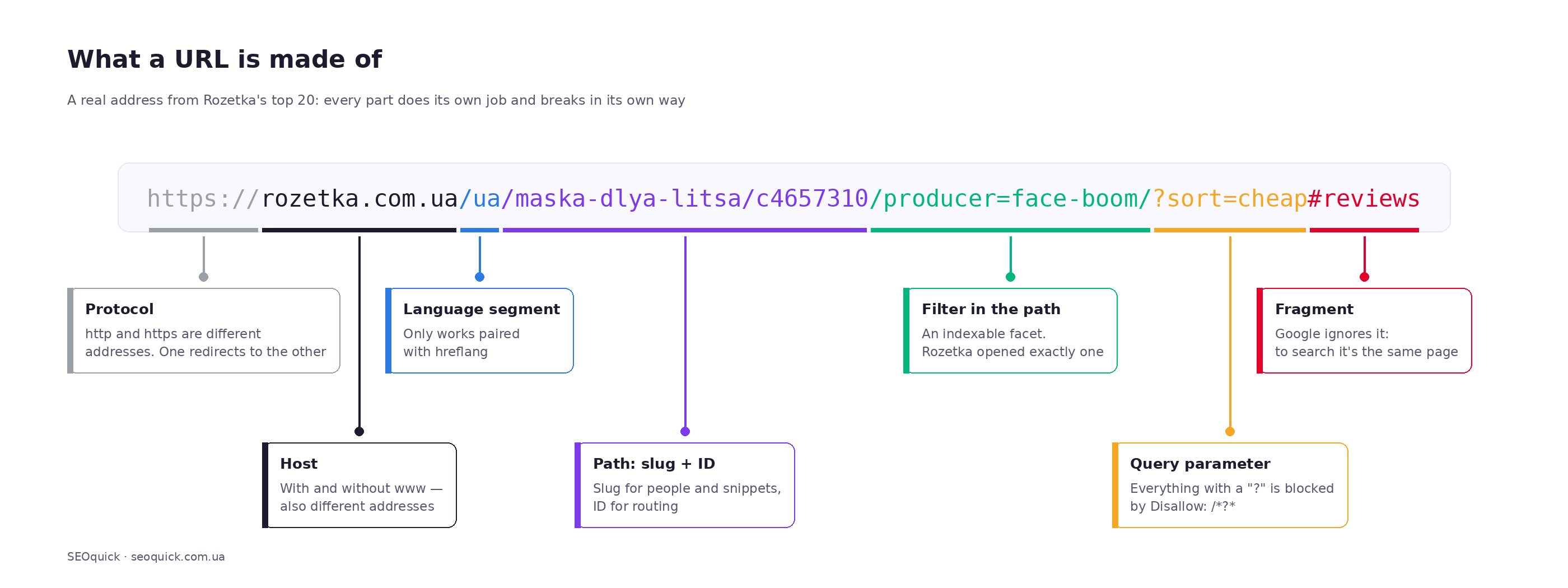
| Part | Example | What it does and what it affects |
|---|---|---|
| Protocol (scheme) | https:// | Defines how the connection is made. To a search engine, http and https are different addresses. One has to redirect to the other. |
| Host | rozetka.com.ua | The domain. With and without www are also different addresses; you need one canonical version. |
| Subdomain | auto., build. | To Google this is largely a separate site with its own authority. Choosing a subdomain is a strategic decision, not a technical one. |
| Language segment | /ua/ | Marks the language version. Only works paired with hreflang. |
| Path | /maska-dlya-litsa/c4657310/ | The section hierarchy. The main part responsible for making the address readable to both people and crawlers. |
| Slug | maska-dlya-litsa | The human-readable part, usually a transliteration of the page name. This is the bit whose length gets measured in studies. |
| Filter segment | producer=face-boom/ | Rozetka moved the filter into the path instead of the query string — more on why below. |
| Query parameters | ?sort=cheap | Sorting, filters, analytics tags. The number one source of duplicates on any store. |
| Fragment (anchor) | #reviews | Never sent to the server and ignored by search engines. You can't swap page content with a fragment. |
I'll use these names throughout the article. It's especially important to keep path segment and query parameter apart: the same filter value written those two ways behaves completely differently in search.
What Google actually requires, and what it merely recommends
Google's hard requirements are few, and they're boring. Everything else is practice that helps people and crawlers but isn't a formal rule. Keeping the two apart is useful: in an argument with a developer you'll know exactly where the standard ends and your preference begins.
What's mandatory
Standard compliance. Google Search supports URLs per IETF STD 66. Reserved characters have to be percent-encoded. If a developer dropped a raw space, quote or square bracket into an address, you're outside the standard and behaviour from there is anyone's guess.
Fragments don't change content. Addresses like example.com/#/catalog are a classic ailment of single-page apps built on older frameworks. Google doesn't see those routes as separate pages. The fix is the History API — real paths instead of a hash.
Case matters. The docs say it plainly: URLs are case-sensitive, /APPLE and /apple are different pages. That isn't a recommendation — that's how the web works.
What's recommended
Here Google gives "good / bad" pairs, and they're worth quoting exactly:
| Aspect | Google recommends | Google advises against |
|---|---|---|
| Descriptiveness | example.com/wiki/Aviation | example.com/index.php?topic=42&area=3a5e |
| Word separator | summer-clothing/filter?color-profile=dark-grey | summer_clothing/filter?color_profile=dark_grey |
| Non-ASCII characters | example.com/%D9%86%D8%B9%D9%86%D8%A7%D8%B9/ | example.com/نعناع/ |
| Parameter format | ?category=dresses&sort=low-to-high | ?[category:dresses][sort:price] |
| Language of the address | example.com/lebensmittel/pfefferminz for a German audience | English words for a German audience |
The hyphen-versus-underscore explanation is purely technical: to a search engine color_profile is one word, color-profile is two. That difference decides how the system tokenises the address.
Google separately lists the parameters that generate duplicates most often: referrer tags (ref=foo%2Cbar), session IDs (sessionid=6EE2BF1AF6A3D705D5561B7C3564D9C2), sort orders (search_sort=relevance). The recommendation is to block such addresses in robots.txt.
How the big Ukrainian stores handle it: a look at real URLs
Theory is theory, but it's more interesting to see what sites that have lived in these results for years actually do. I exported the 120 highest-traffic URLs from four large Ukrainian projects and looked at the decisions behind them. Plus I read their robots.txt files, because without those the picture is incomplete.
Rozetka: filters moved into the path, everything with parameters blocked
The most interesting of the four. Look at real addresses from their top results:
https://rozetka.com.ua/kalkulyatory/c2560887/
https://rozetka.com.ua/ua/hammer-tel000844/p458511719/
https://rozetka.com.ua/maska-dlya-litsa/c4657310/producer=face-boom/
https://auto.rozetka.com.ua/ua/mini-azs/c4630082/razreshennie-gidkosti=benzin/
https://rozetka.com.ua/ua/producer/jysk/
What's baked in here:
- A word plus an identifier. A category is
/kalkulyatory/c2560887/: a human-readable slug and a technical ID prefixed withcfor category. A product is/hammer-tel000844/p458511719/, wherepmeans product. That scheme lets them rename a category without breaking routing: the system finds the page by ID, while the slug works for people and for the snippet. - A filter is a path segment, not a parameter.
producer=face-boom/sits in the path and ends with a slash. It looks like a parameter, but syntactically it's part of the path. - Always a trailing slash. Out of 120 addresses, 120 have one. Zero exceptions, which means the rule is wired into the platform.
- No parameters in the top results at all. Not a single address with a
?among the highest-traffic ones.
Those last two points are explained by their robots.txt, and this is where it gets genuinely interesting. There's a rule Disallow: /*?* — everything containing a question mark is blocked. On top of that they block */search/, */comparison/, */cabinet/*, */section/*/*/, plus the gclid, utm_medium=rooms, yclid and tab= tags.
Now the key part: alongside all that sits Allow: */section/*/producer=*/. The manufacturer filter is the one they deliberately opened for crawling. But only on its own — directly under the allow rule come two disallows:
Allow:    */section/*/producer=*/
Disallow: */section/*/producer=*;*/
Disallow: */section/*/producer=*,*/
The semicolon and the comma are the separators the platform uses to glue several filter values into one segment. So "brand" is open, while "brand + price", "brand + colour", "brand + anything else" are closed. A note on wording: robots.txt governs crawling, not indexing; a blocked address can technically end up in the index through external links, just without its content. In practice, for filter combinations that's enough.
Put the two observations together and you get a deliberate strategy, not an accident. Anything that lands in parameters is, by definition, not indexed at Rozetka. Anything that should be indexed lives in the path. And out of dozens of possible filters, exactly one was chosen for the index — brand — because people really do search for "Face Boom face mask", while "face mask from 200 to 300 hryvnia, sorted by price" nobody searches for.
They have a weak spot too, visible in the same export:
https://rozetka.com.ua/ua/1162060/c1162060/razmer-131496=copy_xxxs_59ee2f126acdc/
https://rozetka.com.ua/ua/2577232/c2577232/producer=beking/
Here the slug went missing, a bare ID is left, and the filter value looks like an internal technical key: copy_xxxs_59ee2f126acdc. That's what an address generated by a system with no human involved looks like — exactly what Google's documentation warns against. Even the market leader has spots like this, and it's worth knowing: there are no perfect structures, only ones thought through where it matters.
Comfy: filters in the path via double underscores
https://comfy.ua/ua/smartfon/brand__apple__seriya_smartphone__apple-iphone-17/
https://comfy.ua/smartfon/brand__apple__seriya_smartphone__apple-iphone-17-pro-max/
https://comfy.ua/ua/podstavka-antivibracionnaja-savitel-m-jaki-lapki-otzyvy.html
Comfy took the same route — filters in the URL as a segment rather than a parameter — but implemented it with a double underscore as the field separator: brand__apple__seriya_smartphone__apple-iphone-17.
Formally that's precisely what Google advises against: an underscore instead of a hyphen. Inside the values they do use hyphens (apple-iphone-17-pro-max), and between fields, double underscores. The logic is readable: underscore as the structural separator between levels, hyphen as the word separator.
Does it work? Judging by the fact that these exact addresses collect the traffic — yes. I wouldn't copy it though: Comfy can afford to ignore the recommendation on the strength of its domain, and a new site has no such cushion.
The second thing that catches the eye is .html in product addresses and the -otzyvy suffix on review pages. The .html extension is a legacy of older CMSs. It doesn't hurt by itself, but it adds characters and advertises a technology that may well change. If you're starting a new project today, you don't need an extension in the address.
Third detail: transliteration. kak-udalit-pyatna-na-ehkrane-noutbuka — "экране" turned into ehkrane. That's machine transliteration by a standard where "э" maps to eh. It reads badly. I'll come back to why the choice of a transliteration table isn't a formality.
Prom: capital letters in addresses
https://prom.ua/ua/Avtozapravochnye-stantsii.html
https://prom.ua/Rozetki.html
https://prom.ua/ua/p2012211303-podarochnyj-nabor-noskov.html
https://prom.ua/m-6437202537981145948-smartfon-hammer-energy.html
Two observations here. First, the structure is flat. Of 120 addresses, 48 are one segment deep and 66 are two. For a marketplace with millions of products that's a deliberate call: don't build a deep hierarchy, keep everything close to the root.
Second, capital letters in addresses — Avtozapravochnye-stantsii, Rozetki, Gorillas-market. Given that URLs are case-sensitive, that's a needless risk: any link where someone types the address in lowercase leads to a page that doesn't exist, or to a duplicate. Prom lives with it, but for a new project the rule is simple — lowercase only, and redirect any other casing to the canonical version.
Identifiers like m-6437202537981145948 — nineteen digits — are past the point of reason. You can neither read that address out loud nor dictate it.
Makeup: addresses with no words in them
https://makeup.com.ua/ua/brand/2321515/
https://makeup.com.ua/ua/brand/232525/
https://makeup.com.ua/brand/29143/
Of 120 traffic-driving addresses, 90 contain a numeric identifier, and on brand pages the address is literally the word brand plus a number. No brand name, no category.
This is exactly the anti-example Google gives in its documentation. Does the site work? It does, the traffic is there. But picture this: you paste that link into a messenger and the person on the other end sees makeup.com.ua/ua/brand/232525/. Not one signal about what's inside. The click-through rate of a link like that — in an email, in a snippet, in a chat — is lower than for /ua/brand/estee-lauder/, and that's before anyone runs a test.
The decisions side by side
| Decision | Rozetka | Comfy | Prom | Makeup |
|---|---|---|---|---|
| Words in the address | Yes (+ID) | Yes | Yes (+ID) | Almost none |
| Numeric IDs | Category and product | No | In products | The whole address |
| Filters | Path segment, one opened | Path segment, underscores | Separate pages | Path segment |
| Parameters in the index | Fully blocked | Selectively blocked | Few | Few |
| Trailing slash | Always | Almost always | No | Almost always |
| File extension | None | .html | .html | None |
| Case | Lower | Lower | Mixed | Lower |
| Language in the path | /ua/ | /ua/ | /ua/ | /ua/ |
What all four share: the language version lives in a path segment, not on a subdomain and not in a parameter. For the Ukrainian market that's the de facto standard, and there's no point arguing with it on a new project.
Transliteration or Cyrillic: what a Ukrainian site should pick
This is the first argument that happens on almost every project. It's easier for a developer to serve Cyrillic — the CMS does it out of the box. To the client, Cyrillic looks clearer. Formally, Google handles both.
But the documentation recommends the encoded form over raw non-Latin characters. The reason is that a Cyrillic address looks lovely right up until the first time someone copies it. In the browser bar you see /маска-для-обличчя/. Copy that link into an email, a messenger, an ads account, a report — and what lands there is /%D0%BC%D0%B0%D1%81%D0%BA%D0%B0-%D0%B4%D0%BB%D1%8F-%D0%BE%D0%B1%D0%BB%D0%B8%D1%87%D1%87%D1%8F/. Thirty characters become well over a hundred.
The practical difference:
| Criterion | Cyrillic in the URL | Transliteration |
|---|---|---|
| In the address bar | Reads beautifully | Reads fine |
| When copied | Turns into percent-encoded mush | Stays readable |
| Length after encoding | Grows 3–4× | Unchanged |
| In ad platforms and analytics | Often displayed encoded | Fine |
| Risk of typos when entered by hand | High (keyboard layout) | Low |
| Three language versions | Three sets of transliteration rules | One set of rules |
For a Ukrainian project there's an extra factor people remember too late. On a multilingual site, Cyrillic forces you to maintain different rule sets for the Ukrainian and Russian versions, and any slip in handling "і", "ї" or "є" spawns a new address. On our own site we keep Latin slugs in all three languages: /razrabotka-sajtov/, /rozrobka-saytiv/, /website-development/. Each address is in its audience's language, and any of them can still be read out over the phone.
Which transliteration table to use
If you've gone with transliteration, the next question is which system. There are many, and they produce different results for the same word. Ukraine has an official standard — Cabinet of Ministers resolution No. 55 of 27 January 2010, used for passports and place names. The awkward letters map like this:
| Letter | Latin | Note | Example |
|---|---|---|---|
| г | h | Not g | Гадяч → Hadiach |
| ґ | g | Distinct from "г" | Ґалаґан → Galagan |
| ж | zh | — | Житомир → Zhytomyr |
| и | y | Not i | Медвин → Medvyn |
| і | i | — | Іванків → Ivankiv |
| ї | yi / i | Word-initial / elsewhere | Їжакевич → Yizhakevych; Кадиївка → Kadyivka |
| й | y / i | Word-initial / elsewhere | Йосипівка → Yosypivka; Стрий → Stryi |
| х | kh | Neither h nor x | Харків → Kharkiv |
| ц | ts | Not c | Біла Церква → Bila Tserkva |
| щ | shch | Four characters | Гоща → Hoshcha |
| є | ye / ie | Word-initial / elsewhere | Єнакієве → Yenakiieve |
| ю | yu / iu | Word-initial / elsewhere | Юрій → Yurii; Корюківка → Koriukivka |
| я | ya / ia | Word-initial / elsewhere | Яготин → Yahotyn; Костянтин → Kostiantyn |
| ь | — | Dropped | — |
| apostrophe | — | Dropped | — |
| зг | zgh | To keep it distinct from "ж" | Розгон → Rozghon |
The practical takeaway isn't to adopt this standard blindly for every slug. It's tuned for passports, not for reading in search results: Koriukivka is harder on the eye than koryukivka. The takeaway is different: one table for the whole site, pinned in code. The worst outcome is half your addresses generated by one transliterator and half by another, with /kharkiv/ and /harkov/ living side by side in the same structure.
And separately: don't mix Ukrainian and Russian transliteration inside one language version. The ehkrane spelling of "экране" you can see on Comfy comes from exactly that — a machine table applied without a second thought.
URL length: how many characters, and why it matters again
Length used to be treated as a matter of taste. In 2026 some data showed up that makes it worth a closer look.
In January 2026 Semrush went through 5 million URLs cited by ChatGPT Search and Google AI Mode — 378,000 citations in the analysis — and looked at what those pages had in common. On slug length the picture is this: the most citations (about 87,000) went to addresses with slugs of 21–25 characters, followed by short ones of 6–10. The working range is roughly 17–40 characters.
An honest caveat: that's a correlation, not a cause. Nobody has shown a model prefers short addresses. More likely a short, meaningful slug is a side effect of a page someone built by hand rather than dumped out of a generator. As a design guideline, though, it holds up.
There's also a technical ceiling people only remember when something falls over. The practical limit is set not by the standard but by the weakest link in the chain:
| Component | Practical limit |
|---|---|
| NGINX | ~4,096 characters |
| CDN (typical setup) | ~8,192 characters |
| Apache | ~8,177 characters |
| IIS | ~16,384 characters |
| Older IE / Edge | ~2,083 characters |
| Chrome | ~32,779 characters |
For ordinary pages none of this applies. But for a store where a user can stack eight filters and the system folds them into a single address, it's a realistic failure mode. And it isn't the most forgiving component that gives way, it's the strictest: with NGINX in front of your app, your ceiling is 4,096 no matter what the browser can handle.
A practical target for a page you're actively promoting: a slug of 20–40 characters, the whole address inside 75–100. Not because there's a penalty beyond that, but because beyond that it stops fitting into a snippet, into an email, and into anyone's head.
Eight addresses for one page: how duplicates appear out of nowhere
The expensive problems don't come from an SEO arguing with a copywriter about a keyword in the slug. They come from places nobody thinks about at the start.
Take any page on your site. Chances are it's reachable at eight addresses or more:
| # | Address | What should happen |
|---|---|---|
| 1 | http://site.com/catalog | 301 → canonical |
| 2 | http://www.site.com/catalog | 301 → canonical |
| 3 | https://www.site.com/catalog | 301 → canonical |
| 4 | https://site.com/catalog | 301 → canonical (if you chose the trailing slash) |
| 5 | https://site.com/catalog/ | 200 — the canonical version |
| 6 | https://site.com/Catalog/ | 301 → canonical |
| 7 | https://site.com/catalog/index.php | 301 → canonical |
| 8 | https://site.com/catalog/?utm_source=fb | 200 + rel="canonical" to the canonical |
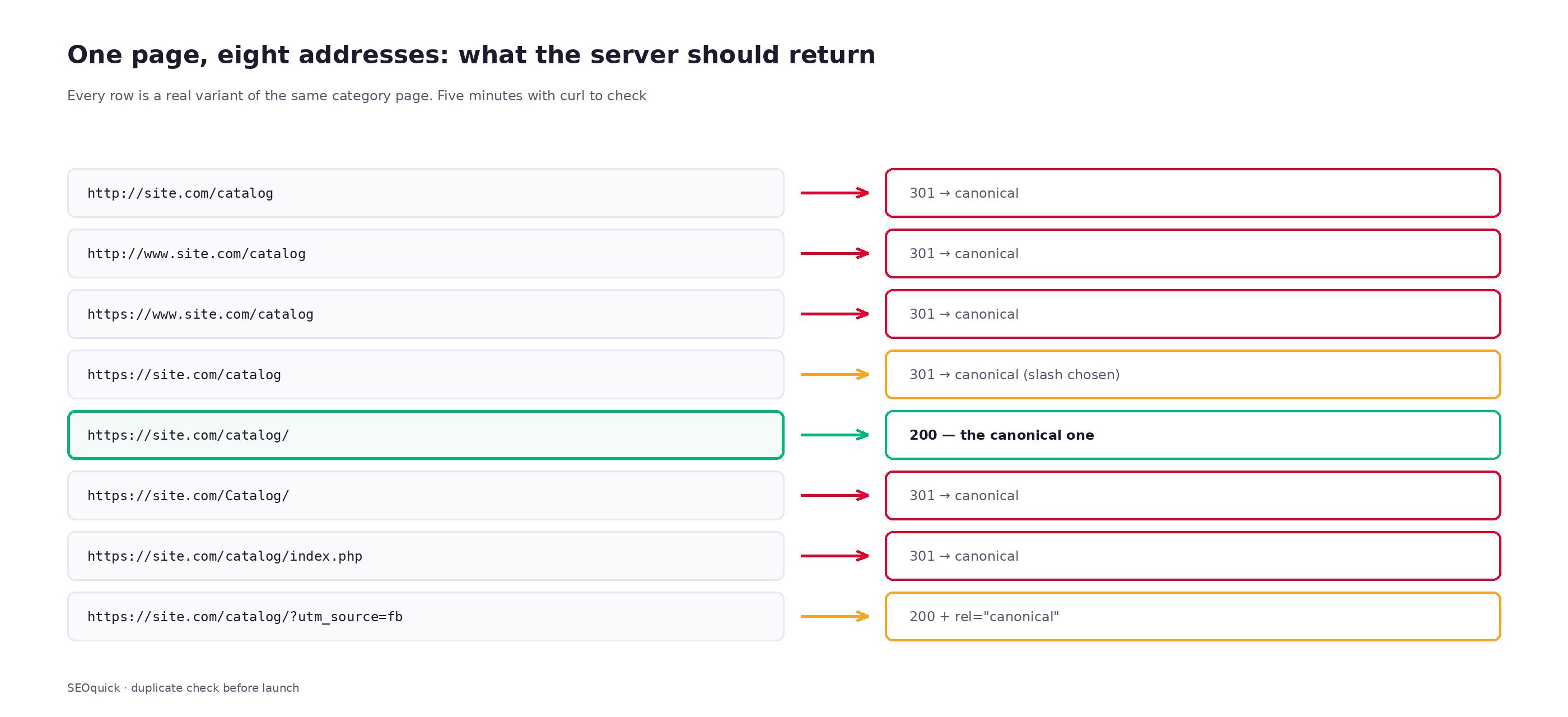
Every variant that returns 200 without a canonical link to the main one is a separate page as far as a search engine is concerned. Authority gets smeared across them, duplicates show up in your reports, and the address that makes it into an AI answer isn't the one you were promoting.
You can check this in five minutes from a terminal:
curl -sI -o /dev/null -w "%{http_code} %{redirect_url}\n" http://site.com/catalog
curl -sI -o /dev/null -w "%{http_code} %{redirect_url}\n" https://www.site.com/catalog
curl -sI -o /dev/null -w "%{http_code} %{redirect_url}\n" https://site.com/Catalog/
All three should return 301 and the same destination. If any of them returns 200, you have a duplicate. If one shows 302, you're telling the search engine the move is temporary, and the signals transfer worse.
A trap of its own: chains. When http://www.site.com/Catalog redirects to https://www.site.com/Catalog, which redirects to https://site.com/Catalog, which finally redirects to https://site.com/catalog/ — that's three hops instead of one. Google warns outright that long redirect chains hurt crawling: every hop is a separate request. The right answer is a single redirect straight to the final address.
Nesting depth: how many levels are acceptable
The second question after "which words go in the address" is "how many segments". There are two constraints here, one technical and one behavioural.
The technical one is about crawling. Google treats crawl budget as critical for sites from a million unique pages updated weekly, or roughly from 10,000 pages if they change daily. If your site is smaller, you can stop thinking about budget. If it's bigger, every extra tier of hierarchy, every extra duplicate and every redirect chain eats crawl that could have gone to products.
The behavioural constraint is simpler: your key commercial pages should be reachable in about three clicks from the homepage. That's not a law, it's a sane target. Pages that take a long walk to reach get processed more slowly by crawlers and found less often by people.
And the depth of the path in the address and the depth in clicks are different things people routinely conflate. On Rozetka the path-depth distribution looks like this: 3 segments — 18 addresses out of 120, 4 segments — 56, 5 segments — 38. So most of their traffic pages sit four or five levels deep in the path. In clicks they're much closer, because links reach them from the homepage, the menu, and internal linking blocks.
The conclusion: path length in the address is a question of clarity, not ranking. There's no reason to build /catalog/electronics/computers/laptops/gaming/asus/rog-strix/ for the sake of hierarchy. But flattening everything to one level the way Prom does is only worth it if you run a marketplace with millions of listings and your own navigation logic.
Filters and faceted navigation: where stores lose the most
Faceted navigation can conjure tens of thousands of addresses out of nothing. The maths is easy: 10 brands × 6 sizes × 8 colours × 4 sort orders × 20 pagination pages equals 38,400 addresses for one category. All of them return 200, all of them hold nearly identical content, and all of them compete with each other.
Google's e-commerce URL guidance lays out a few concrete rules:
- Use
/t-shirt?color=greenrather than/t-shirt?green— always pair the value with a parameter name. - Don't repeat the same parameter in one address.
- Keep transient parameters out of URLs: sessions, timestamps, filters like "near me".
- Handle product variants either as a path segment,
/t-shirt/green, or as a parameter,/t-shirt?color=green; for optional parameters the canonical is the version without them. - Empty categories get
noindexor a 404. - Every pagination page needs its own unique address. Google specifically notes that pagination accounts for more URL-structure mistakes than anything else.
But the technical side is secondary here. The primary question is whether the page should exist at all. Nikolay puts it bluntly in his walkthrough of catalogue structure:
"You're creating a filter — first and foremost you need products behind that filter. Meaning unique content has to exist for the filter you created."
And he goes on to explain where that uniqueness comes from for different business types:
"For an online store, the unique content is the product cards — that's their unique content. If you're a services site, your unique content is a clearly written service page targeting the queries you picked."
That's a working test, and it saves months. Before opening a filter combination for indexing, answer three questions: are there products behind it, is there demand for it in your keyword data, and will its results differ from the parent category. If even one answer is "no", don't create the address.
Three ways to handle filters
| Approach | What it looks like | When it fits | Risk |
|---|---|---|---|
| Filter as a path segment | /maski/producer=face-boom/ | Filters with real demand: brand, type, purpose | Needs discipline: open a handful, not all of them |
| Filter as a parameter, blocked from the index | /maski/?price_from=200&sort=cheap | Sort orders, price ranges, utility filters | Almost none, if it's blocked correctly |
| A dedicated landing page | /maski-dlya-suhoy-kozhi/ | High-volume combinations with demand of their own | Needs its own copy and its own description |
Rozetka's scheme is the first and second approach at once: everything with a question mark is blocked in robots.txt, and exactly one filter — manufacturer — was moved into the path and opened for indexing. That strictness looks blunt, but it's precisely why there isn't a single junk address among their top results.
Pagination: where structure breaks most often
Pagination deserves its own conversation, because even careful teams get it wrong.
What you want: every listing page has its own unique address (/catalog/page/2/ or /catalog/?page=2), its own rel="canonical" pointing at itself rather than page one, and a sensible title that differs from page one's.
What you often find instead:
- Canonical from every page to the first one. The "page one is the main page" logic sounds reasonable, but what you're telling the search engine is that the products on page two onwards aren't needed. On a large catalogue that's a direct route to half your range never reaching the index.
- Infinite scroll with no addresses. Products load via script, the address never changes, and page 40 will never have a URL. The fix is lazy loading with the address updated in parallel through the History API, plus working pagination links in the markup.
- The category description repeated on every page. A 2,000-character category text repeated across all 30 pagination pages gives you 30 near-identical documents. Keep the text on page one only.
- Pagination combined with filters and sorting.
/catalog/?page=7&sort=price&color=redis the most prolific junk generator of them all.
UTM, gclid and other tags: how analytics breeds duplicates
A separate class of addresses nobody considers when designing structure, because they're created by a marketer rather than a developer.
Any tagged link — ?utm_source=facebook&utm_medium=cpc&utm_campaign=autumn — is technically a new address. As long as those links only live inside ad campaigns, no harm done. Trouble starts once somebody publishes one: a partner puts the tagged link on their site, a blogger drops it into a post, an account manager sends it to a client who posts it in a community. Now the page has an external duplicate that a crawler found and indexed.
How the big stores deal with it is visible in their robots.txt files. Rozetka blocks /*gclid=*, /*utm_medium=rooms*, yclid, and on top of that everything at once via Disallow: /*?*. Comfy blocks *utm_*, *?gclid=*, *?yclid=*, plus store_id and city_id — the store and city selectors that would otherwise multiply the catalogue by the number of cities.
The minimum set for any commercial site:
rel="canonical"to the clean address from every tagged page — this is the main mechanism.- Blocking the tags in robots.txt as insurance against wasted crawl.
- A check in Search Console: the Pages report will show whether tagged addresses made it into the index.
One important nuance: robots.txt forbids crawling, but doesn't guarantee absence from the index. If external links point at a blocked address, it can still surface in results without a description. So canonical comes first, robots.txt second.
City pages: the most expensive structural mistake
A story that repeats with clients depressingly often. The business operates in several cities, somebody suggests a page per city, and the structure fills up with dozens of addresses that differ by one word.
"When a client comes to me and says: I do documentation, and I've got one page for Barnaul and another for Abakan, but in fact they don't differ from each other in anything except the name of the city — those are duplicates and junk."
The mechanics are simple. The problem isn't that the address contains a city. The problem is that nothing behind the address is its own. In a store, uniqueness comes from product cards — different filters show different products. A services site has no such source; it has to be created by hand.
Nikolay is blunt about that strategy:
"I'm against the strategy where one service page gets as many copies as there are cities. That strategy sometimes lets you fool the index, sometimes you squeeze through on low-volume queries, but Google already merges all of it."
In the same walkthrough he shows a client who made it work: a washing-machine repair service where pages are split by brand rather than by city. Each brand has its own error codes, its own typical faults, its own Q&A block. /remont-indesit/ and /remont-bosch/ really are different pages, because the machines have different buttons and different failures:
"Different washing machines usually really do have different faults, and for each page a different set of questions was collected with different answers matched to them. Even the error codes."
The pattern that works, and that we've seen in projects: split pages by product or service rather than by geography, and handle regionality as a separate layer. In a children's goods store in Moldova, for instance, growth came not from slicing by city but from new subcategories — prams, cots, playpens — each with its own range and its own demand.
If you do need regional pages — and service businesses often genuinely do — the minimum set of differences looks like this: its own address and phone number, its own prices or call-out times, reviews from customers in that city, its own map, its own list of completed jobs. Without any of that the page won't survive, however correct its address is.
URLs and AI search: what changed in 2026
An address used to be a hygiene question. Now it has a second job — being citable.
When ChatGPT, Perplexity or Google AI Mode compose an answer, they show sources. The user sees your address, and the decision to click or not gets made in a fraction of a second based on what that address says. An address like makeup.com.ua/ua/brand/232525/ says nothing. An address like /struktura-url/ says everything.
The Semrush study of 5 million cited URLs mentioned earlier offers a few more reference points beyond slug length. Cited pages consistently carry structured data: Organization on 25% of pages cited by ChatGPT and 34% in Google AI Mode; Article on 20% and 26%; Breadcrumb on 15% and 20%. Open Graph is present on 40–60% of cited pages.
Breadcrumb markup matters here specifically in the context of addresses: it describes to a search engine the same hierarchy that's baked into the URL path. If the path says one thing (/blog/razrabotka/struktura-url/) and the breadcrumbs say another, you've created the discrepancy yourself. Keeping the path, the breadcrumbs and the markup in agreement is one job, not three.
Once more, honestly: correlation isn't cause. No amount of address editing will make a model cite you. But the combination of "short meaningful address + consistent breadcrumbs + markup" describes a page that was built deliberately, and pages like that get cited more often.
Languages in the address
For a Ukrainian business this is nearly always a live question: two versions minimum, often three.
Google calls two approaches acceptable — a separate country domain (example.de) and a subdirectory (example.com/de/). The third option, a subdomain (de.example.com), technically works, but it means building authority almost from scratch for each version.
| Option | Upside | Downside | Who it suits |
|---|---|---|---|
Subdirectory /ua/ | All authority on one domain, cheap to maintain | One geo-signal for the whole site | Most Ukrainian projects |
Subdomain ua.site.com | Infrastructure flexibility | Authority splits, maintenance costs more | Technically separate versions |
Separate domain site.pl | Strongest geo-signal, local market trust | Every domain is promoted on its own | Entering a market seriously |
All four stores above use a subdirectory. That's not a coincidence: for a market where one company serves two languages inside one country, a subdirectory is the only option that doesn't smear link equity across hosts.
Then comes the part almost everyone gets wrong. Slugs inside each language version have to be localised, not copied. If your Ukrainian version sits at /ua/razrabotka-sajtov/ — a Russian slug in a Ukrainian folder — you've built an address that no audience reads properly. The right form is /ua/rozrobka-saytiv/.
And every version has to point at all the others through hreflang, itself included, plus x-default for the fallback. Without that a search engine can serve a Ukrainian visitor the English version and a foreign visitor the Ukrainian one.
How far this scales is visible in our financial-platform project: 44 language locales, 10,681 verified addresses in the sitemap cache and 57,070 hreflang alternates without a single malformed value. At that number of links, addresses stop being a matter of taste — any instability in the slug generation rules gets multiplied by forty-four versions.
Case study: what moving filters from parameters into the path does
So the previous sections don't read as theory — an example from our own work.
A jewellery store. Starting point: filters produced dynamic addresses with parameters, and the meta tags didn't change when a filter was applied at all — whichever filter someone picked, the title and description stayed those of the parent category. Plus the general technical backdrop: over 9,700 errors and 3,128 pages with no H1.
What we did with the addresses: moved the filters out of parameters into a human-readable form and set unique meta tags for filter pages. That brought back traffic for queries like "gold earrings 585 hallmark" — the very "metal + hallmark + item type" combinations people actually search for.
Result over a year, December 2024 to December 2025: search impressions grew from 169,526 to 960,936 — 5.6×; clicks on product snippets from 1,400 to 7,800; organic traffic from 45,000 to 51,900 visits; ROAS from 2.8 to 5.1.
Note the proportions: impressions grew several times over, traffic by 16%. That's what opening the long tail through addresses looks like: many queries, each with modest volume and very precise intent.
When URLs do have to change: the redirect map
Sometimes reworking addresses genuinely is necessary: moving off a website builder, changing CMS, merging two sites, localising slugs for language versions. In that case one principle applies — the map.
Asked about the keys to a successful migration, Google's John Mueller answers literally: the most important thing is tracking individual URLs so you have a clear map of old and new addresses. Second most important is internal linking — forgotten links in the menu and footer pointing at old addresses slow reindexing more than anything else. He also brings up rel canonical, which people systematically forget during a move.
And the rule broken most often: you can only redirect a page to substantially similar content. If there's no matching page, an honest 404 beats a redirect to the homepage. Google treats a blanket redirect of everything to the homepage as a soft 404: you lose the old page and you lose the time spent working out why nothing transfers.
The order of work when changing addresses
- Collect the full list of old addresses. Four sources, and you need all of them: a Search Console export (what's actually in the index), sitemap.xml (what you consider your pages), server logs for the last 3–6 months (what people actually request, including pages you'd forgotten), and a crawler like Screaming Frog (what's reachable through internal links). The union of those four lists is always wider than you expect.
- Build the "old → new" table. Three columns: old address, new address, match type (exact / close / no equivalent).
- Decide separately what happens to pages with no equivalent. If a page had traffic and links, it's worth building a replacement. If not, 410 or 404 — but not a redirect to the homepage.
- Set up 301s straight to the final address. No intermediate hops, even if the rule is easier to write that way.
- Update internal links. In the menu, the footer, article copy, breadcrumb markup, the sitemap. Internal links should point at new addresses directly, not through a redirect.
- Submit the new sitemap and leave the old one reachable for a few weeks — Google picks up the mapping faster that way.
- Check the actual server responses across the whole table. Not the config — the responses.
- Watch for 4–8 weeks in Search Console: 404 errors, pages with redirects, coverage.
On timing. With a correct 301 a page usually returns to its previous positions, but not instantly: Google has to recrawl the old address, see the redirect and transfer the signals. On a small site that's days, on a large one weeks — and the larger the site, the more it matters not to spend crawl budget on chains and junk.
Our own case: how two redirect layers sent five language URLs to the wrong place
An example from our own practice, so none of this reads as theory. We went through exactly this migration on seoquick.com.ua and stepped on a rake worth describing in detail.
What we changed and why
We inherited the situation: for years the Ukrainian and English versions of the site lived on Russian slugs. A Ukrainian visitor landing on /ua/zakazat-zvonok/ saw a Russian word in the address; an English speaker on /en/raskrutka-v-youtube/ saw one too. One language in the content, another in the address — precisely the localisation mistake described above.
In June 2026 we fixed it: we generated a redirect map from the old Russian-slug addresses to localised ones. The Russian version kept its slugs, so it has no redirects. We didn't touch the blog, podcasts, webinars or tools at all — no slugs changed there, so there was nothing to risk.
The rules file looks like this (Cloudflare Pages format: from, to, status):
# ===== UA — services =====
/ua/kontekstnaya-reklama/            /ua/kontekstna-reklama/         301
/ua/poiskovoe-prodvizhenie/          /ua/poshukove-prosuvannya/      301
/ua/texnicheskij-audit/              /ua/tekhnichnyy-audyt/          301
/ua/website-audit/                   /ua/audyt-saytu/                301
/ua/schedule-event/                  /ua/zabronyuvaty-zustrich/      301

# ===== EN — services =====
/en/poiskovoe-prodvizhenie/          /en/seo-services/               301
/en/razrabotka-sajtov/               /en/website-development/        301
Two things in there were deliberate. First, the English slugs are translations, not transliterations. /en/razrabotka-sajtov/ became /en/website-development/, not /en/razrabotka-sajtov/. Second, /en/kontekstnaya-reklama/ became /en/performance-marketing/ — the service goes by a different name in the English-speaking market, and the address reflects that. A mechanical translation of the slug would have produced /en/contextual-advertising/, which nobody searches for.
Where it broke
In late August we found that five Ukrainian and English addresses were opening the Russian versions of those pages. Not a 404, not a server error — a visitor on the Ukrainian version simply landed on a Russian page and, judging by the behaviour, left.
The cause turned out to be that on our infrastructure redirects live in two places at once. There's the rules file you saw above, and there's a request handler at the Cloudflare Pages functions level with exact mappings in it. The handler runs before the file: if an exact rule matches there, the request never reaches the file with the wildcards.
So the configuration in the file was correct. Checking the file would have shown everything in order. The actual server response was different, because the first layer intercepted the request and sent it off along a stale rule.
What I took away from it
First and most important: a redirect map has to record not just "old → new" pairs but which mechanism handles each pair. If there's more than one layer — and on any modern host with a CDN, edge functions and platform-level rules there usually is — then what you verify is not the config but the actual response for every address.
Second: the check has to be automatic and recurring, not a one-off after release. The simplest version is a list of addresses and a loop that hits each one and compares it with what you expected:
while read -r from to; do
  real=$(curl -sI -o /dev/null -w "%{redirect_url}" "https://site.com$from")
  [ "$real" = "https://site.com$to" ] || echo "MISMATCH: $from -> $real (expected $to)"
done < redirects.tsv
Third, and less obvious: language redirects are more dangerous than ordinary ones because they fail quietly. A broken link returns 404 and shows up in Search Console the next day. A redirect to a page in the wrong language returns an honest 200 — as far as any technical monitoring is concerned, everything is fine. There are only two ways to catch it: with your eyes, or through the behavioural metrics of specific pages.
How to check your own site: tools and commands
A URL audit doesn't need expensive tooling. Here's a set of checks that covers 90% of the problems.
Checking host and trailing-slash canonicalisation
for u in "http://site.com/catalog" "http://www.site.com/catalog" \
         "https://www.site.com/catalog" "https://site.com/catalog" \
         "https://site.com/Catalog/"; do
  printf "%-45s %s\n" "$u" "$(curl -sI -o /dev/null -w '%{http_code} -> %{redirect_url}' "$u")"
done
Expected result: 301 everywhere, all pointing at the same final address.
Finding redirect chains
curl -sIL -w "%{url_effective} %{http_code} (hops: %{num_redirects})\n" \
  -o /dev/null https://site.com/staraya-stranica
More than one hop means the rule needs rewriting so it points straight at the final address.
What to look at in Search Console
- Pages report → Not indexed. The "Page with redirect", "Duplicate, Google chose different canonical" and "Discovered — currently not indexed" buckets all point at address problems.
- URL Inspection. It shows which address Google considers canonical — and it's by no means always the one you declared.
- Crawl stats report. If a large share of requests goes to redirects and 404s, your crawl is being spent in the wrong place.
A crawler
Screaming Frog's free tier covers up to 500 addresses, which is enough for a services site. What to look at first: response codes (the Response Codes tab), chains (the Redirect Chains report), canonical mismatches, duplicate titles as an indirect sign of duplicate pages, and addresses with parameters.
A quick alternative with nothing to install is our on-page audit tool: it shows response codes, redirects, canonical links and duplicates for specific addresses.
Symptom → cause → fix
| What you see | Likely cause | How to check | What to do |
|---|---|---|---|
| Twice as many pages in the index as on the site | Duplicates from host, trailing slash or case | curl -I across the eight address variants | One canonical variant, 301 from all the others |
| Search Console: "Google chose a different canonical" | Conflict between canonical, hreflang and internal links | URL Inspection | Align canonical, internal links and sitemap on one address |
| 40,000 category pages getting indexed | Faceted navigation left open | A site:site.com/catalog/ search | Block the parameters, open only filters with demand |
| Products from page 2 onwards aren't indexed | Canonical from every page to the first | Look at the canonical on /page/2/ | Each page's canonical points at itself |
| Traffic dropped after release, no 404s | Redirects going somewhere wrong (another language, say) | Compare actual responses against the map | Rebuild the map accounting for every processing layer |
| Rankings haven't returned a month after the move | Redirect chains or stale internal links | num_redirects + a crawler | Remove intermediate hops, update the links |
| Addresses with UTM tags showing in results | Somebody published a tagged link | A site:site.com inurl:utm search | Canonical to the clean address + block the tags in robots.txt |
| Some pages open both with and without a trailing slash | No canonicalisation rule at the server level | curl -I on both variants | 301 to the chosen variant, consistently across the site |
A checklist before release
Everything above comes down to a list of decisions you make once — before the first page hits the index.
Canonicalisation:
- One host variant chosen (with or without www) — the rest return 301.
- The whole site on https, with http redirecting in a single hop.
- Trailing slash or no trailing slash — picked once and applied consistently.
- Addresses in other cases redirect to lowercase.
- Every page carries a
rel="canonical"pointing at itself.
Slugs:
- Latin characters, lowercase, words separated by hyphens.
- One transliteration table, pinned in code.
- Slug length within 20–40 characters.
- The slug in the language of its own version, not a transliteration from Russian.
- No internal identifiers in the address — or if there are, next to a word.
Catalogue and filters:
- Filters produce
?key=value, not?value. - Sessions, timestamps and utility filters never reach the address.
- No addresses created for combinations with no products and no demand.
- Only filters with demand in your keyword data are opened for indexing.
- Empty categories return 404 or carry
noindex. - Every pagination page has its own address and its own self-referencing canonical.
Languages:
- Language versions in subdirectories, slugs localised.
- hreflang declared in every direction, including the page itself and
x-default. - Verified that a language version doesn't redirect to another language.
If this is a migration:
- An "old → new" table assembled from four sources.
- Every redirect a 301, with no intermediate hops.
- Internal links updated to the new addresses.
- The map verified against actual server responses, not against the config.
- Every redirect-processing layer accounted for, if there's more than one.
If the site is already live and you're not sure the addresses are in order, start with the online audit or order a technical audit — this is exactly the kind of thing we look for. And if the site is still being planned, these decisions are cheaper to make during development, while nothing has been indexed yet.
Frequently asked questions
Does a keyword in the URL affect rankings?
Barely. As a standalone ranking factor it has counted for almost nothing for years. But a keyword in the address helps a user understand where they're going, sometimes gets highlighted in the snippet, and looks better in the source list of an AI answer. So it works on click-through, not on position.
Trailing slash or no trailing slash?
Google treats both the same; all that matters is picking one and sticking to it. Rozetka and Makeup always add the slash, Prom almost never does — both strategies work. The one thing you can't do is return 200 on both variants at once.
Should I strip dates out of blog URLs?
If the articles get updated regularly, yes — a date in the address works against you: a piece from 2023 looks stale even after a rewrite. But changing addresses for that alone is only worth doing alongside other planned work, never as a standalone operation: the risk of a move always outweighs the cosmetic gain.
What happens to rankings if I change one page's address?
With a correct 301 the page usually returns to its previous positions, but not instantly: Google has to recrawl the old address, see the redirect and transfer the signals. On a small site that's days, on a large one weeks. Trouble starts when the redirect runs as a chain through two or three intermediate addresses, when internal links still point at the old URL, or when the new page differs noticeably in content from the old one.
Can I use Cyrillic in the domain, not just in the path?
Technically yes, Cyrillic domains work through punycode. Practically, you get the same problems as Cyrillic in the path, only worse: the domain shows up in email, on business cards, in contracts. For a business planning to grow beyond one language audience, a Latin domain is safer.
How many levels of nesting are acceptable?
There's no hard limit. Most of Rozetka's traffic addresses sit four or five levels deep in the path and it doesn't hold them back. What matters more than path length is the number of clicks from the homepage: key commercial pages should be reachable in about three. If that takes internal linking that bypasses the hierarchy, then internal linking is what you need.
What do I do with old addresses that have no new equivalent?
If the page had traffic and external links, build a replacement that matches its meaning and redirect there. If it was a utility or temporary page, return 404 or 410. Google treats a blanket redirect to the homepage as a soft error, and it's the worst of the options: you lose the page and you fail to signal the move.

Pagination SEO: how to index list pages without breeding duplicates
Pagination SEO in 2026: canonicals on list pages, noindex, rel=next/prev, infinite scroll, crawl budget. Based on a check of 36,000 traffic-driving URLs across twelve Ukrainian retailers, plus a teardown of pagination at Foxtrot, Epicentr and our own blog.
Read →
H1 vs Title: how many H1 tags you need and how they differ
H1 in SEO 2026: how many H1 headings are acceptable, optimal length, how it differs from title, empty H1 and H1 as an image. Based on a measurement of 77 pages from the Ukrainian top and data on how often Google replaces your title with the H1.
Read →
SEO Trends 2026: 10 Changes You Need to Prepare For Right Now
The key SEO trends of 2026: AI Overviews on 48% of queries, 68% zero-click, the rise of ChatGPT and Google AI Mode. What is changing in search and how to prepare your site — a breakdown by SEOquick.
Read →Want to apply this to your site?
We will review the current situation, find the first growth levers, and suggest a practical working format.