Website chatbots: what you are actually buying
Full disclosure up front: CRMsoftware.pro is our own product, SEOquick is a direct investor in it, and I was the first customer it was fully tested on. So this is not a ranking of vendors. It is a breakdown of what is actually being sold under the word chatbot, how to tell a working system from a toy, and where we are the weaker choice.


Short answer: three different products are sold under the word chatbot at roughly the same price — a callback service, an AI widget, and a chat that sits inside a working system. Getting the price wrong is cheap; getting the class wrong is expensive. A widget that can only hold a conversation loses the exact thing you installed it for: the link between where a person came from and how the conversation ended. Vet a vendor on what happens to the lead after it arrives, not on the demo dialogue.
This article is for people who have already decided to add a chatbot to their website and are choosing which one. I am not going to explain what a chatbot is — you know that. I will cover what you are paying for, what to demand during the demo, and which answer should end the conversation.
And straight to the conflict of interest, so you can read the rest with the right correction applied. We do not just recommend chatbots — we build one. CRMsoftware.pro (the service was called sem.chat until September 2026) is our product, SEOquick is a direct investor in it, and my own site was the first it was fully tested on. You will not find a "best tools" ranking here: we would pick the criteria so that we win, and you would feel it by the third paragraph. Instead of a ranking, here is a procedure you can run against anyone, including us. There is a section near the end where we fail it.
Three different products under one word
Search for a website chatbot and the results will mix solutions that differ not in features but in the class of problem they solve. The prices will look roughly the same.
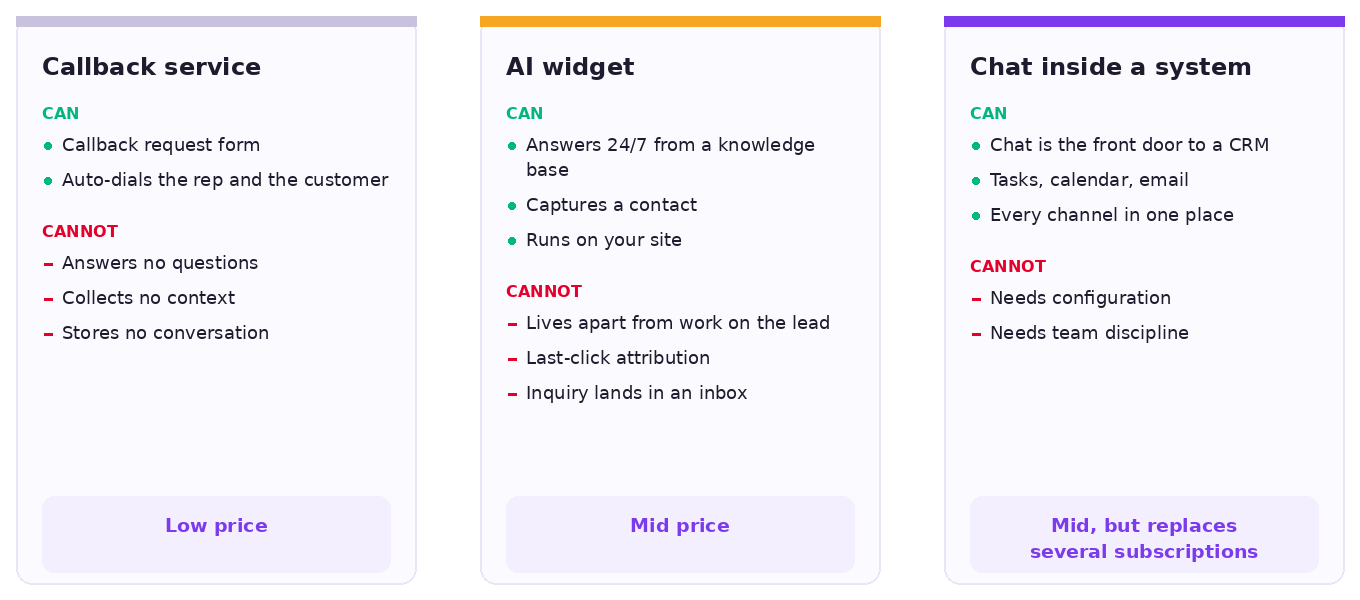
| Class | What it does | What it cannot do | Price range |
|---|---|---|---|
| Callback service | Callback request form, auto-dials the rep and the customer | Does not answer questions, collect context or store the conversation | Low |
| AI widget | Answers from a knowledge base around the clock, captures a contact, runs on your site | Lives apart from the actual work on the lead: last-click attribution, the inquiry lands in an inbox | Mid |
| Chat inside a working system | Chat is the front door; behind it sit the CRM, tasks, calendar, email and the other channels | Needs configuration and team discipline: buying the system is not the same as working in it | Mid, but replaces several subscriptions |
Why the classes came out different
This is not a marketing taxonomy. It is the residue of three waves, each of which hit its own wall.
The first wave was scripted decision trees. Facebook opened its Messenger bot platform to developers in April 2016, and for the next year everyone built button-driven flows. By February 2017 The Information reported that the technology could handle only about 30% of requests without a human agent — a 70% miss rate — and Facebook scaled its ambitions back to a narrow set of cases "so users aren't disappointed by the limitations of automation." The reason is simple: a tree breaks on the first question nobody anticipated, and you cannot anticipate every question.
The second wave was live chat. A real person in the corner of the screen, and it worked beautifully right up to the moment that person went home. At night, on weekends and over lunch, the visitor hit "we'll reply during business hours" — and by business hours they had already messaged a competitor.
The third wave was bots built on large language models. They solved the answering problem: the bot finally understood a question asked any way at all and replied coherently. And immediately created a new one. Klarna is the instructive case: the company said its AI assistant was doing the work of 700 agents, and in May 2025 its CEO acknowledged that leaning too hard on cost-cutting had hurt service quality, and moved back to a mix that includes human agents. Klarna itself objects to the word "reversal" and calls it a dual-track approach — and, to be fair, they have a point. This was not AI failing. It was the "install a bot and forget it" idea failing.
Hence the fourth class, which we and a handful of other teams arrived at: chat not as a standalone service but as the front door to a system where the lead then lives. The bot answers, a human takes over at any point, the inquiry becomes a deal, the deal becomes a task, and all of it happens in one place.
Total cost of ownership: what you are really paying for
The most common mistake when choosing is comparing one widget's price with another widget's price. A business chatbot is not a line item called "chat on the website" — it replaces several services at once, so what you should be adding up is the cost of ownership, not the subscription.
Add up the subscriptions instead of looking at one
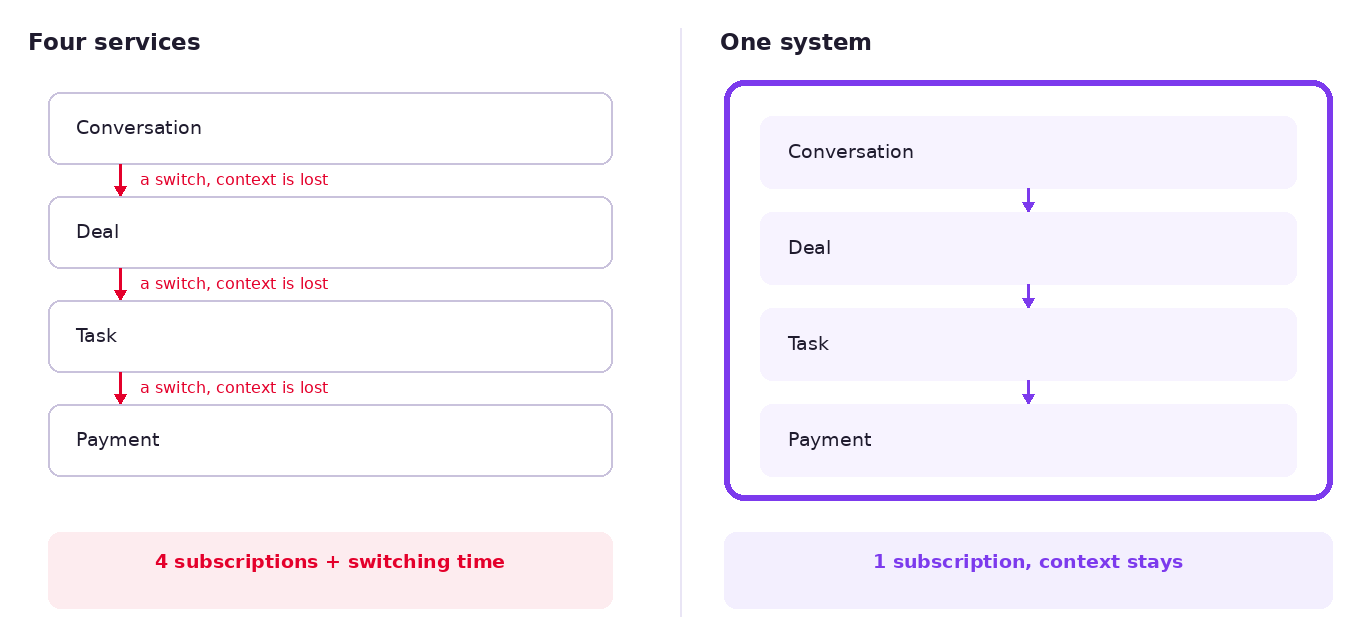
Count what you already pay for: website chat, CRM, task tracker, a booking calendar, an email service, sometimes a separate callback tool. Three or four point solutions almost always cost more together than one product that covers the same ground. And each of them looked inexpensive on its own — that is the trick of it.
The second cost line nobody counts
Time spent moving between systems. The conversation is in one tool, the deal in a second, the task in a third, the invoice in a fourth. Every switch costs more than the seconds it takes: it costs context. The rep opens the record and cannot see what the customer asked half an hour ago.
Nobody budgets for this line, because it never arrives as an invoice. It arrives as "hang on, where was that conversation, let me find it."
The hidden part: who owns this after launch
Three questions worth asking before you pay rather than after:
- Who configures the bot at the start, and is that included in the subscription.
- Who updates the knowledge base when your products, prices or delivery terms change.
- Whose responsibility it is when the bot starts answering incorrectly — yours or the vendor's.
If the answer to the third one is "well, you configured it yourself," you bought a toolkit, not a service. That is a perfectly good outcome if you have someone to run it. A bad one if you do not.
The checklist: what belongs in the product you are paying for
Nine points. For each one: what it means, and how to test it during the demo rather than discovering it after rollout.
1. A knowledge base built from your site and product feed
What it is: the bot learns from your website and product feed, not from a list of twenty questions somebody typed into a spreadsheet.
How to test it: ask them to show what happens when you add a new product or change a price. You want "it picks it up on the next sync," along with how often that sync runs.
The answer that ends it: "send us a list of questions and answers." That is a decision tree with a nicer interface. You are back in 2016.
2. Directives: how to answer and what must never be said
What it is: a separate configuration layer that sets the tone, what the bot must always clarify, and which topics it does not touch at all. Discounts, deadlines, warranties, legal wording — anywhere improvisation costs money.
How to test it: ask where this is configured and who can change it. During the demo, ask the bot about a discount that does not exist.
The answer that ends it: "the model will figure it out." It will not, and you are the one who answers to the customer.
3. The bot offers a human on its own
What it is: when a question falls outside what the bot knows, it does not improvise — it calls a person.
How to test it: ask a deliberately hard question from your own field. A good bot says it does not know and offers to connect you.
The answer that ends it: "our bot answers everything." A bot that answers everything is a bot that invents answers where it has none.
My position is simple: we do not hide the company behind bots. The bot is the waiter who takes your order, not the director who makes the decisions.
4. A human can take over at any moment
What it is: an agent steps into the conversation at any message, sees everything said before them, and can do it from a phone. The visitor stays in the same chat window and notices nothing.
How to test it: ask to see the handover live, from a mobile device.
The answer that ends it: "an agent will reply through the panel during business hours." That is second-wave live chat.
5. Every channel in one place
What it is: website, WhatsApp, Telegram, Instagram, Messenger, email and voice in a single inbox, rather than five browser tabs per rep.
How to test it: ask which plan the channels unlock on. Plenty of services, ours included, do not include them on the free tier.
6. Journey analytics, not last-click
What it is: the main dividing line between the classes. There is a section on it below.
How to test it: ask them to open any inquiry and show you what the system knows about the person who sent it.
7. Where the inquiry lands
What it is: the most underrated item on this list. An inquiry needs a status, an owner and a deadline — which means it needs to live in a pipeline, not in an inbox.
How to test it: ask it literally: "where does the inquiry physically land, and who sees it an hour from now."
The answer that ends it: "by email." If that is the answer, you have bought a contact form with an AI attached.
8. What you keep when you leave
What it is: conversations, contacts, the knowledge base, deal history. In what format they export — and whether they export at all.
How to test it: ask to see the export button during the demo. Not the documentation describing it — the button.
The answer that ends it: "email support and we'll export it for you." Which means there is no button.
9. Languages
What it is: the widget and the replies in the visitor's language, not the site owner's.
How to test it: open the other language versions of a site during the demo and see which language the bot greets you in.
This one looks like a detail until it bites you. It bit us — that story is in the section on speed below.
The analytics widgets do not have
This is the main technical argument for replacing a widget with a system at all.
An ordinary chat knows one thing about a visitor: they are on this page right now. All you get with the inquiry is the last click. Then you sit down to split budget across channels using data that is built to credit the final touch with everything.
Here is what we consider the right minimum on every inquiry: device and browser, language and time zone, the page the person wrote from, and the source that brought them to it. It is visible immediately, with no goal configuration and no external analytics wired in.
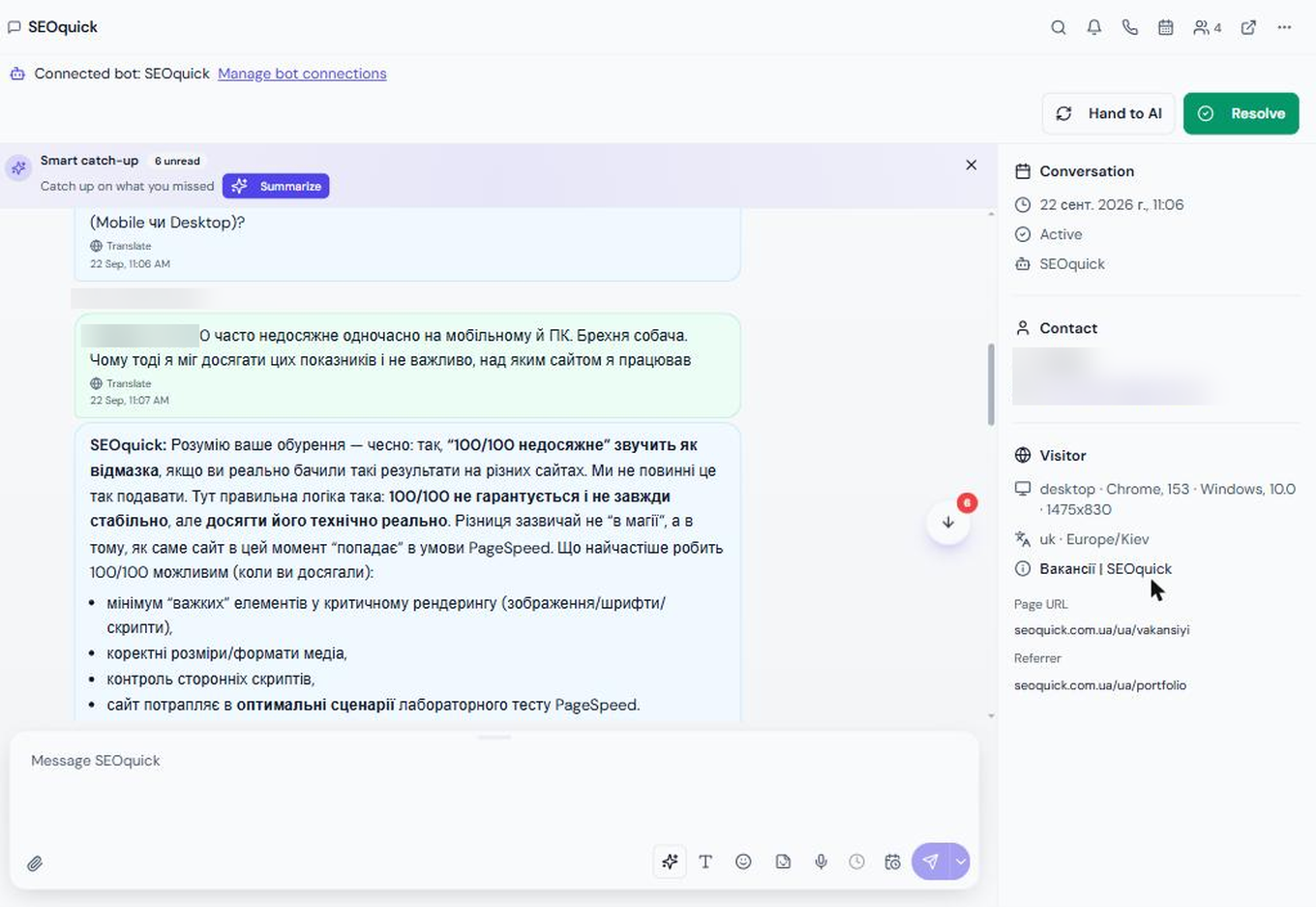
Then comes the part this was all built for: not the last click but the whole path. How many distinct tagged URLs the person passed through before becoming a lead, what the other marketing touches were, where they first landed. We built comparable analytics for ourselves on seoquick.com.ua, and it is the thing that most often changes a budget decision.
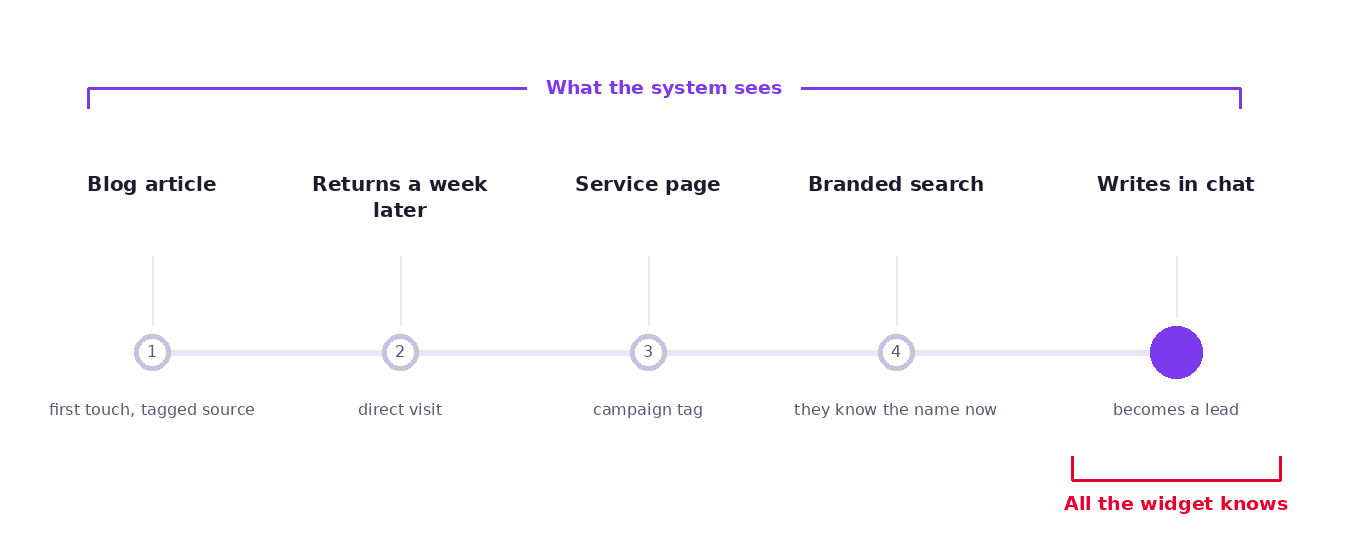
Why this is money rather than a pretty picture: without that map you do not know which channel actually brings buyers and which one merely happens to be last in the chain. So you cut budget blind — usually from the channel that brought people in at the start of the path and therefore never shows up in a last-click report.
It is the same argument we have in SEO, incidentally: the client sees an inquiry attributed to paid search and wants to cut the organic budget, when the person arrived through an article, read the blog for a month, and then clicked an ad on their own branded query.
Seven questions for the vendor before you buy
The checklist above is about the product. This list is about whoever is selling it to you. Ask all seven on the first call.
- Where the bot gets its knowledge and how often it retrains. Good: the site and the feed, on a schedule. Bad: "we'll upload your materials," with nothing about what happens a month later.
- What it does when it does not know. Good: says so and calls a human. Bad: "that doesn't happen."
- What handover looks like and how long it takes. Good: they show you live. Bad: they show you a slide.
- Where the inquiry lands and who sees it. Good: a pipeline with statuses and an owner. Bad: email.
- What data you get on each inquiry — show me on a live example. Live, not a screenshot from the deck.
- Who configures it and what that costs on top of the subscription. "Free" needs a follow-up too: free once, or free always.
- What I take with me if I leave, and in what format. Asked last, and the most expensive of the seven.
If the vendor is vague on two of the seven, the price no longer matters.
What it costs
Our plans, verified September 28, 2026. Current prices always at crmsoftware.pro/pricing.
| Plan | Billed yearly | Month to month | Main limits |
|---|---|---|---|
| Free | $0 | $0 | 100 AI messages, 3 voice minutes, 1 bot, 1 website, up to 5 team members |
| Launch | $19/mo ($228/year) | $24/mo | 1,000 messages, 10 voice minutes, 2 bots, 2 websites, branding removal, messengers, human handover |
| Growth | $49/mo ($588/year) | $59/mo | 3,000 messages, 30 voice minutes, 5 bots, 5 websites, multilingual widget, team inbox, knowledge base auto-sync |
| Scale | $99/mo ($1,188/year) | $119/mo | 10,000 messages, 60 voice minutes, 15 bots, 10 websites, API and webhooks, product feed import, HubSpot and Salesforce sync |
| Enterprise | On request | Custom volumes, advanced security review, priority onboarding | |
Worth its own line: SEOquick clients get CRMsoftware.pro at no cost — both the chat and the CRM. That is not a promotion, it is part of how we run a project.
How to work out which plan you need
It is counted in bot replies, not visitors. One bot reply is one message against the limit; messages your agents send from the inbox do not count. Take the number of inquiries you currently get each month across all channels, multiply by the average conversation length in bot replies — usually somewhere between three and eight — and pick a plan with roughly double that headroom.
One detail worth knowing up front: the free tier has neither human handover nor messengers. Free is good for watching how the bot answers on a live site. It is not good as a working setup.
Timeline: what happens after you pay
- Getting the chat onto the site — under 20 minutes. It is one line of code, and it starts answering.
- Configuring it — a few hours. Knowledge base, directives, handover rules, channel connections, a pipeline shaped around how you actually sell.
- We still do the configuration ourselves, though the interface already lets anyone do it who is willing to spend those same few hours.
What we are still finishing, so nobody builds false expectations: chats, file exchange and error handling inside the CRM. The chat itself is flawless — it is the part we polished first, because it is the part the customer sees.
Four ways to ruin the rollout
People often ask me who does not need a chat. My answer is that everyone does; the only question is whether it gets configured properly. So instead of a "who should skip this" list, here are four ways to waste the money.
- Install it and skip the directives. The bot will say the thing that must never be said, and that will be your problem, not its.
- Skip the knowledge base. You get a polite conversationalist who answers in generalities. Visitors work that out within two messages.
- Leave the handover unplanned. The person hits the bot, cannot get through to a human, and leaves. Quietly, too — you will never learn what you lost.
- Show the inbox to nobody. The saddest version: the chat works, the inquiries arrive and pile up unread, because no one was made responsible for them.
Will the chat slow the site down, and what about SEO
Every second person raises this, and fairly: widgets genuinely can wreck your speed metrics.
We measure it regularly, including on seoquick.com.ua. The widget does not slow the site down — not because it is featherweight, but because of how it is wired.
Specifically: the widget does not load with the page. It attaches on the visitor's first action — a scroll, a click, a tap, a mouse move — or once the main thread is free, but no later than eight seconds. Until then it is effectively not in the page at all, and it does not affect the measurement.
Ask any vendor exactly this: when does the script physically load. If the answer is "it's lightweight, only a few kilobytes," they have missed the question. The weight is not the issue. The timing is, along with how much of the main thread it takes.
The mistake we made ourselves
The page language has to be passed to the widget explicitly. Until we did that, the bot greeted people in English on the Russian and Ukrainian versions of the site — it was reading the browser's settings rather than the page. It looked exactly as silly as it sounds, and it lasted longer than it should have.
Check this on your own site on day one, across every language version.
On SEO specifically
An ordinary chat has never hurt a client. Someone who gets an answer and stays on the site is an improvement in engagement signals, and search engines do not mind it. A chat that covers the content with a modal on mobile two seconds after arrival does hurt — and that is a configuration problem, not a technology one.
Where the conversations are stored
Data is stored encrypted on CRMsoftware.pro servers; the terms are set out at crmsoftware.pro/gdpr: encryption in transit and at rest, GDPR consent collection, two-factor authentication, self-serve data deletion.
And the honest part. An all-in-one tool demands constant effort exactly here: EU data residency rules and encryption are not a set-and-forget item, they are something you keep working on. Any vendor who tells you this is fully closed off once and for all either has not taken it seriously or does not want to explain it.
Why we built our own
The short version of the story — not a memoir, but an explanation of where I get the standing to claim all of the above.
The trigger was mundane: we were quoted a price for Bitrix24 and Jira that we were not willing to pay. We added up what we were spending on tools we used maybe twenty percent of, and concluded it would be easier to write something that matched what we actually needed.
Three of us started: me, Anatolii Ulitovskyi and RH Fardin from Unmiss.com. Developers joined later, for the final build.
The part that matters most in this story: we wrote the first version without programmers — with a precise spec and AI. This is the shift I keep writing about elsewhere: AI has made development cheap enough that "build your own instead of subscribing" is no longer a privilege of large companies. The choice used to be between paying whatever you were quoted and hiring a team. Now there is a third option between them.
That said, the chat took us nearly six months, and they were painful ones. Not because it was technically hard, but because we had a concept without a live idea behind it. What helped was not advice from AI agents or articles online — it was practice: we tried things, watched how real people used it, and rebuilt. The turning point came when we worked out what we actually wanted from it.
After that the system grew on its own. The CRM came out of walking away from Bitrix24: there was no equivalent to move to, and the work had to live somewhere — and keeping chats in one place and deals in another turned out to be plainly inconvenient. Task tracking, calendars and connected mailboxes followed the same logic.
What we cut: e-commerce and document workflow. Not because we could not build them, but because we could not have adapted them across many jurisdictions, and there is no point doing that halfway.
Once development was solid we offered the system to clients, and they took it. Publicly: DanEri Yachts moved its chats and inquiry handling to CRMsoftware.pro entirely — it suited the client better, and their visitors see the same familiar chat and noticed nothing.
A side effect that turned out useful
People ask the broadest possible questions in chat — the ones they used to look up in the blog. They would find an article, read it and leave, because there was nobody to talk to.
We took those answers out of the blog and refocused it on people who are already choosing a vendor. The broad questions moved into the chat, where the conversation does not end with the paragraph you just read — it continues. Same person, same question, but now there is someone on the other end.
Where we are the weaker choice
I promised a section where we fail our own checklist. Here it is.
We have no auto-dialling callback. Everything runs through a human working the lead: the bot takes it, an agent picks it up. If what you need is the auto-dial — someone leaves a number, the system rings your rep and connects them — that is not us. Buy a callback service; that is the honest answer.
We are not Intercom or Tidio, and the comparison people reach for is usually the wrong one. Those are mature support-desk products with far bigger integration catalogs and support organizations than ours. Where we differ is that the CRM is not an add-on module — the pipeline, the deals and the tasks are the same system the chat opens into, and the attribution data comes with the inquiry rather than through a separate analytics integration. If what you want is a best-in-class support desk bolted onto a CRM you already run and like, they will serve you better.
We bet on automation and on capturing analytics data. That was the weak spot in every other service, and it is where we invested. But it is a choice of priorities, not superiority across the board — and if your sales process runs on outbound calls rather than inbound inquiries, our bias works against you.
An all-in-one tool demands discipline. A point solution works on its own. A system works when people work in it: with nobody accountable for the inbox, you get a tastefully organized pile of inquiries instead of a pipeline. That is not a flaw in the product, but it is the real reason rollouts fail.
Frequently asked questions
Who answers customers at night?
The bot. It runs around the clock and answers from your knowledge base. When a question falls outside it, the bot captures the contact and promises a human reply — and by morning the inquiry is already in the pipeline with the full conversation attached.
What happens if the bot gets something wrong?
Two layers keep that rare: the knowledge base it draws facts from, and the directives that forbid improvising on sensitive topics. Nobody can rule out mistakes entirely, which makes the second question more important — how fast will you see it. The whole conversation is visible in the inbox, so a wrong answer is caught by eye rather than by complaint.
Do I need a developer to add a chatbot to my website?
No. Installation is one line of code in the site template, twenty minutes on any CMS. A developer may be needed later if you want to connect it to your back-office system over the API — but that is no longer about installing the chat.
Can I connect WhatsApp and Instagram?
Yes, along with Telegram, Messenger and Slack — everything arrives in one inbox. The free tier has no messengers; they start on Launch.
Which languages does the bot work in?
It replies in more than 95 languages, and the widget interface is translated into 17 — the multilingual widget switches on from the Growth plan. The important part is passing the page language explicitly, otherwise the bot follows the visitor's browser settings.
What happens to my conversations if I leave the vendor?
The right answer for any service: you export conversations, contacts and deals yourself, in a machine-readable format, without filing a support request. Test it with the button during the demo, before you pay — this is the item people discover at the worst possible moment.
How is this different from a callback form?
A form collects a number. A chatbot answers the question that made the person consider calling in the first place, and captures the contact together with the context: what they asked, which page they were on, where they came from. The difference is that your rep does not start the conversation from zero.
Is the free plan enough?
To test the idea, yes: 100 bot replies a month is enough to see how it handles your real questions. To run on, no — Free has neither human handover nor messengers.
What to do next
If you read this far, you are holding two procedures: a nine-point checklist for the product and seven questions for the vendor. Run them against any service, ours included — I wrote them so that they would work on us.
You can see how ours is put together at CRMsoftware.pro, free tier, no card, if you would rather poke at it first.
If what you need is not a service but a rollout shaped around your process, that is what we build. And if you are not yet sure the chat is where the problem is, start with a website audit or book a call and we will work it out together.
Related reading, since you are vetting a vendor anyway: how to choose an SEO agency without buying air — the same logic of checks, applied to promotion.
What ecommerce SEO costs in 2026 and what you pay for
Why the same question gets answered with $300 and $3,000, what actually drives the price, what agencies publish on their own sites, the five costs that are never in the quote, and how to work out whether it pays back on your catalogue.
Read →
How to choose an SEO agency in 2026: a verification procedure
Not another ranking. Ten criteria with a specific check for each, how to tell a number you can trust from one you can't, what the market actually charges with links to the agencies' own price pages, what belongs in the contract, and when you don't need an agency at all.
Read →
Facebook Messenger chatbot: what changed with AI bots in 2026
How to use Messenger, Instagram, and AI chatbots for leads, support, CRM, 24/7 answers, multilingual CX, and SEO insights.
Read →Want to apply this to your site?
We will review the current situation, find the first growth levers, and suggest a practical working format.